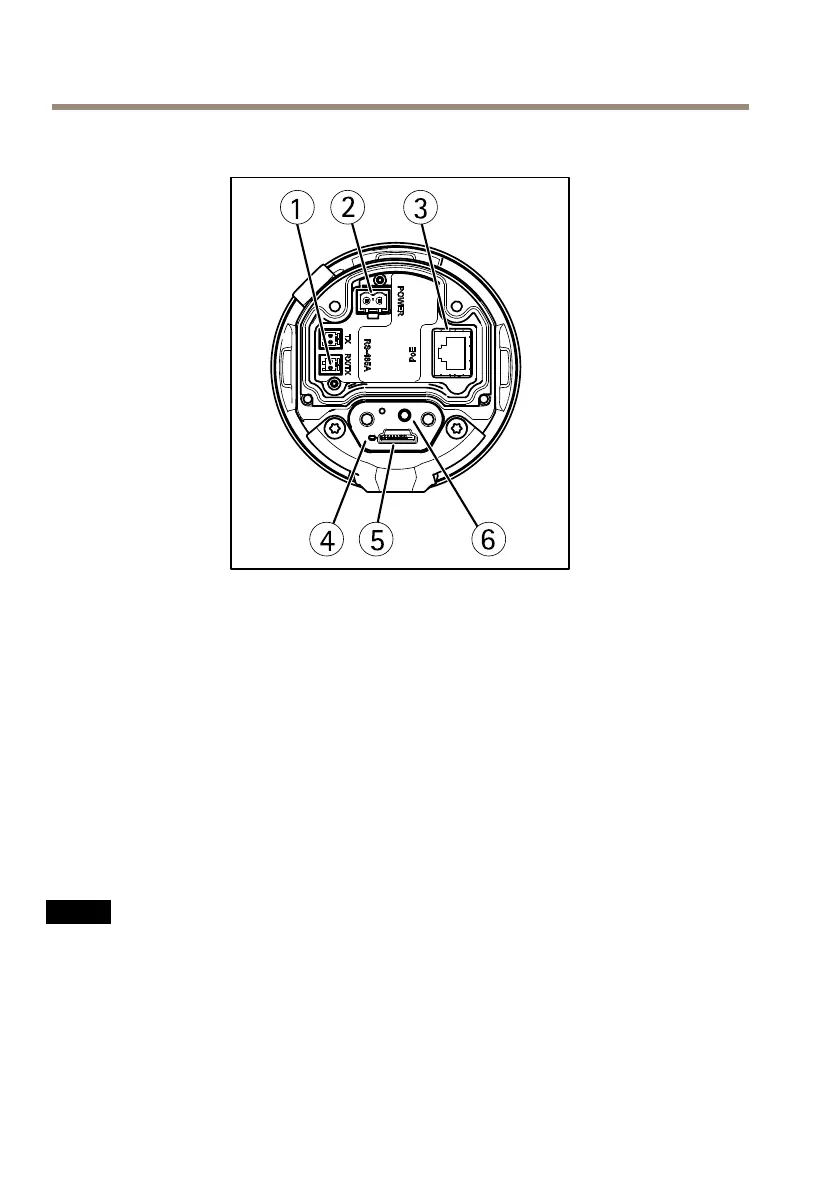
AXISQ86–ESeries
CameraUnit
1
RS485/RS422connector
2
Powerconnector
3
Networkconnector
4
StatusindicatorLED
5
microSDmemorycardslot
6
Controlbutton
ConnectorsandButtons
Forspecicationsandoperatingconditions,seepage13.
NetworkConnector
RJ45Ethernetconnector.
NO NO
NO
TICE TICE
TICE
Theproductshallbeconnectedusingashieldednetworkcable(STP).Allcablesconnecting
theproducttothenetworkshallbeintendedfortheirspecicuse.Makesurethatthe
networkdevicesareinstalledinaccordancewiththemanufacturer’sinstructions.For
informationaboutregulatoryrequirements,seeElectromagneticCompatibility(EMC)on
page2.
12



 To Next Page