AXISQ86–ESeries
1
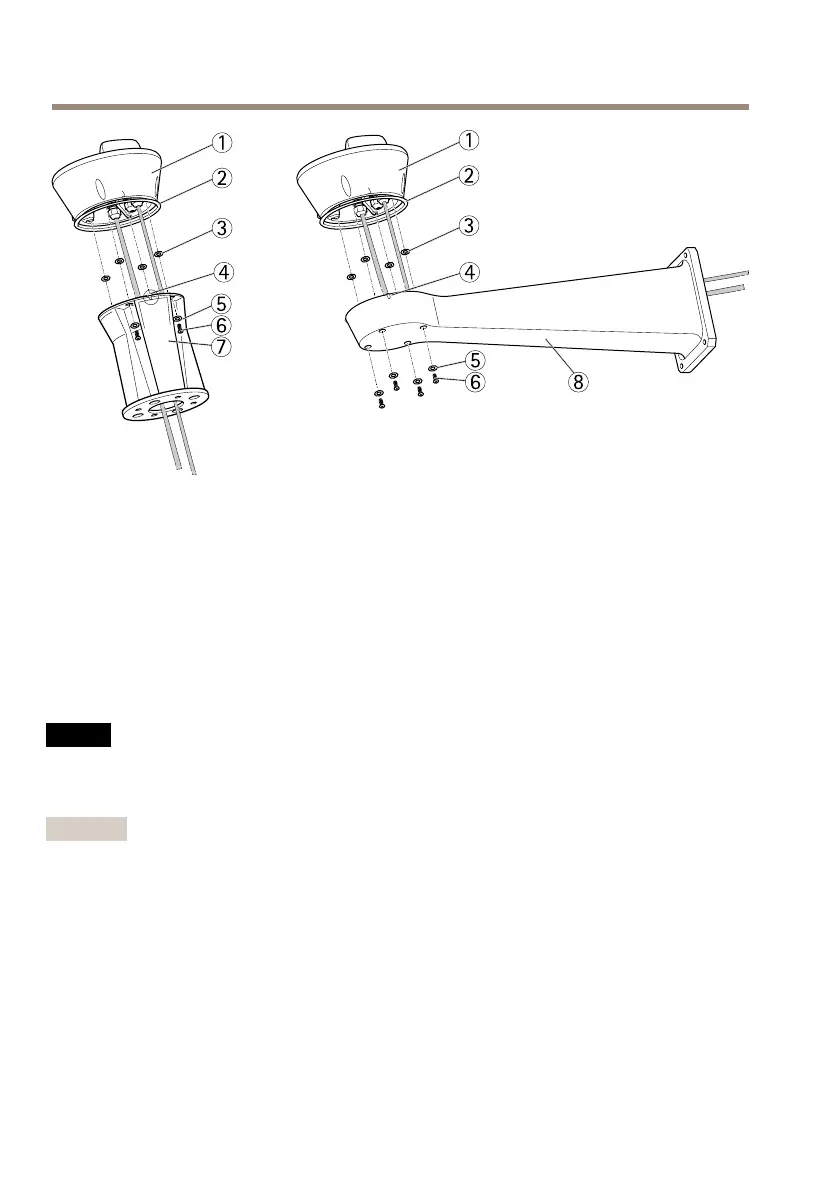
Baseunit
2
Seal
3
Washer(4x)
4
Alignmentindicator
5
Washer(4x)
6
Screw(4x)
7
Columnbracket
8
Wallbracket
AttachthePan/TiltUnittotheBaseUnit
NO NO
NO
TICE TICE
TICE
Usethealignmentindicatorstoaligntheunits.Incorrectalignmentcouldcausedamage
tocomponents.
Important
•Assembletheproductinanuprightposition.Donotinstalltheproductupsidedown.
•Makesuretoconnectthepan/tiltunitstraightfromaboveasshownintheillustration.
Donottiltitontothebaseunit.
1.Makesurethesealisinposition.
2.Tiltthecamerahousingback.
3.Attachthepan/tiltunittothebaseunitandtightenthescrews(torque4Nm)usingthe
suppliedallenkey.
18



 To Next Page