AXISQ8685-EPTZNetworkCamera
AboutPTZ(PanTiltZoom)
1.ClickAddareatocreateanexcludearea
2.Resizeandmovethearea(thebluerectangle)tothedesiredposition.
3.EnteradescriptivenameandclickSave.
Toremoveanarea,clickthenameoftheareaandclickRemove.Toenableordisableanarea,clickthenameoftheareaand
clickEnable/Disable.
MaxLimits
Thepanandtiltlimitsrestricttheareawhereautotrackingisallowed.Theareabeyondthesetlimitswillbeignored.Thismayprove
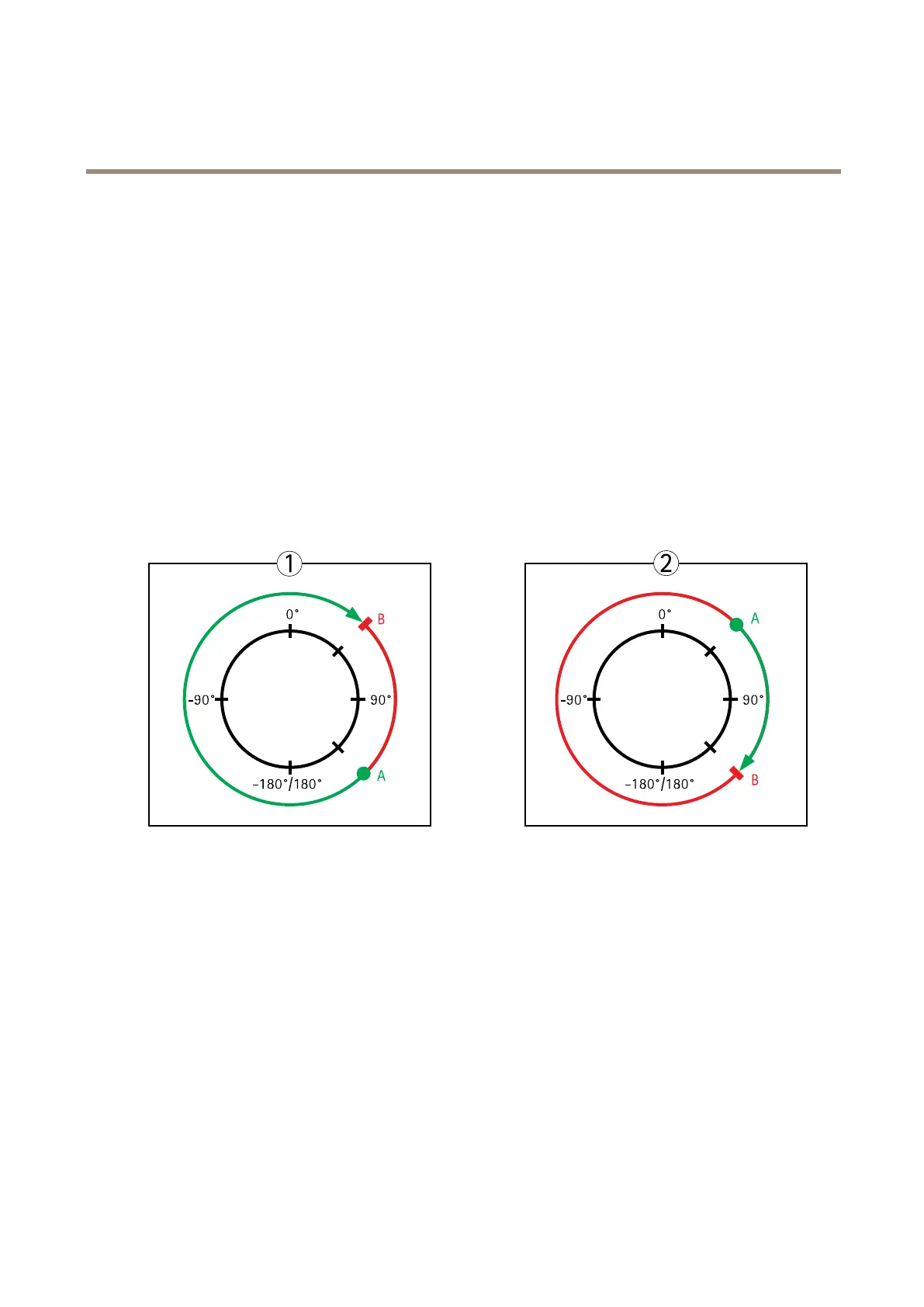
useful,forexample,toavoidtrackingbirdsinthesky.Betweenthepanstartandendlimits,autotrackingisallowedgoingclockwise.
Theillustrationsshowthedifferencebetweensettingarangefrom135°to45°(1)andarangefrom45°to135°(2).
1.SelectEnabletiltlimitandEnablepanlimitrespectivelytoenablethetiltandpanlimits.
2.EntertheTiltangleandPanlimitvalues,orclickthelinksandmovethebluehorizontalandverticalbarsinthepreview
windowuntilsatised.
3.ClickSave.
Topview
APanlimitstart
BPanlimitend
Aboutguardtours
Aguardtourdisplaysthevideostreamfromdifferentpresetpositionseitherinapredeterminedorrandomorder,andforcongurable
periodsoftime.Oncestarted,aguardtourcontinuestorununtilstopped,evenwhentherearenoclients(webbrowsers)viewingthe
images.
Howtocreateaguardtour
1.GotoSetup>PTZ>GuardTour.
2.ClickAdd.
3.Typeaname.
4.Specifythepauselengthbetweenruns.
34



 To Next Page