EasyManua.ls Logo

Axxera AV6117B - User Manual

Axxera AV6117B
35 pages
Print Icon
To Next Page IconTo Next Page
Loading...
INSTALLATION/OWNER’S MANUAL
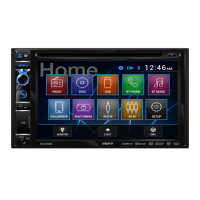
DVD Multimedia Receiver with Bluetooth
featuring a
6.2" Touch Screen Display
AV6117B
The DVD video display of the in-dash unit will not operate while the vehicle is moving. This is a safety feature
to prevent driver distraction. In-dash DVD video functions will only operate when vehicle is in Park and the
parking brake is engaged. It is illegal in most states for the driver to view video while the vehicle is in motion.
Safety Notes:
®
Question and Answer IconNeed help?

Do you have a question about the Axxera AV6117B and is the answer not in the manual?

Overview

The AV6117B is a DVD Multimedia Receiver with Bluetooth, featuring a 6.2" Touch Screen Display, designed for in-vehicle entertainment and communication. It supports various media formats including DVD, CD, USB, and SD cards, and offers AM/FM tuner functionality.

Function Description:

The AV6117B serves as a central hub for in-car entertainment and communication. Its primary functions include:
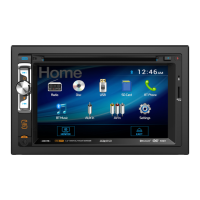
  • DVD/CD Playback: Plays DVD video and CD audio discs. It supports various disc types like CD-DA, CD-ROM (ISO), CD-R, CD-RW, DVD Video, DVD+R/RW, and DVD-R/RW.
  • USB/SD Card Playback: Allows playback of MP3 audio files and viewing of JPG photos from USB devices and SD/SDHC cards.
  • AM/FM Tuner: Provides access to AM and FM radio stations with features like local/distance tuning, stereo/mono selection, and preset station storage.
  • Bluetooth Connectivity: Enables hands-free calling and audio streaming (Bluetooth Music) from compatible devices. It features auto-answer and auto-connect options.
  • Auxiliary Inputs: Includes a front 3.5mm auxiliary input for connecting external audio devices and rear RCA A/V inputs for audio/video sources.
  • Rear Camera Input: Supports an optional rear view camera (not included) for enhanced safety during reversing.
  • Touch Screen Display: A 6.2" digital touch screen provides an intuitive interface for controlling all functions.
  • Steering Wheel Control (SWC) Interface: Compatible with analog steering wheel controls, allowing users to program functions to their vehicle's existing steering wheel buttons.
  • Audio Control: Offers various audio adjustments including EQ presets (Jazz, Classic, Pop, Rock, Beat, Flat, User), Fader/Balance control, Subwoofer volume (1-12 or OFF), Loudness levels (OFF, Low, High), and Subwoofer Center Frequency (Flat, 80Hz, 120Hz, 160Hz).
  • General Settings: Customizable options for animation length, key beep, disc format (NTSC, PAL, AUTO), TV type (4:3PS, 4:3 LB, 16:9), rating, radio region (Europe, American1, American2, Japan, Russian), wallpaper, demo modes, dimmer levels, and camera display (Normal/Mirror).

Important Technical Specifications:

  • Power Output: 16 Watts RMS x 4 channels at 4 ohms and ≤ 1% THD+N (CEA-2006 compliant).
  • Signal to Noise Ratio: 80dBA (reference: 1 watt into 4 ohms).
  • Disc Frequency Response: 20Hz-20kHz.
  • Disc Channel Separation @ 1kHz: >80dB.
  • Disc D/A Converter: 24 Bit.
  • FM Tuner Tuning Range: 87.5MHz-107.9MHz.
  • FM Tuner Usable Sensitivity: 10dBf.
  • FM Tuner 50dB Quieting Sensitivity: 20dBf.
  • FM Tuner Stereo Separation @ 1kHz: 38dB.
  • FM Tuner Frequency Response: 30Hz-13kHz.
  • AM Tuner Tuning Range: 530kHz-1710kHz.
  • AM Tuner Usable Sensitivity: 24uV.
  • AM Tuner Frequency Response: 30Hz-2.3kHz.
  • Front USB: High Speed USB 2.0, Mass storage class compatible.
  • SD Compatibility: Micro SD memory card & Micro SDHC memory card.
  • Monitor Panel Size: 6.2" diagonal measurement.
  • Monitor View Angle (up/down/left/right): 50/70/70/70.
  • Monitor Resolution: 800 (H) x 480 (V).
  • Monitor Brightness (cd/m²): 250.
  • Monitor Contrast Ratio: 500:1.
  • Monitor Pixels: 1,152,000.
  • Speaker Output Impedance: 4 ohms.
  • Line Output Voltage: 4 volt RMS.
  • Line Output Impedance: 200 ohms.
  • Chassis Dimensions: 7" x 7" x 4" (W x D x H).
  • Power Requirement: 12VDC negative ground only.
  • Fuse: (1) 10 amp blade-style fuse.

Usage Features:

  • Safety Lock-out Feature: For driver safety, video playback on the in-dash monitor is disabled while the vehicle is moving. It only operates when the vehicle is in "Park" and the parking brake is fully engaged. The parking brake detect wire (Pink Lead) must be properly connected to the parking brake mechanism.
  • Main Menu Access: A house icon in the top left corner of the monitor provides quick access to the Main Menu, where users can select different modes like Radio, Disc, USB, SD Card, Bluetooth Phone, Bluetooth Music, Rear Camera, Auxiliary Input, AV Input, and Setup.
  • Remote Control: A wireless remote control is included for convenient operation of various functions, including power, mode selection, play/pause, mute, title, subtitle, setup, angle, slow motion, volume, zoom, seek, AS/PS, repeat, stop, enter, and band selection.
  • Intuitive Touch Screen: The 6.2" touch screen allows for easy navigation and control of all unit functions.
  • Media Compatibility: Supports a wide range of audio and video file types, including AVI, MPEG2, MPEG4, DivX/Xvid for video, and MP3 for audio. It also supports various file systems like ISO9660 (Level 1, Level 2, Joliet, Romeo) and FAT (FAT12, FAT16, FAT32).
  • Steering Wheel Control Learning: Users can program their vehicle's analog steering wheel controls to operate the unit by following a simple learning process within the setup menu.
  • Audio Customization: Extensive audio settings allow users to tailor the sound output to their preferences.
  • Rear Camera Display: When connected, the rear camera view can be manually selected or automatically displayed when the vehicle is in reverse.
  • Bluetooth Hands-Free: Allows for dialing numbers, accessing recent call lists, and transferring audio between the unit and a mobile phone during calls.
  • Bluetooth Audio Streaming: Enables wireless playback of music from a Bluetooth-enabled device.

Maintenance Features:

  • Reset Function: A RESET button (located behind the faceplate) can be used to resolve abnormal operation or if the unit becomes inoperable, restoring the main processor to default settings.
  • Fuse Replacement: The unit uses a 10 amp blade-style fuse. Instructions are provided for safe replacement, emphasizing the use of the correct type and amperage.
  • Cleaning: The monitor should be cleaned with a dry silicone cloth or soft cloth. Harsh solvents or stiff cloths should be avoided to prevent damage to the screen surface or printing.
  • Troubleshooting Guide: The manual includes a comprehensive troubleshooting guide to help users diagnose and resolve common issues such as power problems, no sound, blown fuses, video display issues, DVD playback problems, and remote control malfunctions.
  • Warranty Information: A one-year limited warranty covers defects in material and workmanship, with instructions for obtaining service, including contact information for customer support.
  • Battery Replacement (Remote Control): Instructions are provided for replacing the CR2025 lithium battery in the remote control, including proper disposal and storage guidelines.

Axxera AV6117B Specifications

General IconGeneral
BrandAxxera
ModelAV6117B
CategoryReceiver
LanguageEnglish

Related product manuals