EasyManua.ls Logo

Axxera AV614BH - User Manual

Axxera AV614BH
34 pages
Print Icon
To Next Page IconTo Next Page
Loading...
INSTALLATION/OWNER’S MANUAL
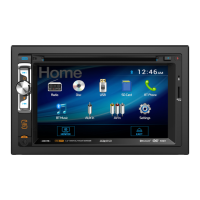
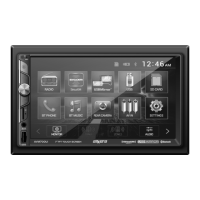
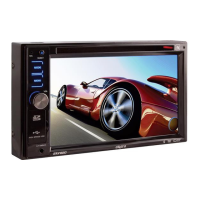
DVD Multimedia Receiver with Bluetooth
featuring a 6.2" Touch Screen Display
AV614BH
The DVD video display of the in-dash unit will not operate while the vehicle is moving. This is a safety feature
to prevent driver distraction. In-dash DVD video functions will only operate when vehicle is in Park and the
parking brake is engaged. It is illegal in most states for the driver to view video while the vehicle is in motion.
Safety Notes:

Other manuals for Axxera AV614BH

Questions and Answers

  • M
    michellegreeneAug 14, 2025
    How to troubleshoot Axxera AV614BH that will not turn on?
    • J
      Joseph MooreAug 14, 2025
      If your Axxera Receiver isn't powering on, several issues could be the cause. First, check the yellow and red wires to ensure they are properly connected and receiving the correct voltage (11~16VDC). Next, verify the black wire is securely connected to ground. Finally, inspect the fuse(s) and replace them if they are blown.
  • D
    Donald CrawfordAug 18, 2025
    What to do if Axxera AV614BH Receiver keeps blowing fuses?
    • A
      amy02Aug 18, 2025
      If your Axxera Receiver continues to blow fuses, there are a few potential causes. Check the yellow and red wires for any pinching that may cause them to touch the chassis ground. Also, inspect the speaker wires to ensure they are not touching the chassis ground. Finally, make sure you are using fuses with the correct rating.
  • L
    lorraine05Aug 21, 2025
    Why does my Axxera AV614BH have power but no sound?
    • T
      Theresa FosterAug 21, 2025
      If your Axxera Receiver powers on but produces no sound, the issue likely lies with the speaker connections. First, check the connections at the speakers to ensure they are properly connected. Second, inspect all bare speaker wires to ensure they are insulated from each other and the chassis ground.
  • B
    Brianna BarnesAug 25, 2025
    What to do if Axxera AV614BH has audio but no video?
    • J
      Jennifer MuellerAug 25, 2025
      If your Axxera Receiver has audio but no video, the problem might be related to the parking brake safety circuit. Check the connections at the parking brake. Also, ensure that the parking brake is applied.
  • C
    Cory GutierrezAug 28, 2025
    Why is there no video display on my Axxera AV614BH Receiver when in reverse?
    • H
      Heidi LopezAug 28, 2025
      If you're not seeing a video display on your Axxera Receiver when in reverse, there are a couple of things to check. First, verify the connections at the reverse lamp to ensure the reverse circuit is properly connected. Also, make sure the vehicle is actually in reverse gear.
  • J
    Jonathan CarneyAug 31, 2025
    How to fix excessive skipping on Axxera AV614BH Receiver?
    • E
      Eduardo WilliamsonAug 31, 2025
      Excessive skipping on your Axxera Receiver can be caused by a couple of things. Check the mounting sleeve to ensure the unit is mounted correctly. Also, inspect the disc for scratches or physical defects.
  • S
    saundersmargaretSep 3, 2025
    What to do if DVD does not start playback on Axxera AV614BH Receiver?
    • S
      susan21Sep 3, 2025
      If your Axxera Receiver is not playing DVDs, there could be a couple of reasons. First, inspect the DVD for any scratches or physical defects. Second, ensure that you are using discs labeled "Region 1" or "All".
  • M
    martinwelchSep 7, 2025
    What does 'Disc Region Incorrect' mean on my Axxera AV614BH?
    • D
      Diane JonesSep 7, 2025
      The 'Disc Region Incorrect' message on your Axxera Receiver indicates a region code error. Use discs labeled "Region 1" or "All" only.
  • J
    Joshua RuizSep 10, 2025
    Why is the IR remote not working on my Axxera AV614BH?
    • J
      jestradaSep 10, 2025
      If the IR remote for your Axxera Receiver isn't working, the most likely cause is a dead battery. Replace the battery in the remote.

Summary

AV614 BH Installation and Owners Manual

Important Safety Warnings

Driver Distraction Prevention

Warnings against operating video while driving and ensuring proper unit installation.

Parking Brake Lock-out Feature

Instructions on installing and not bypassing the parking brake lock-out for safety.

Safe Volume Operation

Advice to keep volume low to hear traffic sounds and prevent distraction.

General Safety Information

Installation and Operation Precautions

Guidelines to prevent unit damage, personal injury, and ensure proper installation.

Unit Preparation and Installation

Installation Steps

Procedure for mounting the unit, connecting wires, and securing the trim.

Wiring Diagram and Connections

Steering Wheel Interface

Information on the built-in, programmable steering wheel interface.

DualMirror Connectivity

Explanation of DualMirror technology for mirroring smartphone screens.

Control Locations and Functions

Front Panel Controls

Identifies and describes the function of each button on the unit's front panel.

Remote Control Layout

Details the function of each button on the provided remote control.

General Operation

Selecting Input Sources

Guide to switching between different input modes like Tuner, Disc, USB, etc.

Accessing the Main Menu

How to access the main menu screen from the touchscreen.

Audio Settings and Reset

Unit Reset Function

How to reset the unit to default settings using the reset button.

Audio Adjustments (EQ, Loudness, Bass, Treble)

Guide to adjusting EQ, Loudness, Bass, Treble, Balance, Fader, and Subwoofer levels.

General Operation (Setup Menu)

Accessing and Using Setup Menu

How to access the setup menu and configure language, beep, screen saver, and SWI settings.

General Setup Options

Configuration settings for language, beep, screen saver, calibration, and SWI.

Steering Wheel Interface Settings

Steps to program steering wheel controls for the unit.

General Operation (System Settings)

Bluetooth Setup and Options

Configuration for Bluetooth signal, auto-connect, and auto-answer features.

Media Playback Settings

Settings for Parental Control, Subtitle, Audio, DVD Menu, and View Mode.

AM;FM Tuner Operation

Tuner Interface Overview

Explanation of tuner screen elements and basic operation.

Tuning Frequency Up

How to tune the radio to a higher frequency.

Tuning Frequency Down

How to tune the radio to a lower frequency.

Preset Station Management

How to store, recall, and manage preset radio stations.

AM;FM Tuner Advanced Operation

Local and Distance Tuning

Selecting between Local (LOC) and Distance (DX) tuning for better reception.

Preset Scan and Auto Store

Scanning preset stations or automatically storing strongest stations.

CD, USB, and SD Card Operation

Media Playback Overview

How to play audio files from discs, USB devices, or SD cards.

Disc Playback Instructions

Steps to insert a disc and initiate playback.

USB Device Playback

Instructions for connecting a USB device for playback.

SD Card Playback Instructions

How to insert an SD card for media playback.

CD;USB;SD Card Playback Controls

Direct Track Access

Accesses keyboard to input track/file number for direct playback.

Next Track and Fast Forward

Advances to the next track or fast forwards the current track.

DVD Operation

DVD Touchscreen Controls

Description of hidden touchscreen controls for DVD playback functions.

DVD Operation (Transport Controls)

DVD Transport Control Functions

Explanation of DVD transport controls for playback.

DVD Operation (Playback Controls)

DVD Operation (Additional Options)

DualMirror Operation

DualMirror Technology Overview

Mirrors smartphone screens to receiver and charges device via USB.

Bluetooth Operation

Bluetooth Setup Menu

Accessing the Bluetooth setup menu to configure the unit.

Bluetooth Configuration Options

Enabling/disabling Bluetooth, auto-connect, and auto-answer features.

Pairing a New Bluetooth Device

Instructions for pairing a new Bluetooth device with the unit.

Bluetooth Operation (Phone and Call Functions)

Product Specifications

Troubleshooting Guide

Troubleshooting: Unit No Power

Common causes and solutions for the unit not turning on.

Troubleshooting: No Sound

Causes and actions for the unit having power but no audio output.

Troubleshooting: Blown Fuses

Reasons for the unit blowing fuses and how to resolve them.

Troubleshooting: Audio Without Video

Causes and solutions when audio is present but no video is displayed.

Troubleshooting: No Reverse Video

Solutions for no video display when the vehicle is in reverse.

Troubleshooting: DVD Playback Issues

Reasons why DVD playback may not start and how to fix.

Axxera AV614BH Specifications

General IconGeneral
BrandAxxera
ModelAV614BH
CategoryReceiver
Display TypeLCD
Screen Size6.2 inches
TouchscreenYes
BluetoothYes
USB PortYes
SD Card InputYes
DVD PlayerYes
AM/FM TunerYes
Rear Camera InputYes
Steering Wheel Control CompatibleYes
Channels4
Power Output50W x 4
EqualizerYes
Auxiliary InputYes
Remote ControlYes
Compatible FormatsMP3, WMA

Related product manuals