NAME MIDI code BUTTON AND MESSAGE TYPE MIDI CHANNEL MIDI INDEX
button 22 4A BTN NOTE 1 OFF = 00, ON = 7F
button 23 4B BTN NOTE 1 OFF = 00, ON = 7F
button 24 4C BTN NOTE 1 OFF = 00, ON = 7F
button 25 4D BTN NOTE 1 OFF = 00, ON = 7F
button 26 4E BTN NOTE 1 OFF = 00, ON = 7F
button 27 4F BTN NOTE 1 OFF = 00, ON = 7F
button 28 50 BTN NOTE 1 OFF = 00, ON = 7F
button 29 51 BTN NOTE 1 OFF = 00, ON = 7F
button 30 52 BTN NOTE 1 OFF = 00, ON = 7F
Wheel 1 Left 0E BTN NOTE 1 7F
Wheel 1 Right 0D BTN NOTE 1 7F
Wheel 1 press in 0F BTN NOTE 1 OFF = 00, ON = 7F
Wheel 2 Left 11 BTN NOTE 1 7F
Wheel 2 Riht 10 BTN NOTE 1 7F
Wheel 2 press in 12 BTN NOTE 1 OFF = 00, ON = 7F
Wheel 3 Left 14 BTN NOTE 1 7F
Wheel 3 Right 13 BTN NOTE 1 7F
Wheel 3 press in 15 BTN NOTE 1 OFF = 00, ON = 7F
Wheel 4 Left 17 BTN NOTE 1 7F
wheel 4 Right 16 BTN NOTE 1 7F
wheel 4 press in 18 BTN NOTE 1 OFF = 00, ON = 7F
pad 1 1 BTN NOTE 1 OFF = 00, ON = 7F
pad 2 2 BTN NOTE 1 OFF = 00, ON = 7F
pad 3 3 BTN NOTE 1 OFF = 00, ON = 7F
pad 4 4 BTN NOTE 1 OFF = 00, ON = 7F
pad 5 5 BTN NOTE 1 OFF = 00, ON = 7F
pad 6 6 BTN NOTE 1 OFF = 00, ON = 7F
pad 7 7 BTN NOTE 1 OFF = 00, ON = 7F
pad 8 8 BTN NOTE 1 OFF = 00, ON = 7F
pad 9 9 BTN NOTE 1 OFF = 00, ON = 7F
pad 10 OA BTN NOTE 1 OFF = 00, ON = 7F
pad 11 OB BTN NOTE 1 OFF = 00, ON = 7F
pad 12 OC BTN NOTE 1 OFF = 00, ON = 7F
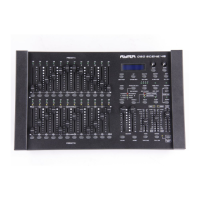
Since the DigiCon-1 is equipped with its own power transformer, it doesn’t require USB power. This counters
the use of weaker USB outputs that would only have a negative effect on its performance. The USB port of
the DigiCon-1 should only be used to power a small USB lamp or any other small gadget.
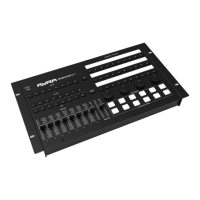
Most of the buttons fitted to the DigiCon-1 feature mechanical switches, including the Flash Section buttons.
This way, there’s physical feedback that lets you know that the buttons have been properly activated.
The endless rotary encoders (the four knobs) can be infinitely rotated and send out +1 or -1 messages. The
encoders also have an assignable push-button (on/off) function for controlling and fine tuning parameters like
pan/tilt.
Use with Other Software
Due to its universal design, the DigiCon-1 can be used to perform specific, as well as more general tasks;
the possibilities are endless.
For certain software, it’s essential that the buttons of the Digicon-1 are ‘mapped’ before use. This is to let the
software know which signal coming from the controller needs to converted into which specific action.
The information in this user manual is subject to change at any time without notice.
Version: 1.0 Date of creation and author's initials: 02-12-2020 RV Revision date and author's initials: -


 To Next Page