6-1
Chapter 6. LIST OF DISPLAYS AND SETTING DATA
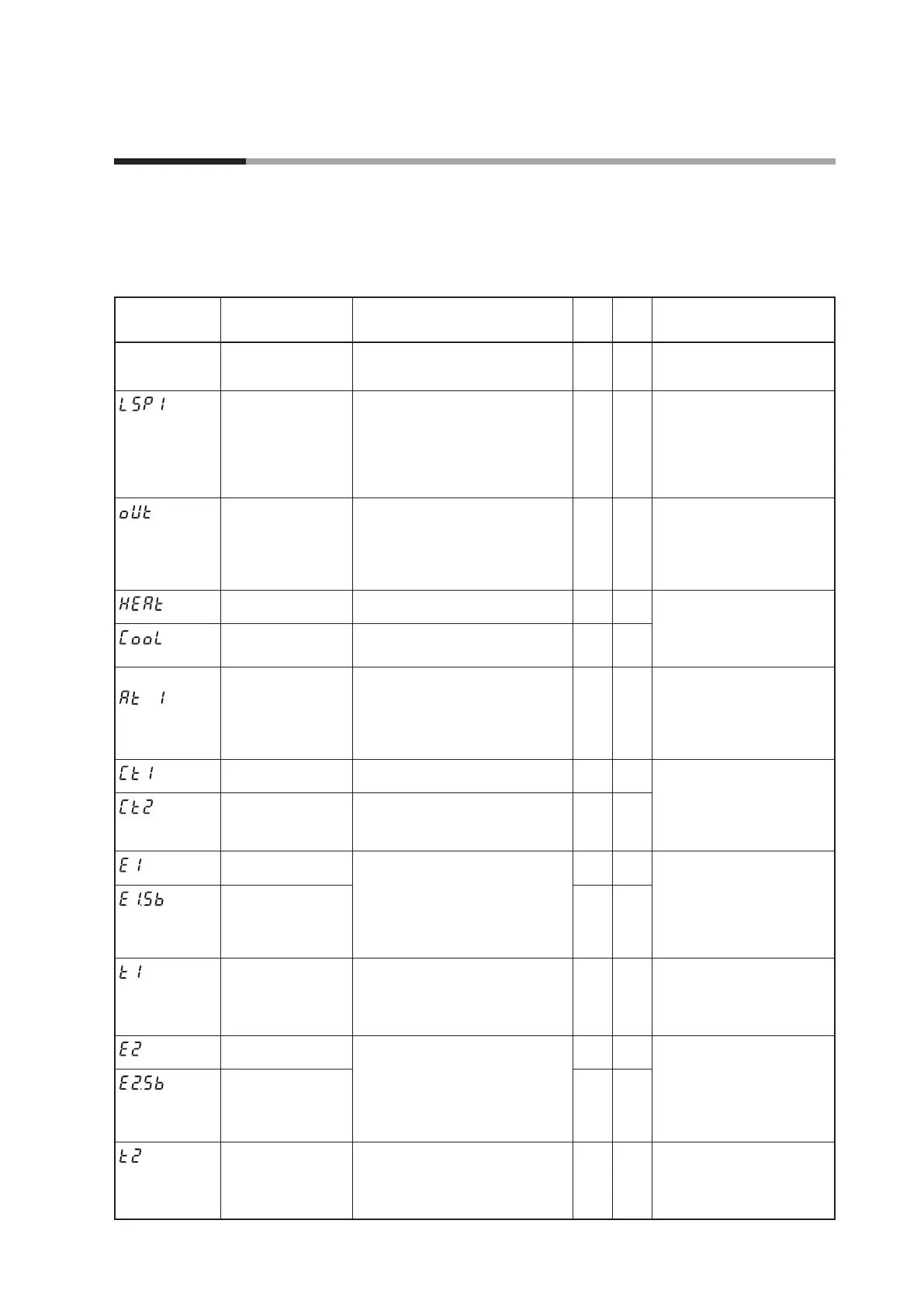
6 - 1 List of Operation Displays
The following shows the meanings of the values stated in the “User Level” column:
0: Simple, Standard, or High function configuration, 1: Standard or High function configuration, and 2: High
function configuration
Operation displays
Display Item Contents
Initial
value
User
level
Notes
Upper display: PV
Lower display: SP
SP (
Target value)
SP low limit (C07) to SP high limit (C08)
0 0 Whether or not this item is
displayed is selected by the PV/
SP display setup (C74).
(Display example)
Lower display:
LSP
LSP g
roup number
(Numeric value at 1st
digit = the right end
digit)
1 to LSP system group (C30, Max. 4)
1 0
Displayed when LSP system
group (
C30
) is “2” or more. The
lower display shows the LSP set
value corresponding to the LSP
group number. Whether or not
this item is displayed is selected
by the PV/SP display setup (
C74
).
MV (Manipulated
Variable)
-10.0 to +110.0 %
Setting is disabled in AUTO mode.
(Numer
ic value does not flash.)
Setting is enabled in MANUAL mode.
(Numer
ic value flashes.)
— 0 In the ON/OFF control (CtrL =
0), "100.0" is displayed at ON
and "0.0" is displayed at OFF.
Whether or not this item is
displayed is selected by the MV
display setup (C75).
Heat MV (Manipulated
Variable)
Setting is disabled. — 0
This item is displayed when using
the Heat/Cool control (C26 = 1).
Whether or not this item is
displa
yed is selected by the MV
display setup (C75).
Cool MV (Manipulated
Variable)
Setting is disabled. — 0
Upper display: PV
(Display example)
AT progress display
(Numeric value at the
1st dig
it = right end
digit)
Setting is disabled.
1 or more : During execution of AT
(Value is decreased.)
0: Completion of AT
— 0 Displayed during execution of
AT. (The display is continued
even after completion of AT.)
Whether or not this item is
displa
yed is selected by the MV
display setup (C75).
CT (Current trans-
former) current value 1
Setting is disabled. — 0 Displayed when the optional
model has two current
transformer points.
Whether or not this item is
displa
yed is selected by the CT
display setup (C78).
CT (Current trans-
former) current value 2
Setting is disabled. — 0
Internal Event 1 main
setting
The allowable setting range may vary
depending on the operation type of
the internal event.
-1999 to +9999U: Set value is other
than the f
ollowing values:
0 to 9999U: Set value is an absolute value.
-199.9 to +999.9 %: Set value is MV.
0 0 S
etting required by the
operation type of the internal
event is displayed.
Whether or not this item is
displayed is selected by the EV
display setup (C76).
Internal Event 1 sub
setting
0 0
(Display example)
Timer remaining time 1
Setting is disabled.
“
” is displayed at the right end digit
when using the ON delay time.
“L” is displayed at the right end digit
when using the OFF dela
y time.
— 0 Whether or not this item is
displayed is selected by the
timer remain time display setup
(C77).
Internal Event 2 main
setting
The allowable setting range may vary
depending on the operation type of
the internal event.
-1999 to +9999U: Set value is other
than the f
ollowing values:
0 to 9999U: Set value is an absolute value.
-199.9 to +999.9 %: Set value is MV.
0 0 S
etting required by the
operation type of the internal
event is displayed.
Whether or not this item is
displayed is selected by the EV
display setup (C76).
Internal Event 2 sub
setting
0 0
(Display example)
Timer remaining time 2
Setting is disabled.
“
” is displayed at the right end digit
when using the ON delay time.
“L” is displayed at the right end digit
when using the OFF dela
y time.
— 0 Whether or not this item is
displayed is selected by the
timer remain time display setup
(C77).



 To Next Page