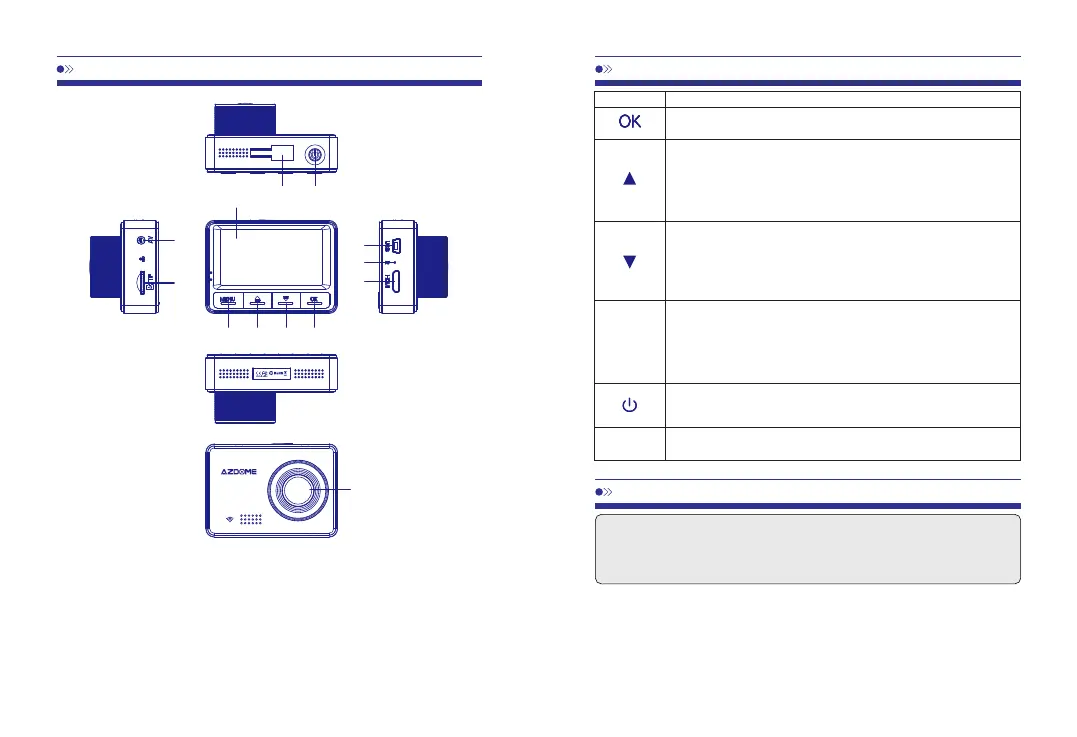
①Holder
EN-02
EN-03
⑬Lens
⑩Up
⑦Reset
④AV-OUT
②Power
⑪Down
⑧HDMIPort
⑤TFCardSlot
③Screen
⑫OK/Confirm
⑨Menu
⑥USBPort
①②
④
⑤
⑥
⑦
⑧
③
⑨⑩⑪⑫
⑬
Function
Clicktoconfirmaselection
Pageup
Zoom
Switchmuterecord
Pagedown
Zoom
SwitchWiFi(Longpress)
ModeSwitchover
Entersettingmenu
SOSlockfile
Turnon/off
Reset
MENU
Reset
Button
Tips:Westronglyrecommendthatpleaseformatyourmemorycardbeforeusingitatthe
firsttimebyshort-pressingMbuttontwiceandformatincamera'ssystemsettings.Batteryis
mainlyusedtosavefilesinemergency.PleasealwaysconnectDashCamtoexternalpower
whileitisinuse.
1.AutoPowerON/OFF:
①ConnectthecarchargerandDashCambyusingthechargingcable.
②Plugtheotherendofthecarchargertoyourvehicle'scigarettelightersocket.
③Whenthecarengineisstarted,DashCamautomaticallyturnsONandstartrecording.When
thecarkeyisturnedtoLOCKposition,DashCamautomaticallysavestherecordingandturns



 To Next Page