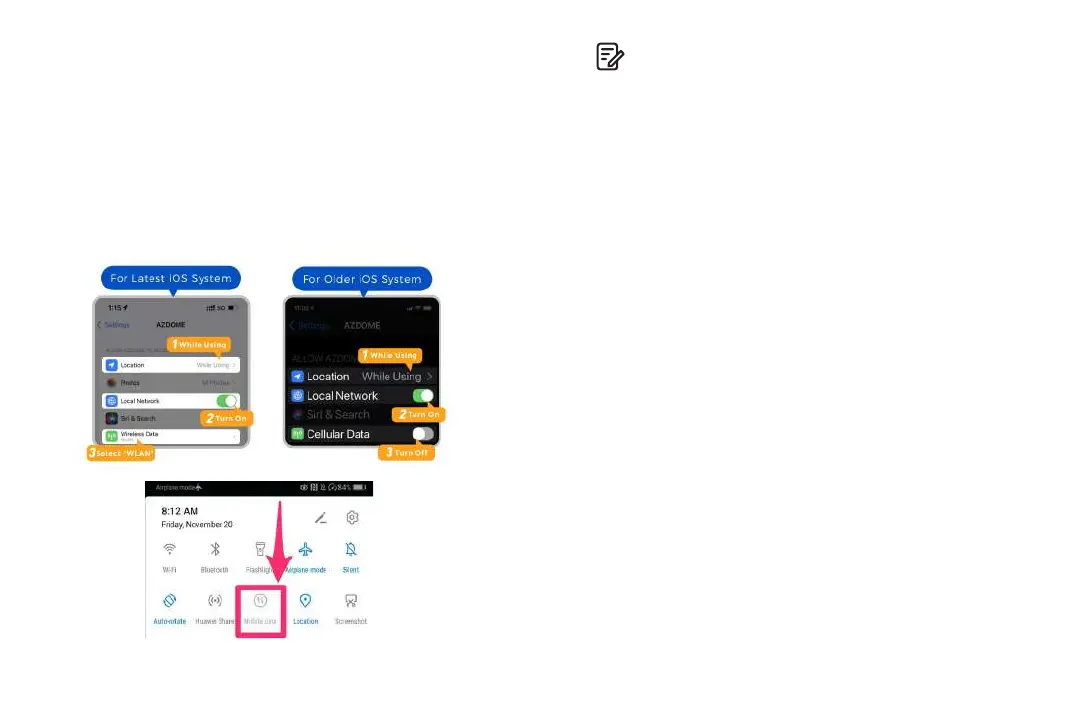
The app won t show the live video on your phone. It '
only shows a picture of the beach?
The cellular data will cause the live video not to be viewed. If
the APP won't show the live video, please disable the
‘AZDOME’ cellular data of your phone. Sure that the Local
Network of the ‘AZDOME’ is turned on.
1. For Latest iOS System: Setting→AZDOME→Click ‘Wireless
Data’→Select ‘WLAN’ .
2. For Older iOS System: Setting→AZDOME→Disable the
‘Cellular Data’.
Can I watch the videos around my car remotely?
NO. AZDOME M330 dash cam is NOT made to broadcast
footage over the cloud or internet. It is NOT a cloud or an IP
camera and it is NOT meant to do that. You can get live video
and footage on
AZDOME
dash cam’s APP as long as you stay
within the 10FT range from the dashcam.
What is the WiFi Range?
The WiFi signal range is about 10FT when there are NO
obstructions in the middle. Please NOTE that just like your
home WiFi network, you don't have WiFi signal outside your
home, the same way, WiFi range is 10FT from this small device.
What is a WiFi Feature?
The WiFi feature has been designed so you can pair your dash
camera wirelessly with your smartphone and access your
recording instantly from the dash cam. Here you can view,
download and share your videos easily with your friends and
family. Just like how you would connect your Bluetooth
speaker to your smartphone for wireless music play, the
same way dash cameras use WiFi signal (instead of a
Bluetooth) to pair your smartphone with AZDOME M330.
Note:
1. WiFi Direct lets you directly connect your smartphone to
your dash cam via WiFi within a range of 10FT.
2. Once it is connected to the AZDOME APP it will automatically
update the date/time.
3. The AZDOME is available for devices running Android 5.0
and higher, or iOS 9.0 and higher.
EN-19 EN-20



 To Next Page