Instruction
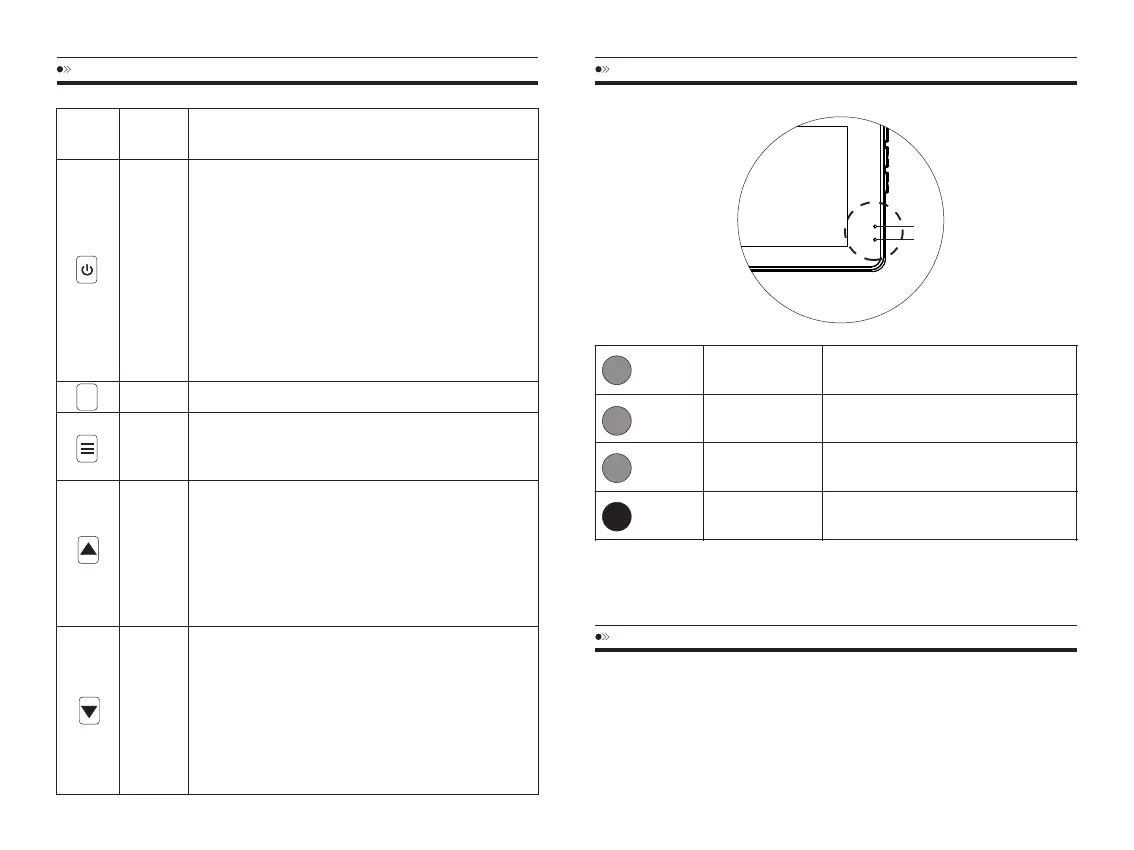
1.ToTurnONTheCamera:Presspowerbuttononce.
2.ToTurnOFFTheCamera:Pressandholdpower
buttonfor2-seconds.
3.PressOnce-tostart/stopvideorecording
4.PressOnce-totakephotowhileonPhotoMode
5.PressOnce-toplayback/pausethevideowhilein
PlaybackMode
6.PressOnce-toenter/confirmspecificsettings
whileinMenuSettings
7.PressOnce-toawakescreenwhileonscreensaver
function.
Allsettingswillberestoredtofactorysettings.
PressOnce-toenter/exitmenusettings
Pressandholdfor2-Seconds-toswitchModes
(Video/Photo/Playback)
1.PressOnce-toscrollupwhileinanyMenuSettings
2.PressOnce-switchfrontandrearcameraonVideo
Modeorrecording
3.PressOnce-toscrolltopreviousvideofileswhile
inPlaybackMode
4.Pressandholdfor2-Seconds-toturnonWiFion
VideoMode
1.PressOnce-toscrolldownwhileinAnyMenu
Settings
2.PressOnce-toenable/un-enableaudiorecording
whenrecording
3.PressOnce-toscrolltonextvideofileswhilein
PlaybackMode
4.Pressandholdfor2-Seconds-tolockcurrent
videofile
KEYS AND FUNCTIONS
Button
Image
Button
Name
POWER/
OK
RESET
MENU/
MODE
UP
DOWN
R
INSTALLATION
InsertMicroSDCard
1.MakesurethedashcamisturnedOFF.
2.InserttheMicro-SDCardhalfwayin(GOLDContacts-BacktheLensSide)
3.Nowgentlypushthecardinuntilitclicks&looksinplace.
4.MustuseonlyBrandName,Class-10,U3orhigherspeedMicro-SDCard.
EN-08 EN-09
BlueLED
BlueLED
BlueLED
RedLED
Solid
Blinking
Blinkingrapidly
Solid
Cameraidle
Cameraisrecording
Updatingfirmware
Internalbatteryischarging
LED STATUS LIGHT INDICATOR
①
②
1
1
1
2



 To Next Page