EN-10 EN-11
RemoveMicroSDCard
-ToremovetheMicroSDcard,gentlypushitstopedgeinwarduntilitclicks,
andthenpopsout,thensimplypullitoutoftheslot.
MOSTIMPORTANTaboutMicro-SDCard
1.DonotremoveorinsertMicro-SDcardwhenthecameraispoweredon
whichmaydamagethememorycard.
2.YouMUSTFormattheMicro-SDcardincameraforthefirsttimeusing.
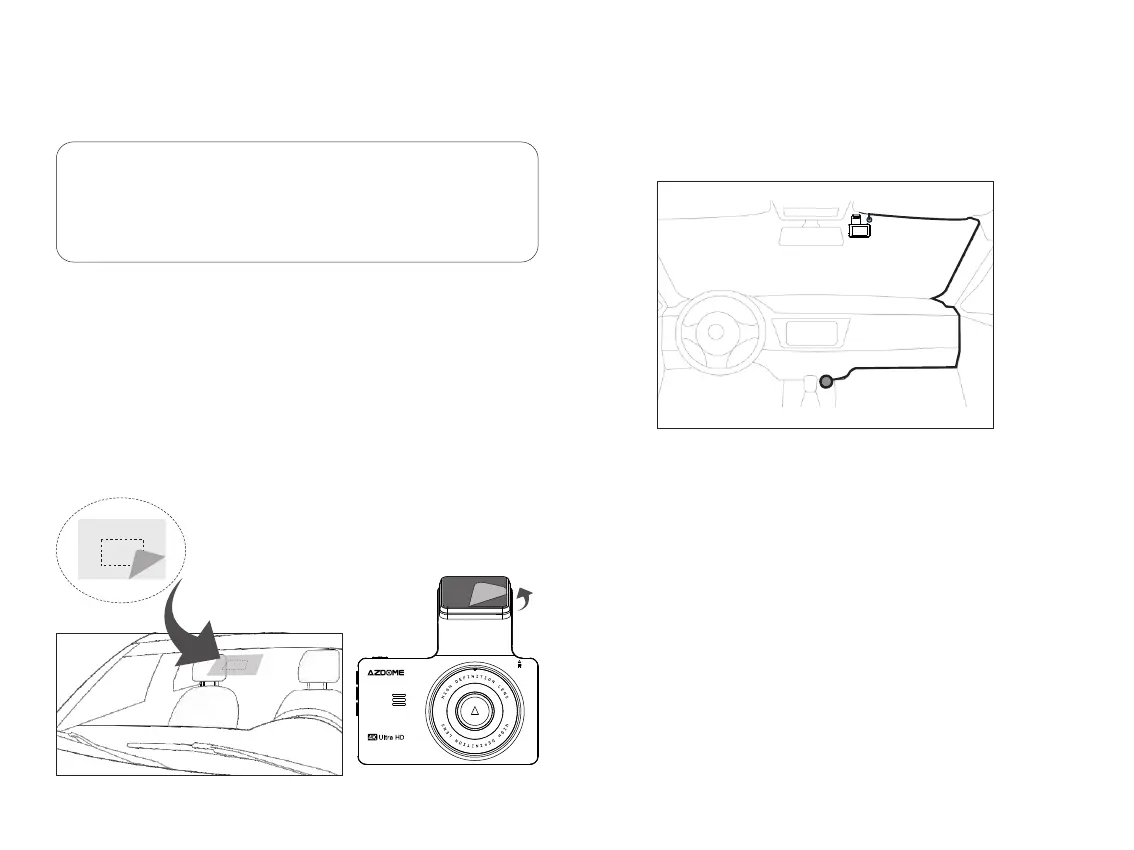
Frontcamerainstallation
1.Stoptheenginewherethereissomelightandinasafeplace,andthen
removethekey.
2.Makesuretocleanyourwindshieldfromthedustparticlesandan
evaporatedgreasefromthedashboardsurface.
3.AttachtheStaticClingsSticker(itwillleavenoresiduewhenremovalis
required)tothewindshield.Peelofftheprotectivefilmfromthedouble-sided
tapeandattachthefrontcameratotheStaticclingssticker.
4.InserttheMicroSDcardintotheMicroSDslotofthedashcam.
(Note:pleaseuseanA-Brandhigh-speedMicroSDcard,class10orabove)
5.PlugUSBchargerintoyourvehiclescigarettelightersocket.Runthecable
alongyourvehiclesconsoleandwindscreenandplugitintothecameraport
markedwiththeUSBicon.
6.Usethecablecliptoorganizeandhidethepowercordsothatitdoesnt
interferewiththedriversvision.
Rearcamerainstallation
1.Therearcameraequippedwitha6-metercableistoconnecttothe
dash-camviaAV-INport.Pleasecheckiftheprovidedcableislongenoughto
reachtherearcaminyourcar.
2.Installtherearcameranearthelicenseplate.Feedthecamerawirethrough
totheinteriorofthevehicleeitherbydrillinganewhole;orusingtheexisting
holeforthenumberplatelightifpossible.Thetwoincludedscrewsand
doublesidedtapewillholdthecamerainplace.
StaticClingsSti cker
Removethefilmofthe
StaticClingsSticker



 To Next Page