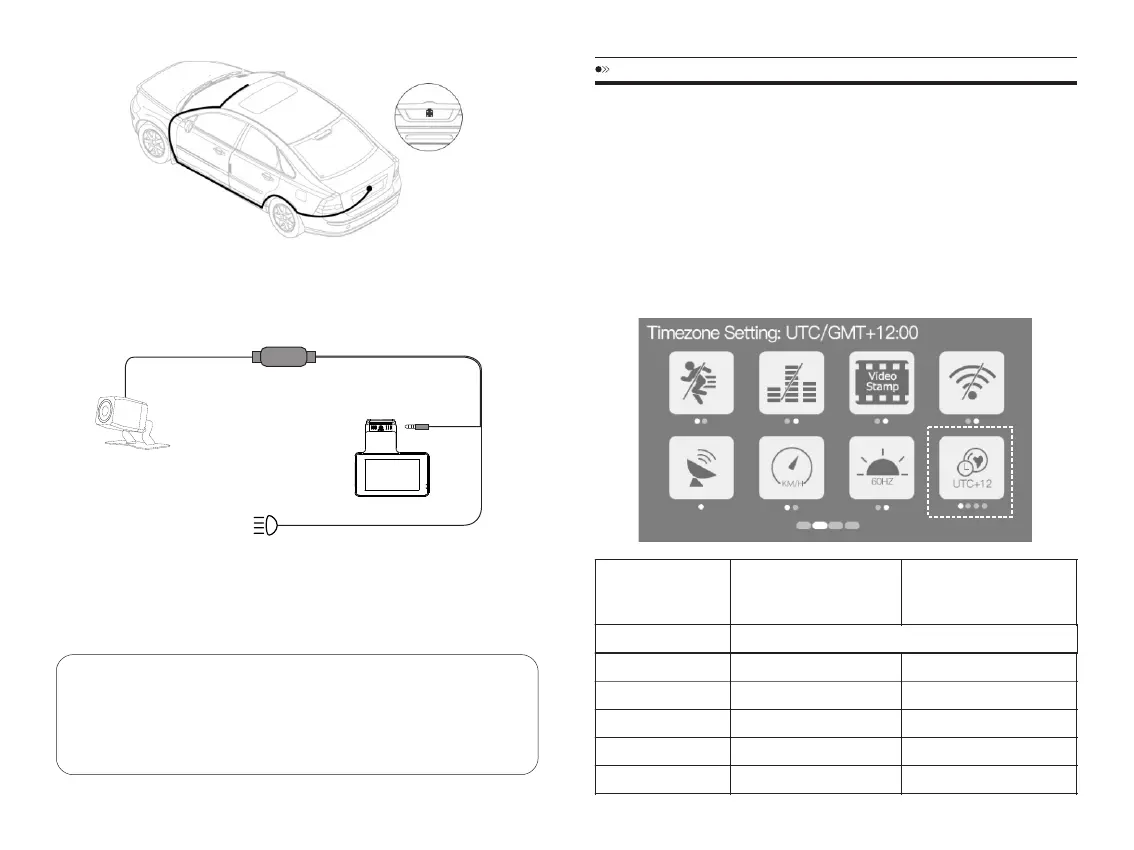
3.Tousethereversingfunction,connecttheredcableofrearcamera
extensioncabletotheanodeofthecarreversinglampbyusingatestlightor
multimetertodeterminewhichwireisanode.
RearCamera
Rear
ReversingLampPositiveLead
ReversingLamp
4.Oncealloftheplugsareconnectedandpowerconnectionsaremade.
Switchontheignition.Shiftthegearintoreverse,andifalliswiredcorrectly;
therearcamerimagewillappearinyourdashcam.
Note
①Pleasecleanthepositiontoensuretheadhesivequalitybeforeinstallthe
rearcamera.
②Pleasefastenthescrewstoadjustthedesiredrearcameraviewangle.
GETSTARTED
PowerOn/Off
Option1:StarttheenginetoautomaticallypowerontheDashCamera;stop
theenginetoautomaticallypoweritoff.
Option2:Presspowerbuttononcetoturnondevice;Pressandholdpower
buttonfor3secondstoturnoffdevice.
SettingTimezoneAndDate/Time
①SettheUTC/GMTvaluefirst.
WhenDaylightSavings
BeginsMarch-Nov
WhenDaylightSavings
EndsNov-March
TimeZones
Hawaii GMT(-10:00)
Alaska
PacificTimeZone
MountainTimeZone
CentralTimeZone
EasternTimeZone
GMT(-9:00)
GMT(-8:00)
GMT(-7:00)
GMT(-6:00)
GMT(-5:00)
GMT(-8:00)
GMT(-7:00)
GMT(-6:00)
GMT(-5:00)
GMT(-4:00)
EN-12 EN-13



 To Next Page