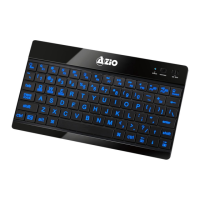
Tablet Keyboard
FEATURES
• Bluetooth3.0WirelessTechnology
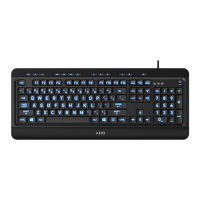
• LargeFontswithBacklightIllumination
• UniversalCross-PlatformDesign
PACKAGE CONTENTS
1xKB335BluetoothTabletKeyboard
1xUSBChargingCable
1xQuickStartGuide
SPECIFICATIONS
• Model:KB335
• Connection Type:Bluetooth3.0
• Range:Upto33ft.
• Dimensions:5.4(L)x9.5(W)x0.4(H)Inches
• Backlight:Blue
• Battery: RechargeableLi-ion850mAh/10hrsBatteryLife/30Days
Standby
• Hotkeys:Home,Browse,SwitchInputLanguage,SelectAll,Copy,Cut,
Paste,PreviousTrack,NextTrack,Play/Pause,Mute,Vol+,Vol-,Turnoff
Screen
• OS Support:Windows2000,XP,Vista,7,8,iOS,Android3.0+,Windows
Mobile6.0+,NokiaSymbianS60,PS31.82+
• Warranty:1YearLimited
CHARGING THE BATTERY
Beforersttimeusage,werecommendthatyouchargethebattery.Connectthe
includedmicroUSBendoftheUSBcabletothekeyboardandtheotherendtoa
computer.TheLEDwilllightupredwhencharging.Whenchargingiscomplete,
theredLEDwillturnoff.
PAIRING WITH YOUR TABLET/SMARTPHONE
1. MakesurethekeyboardisturnONbyslidingthepowerswitchtowardsthe
“on”position.TheblueLEDwillashonce.
2. Activatepairingmodebyholdingdownthe“Connect”buttonuntiltheblue
LEDstartsashing.
3. ActivateyourTablet/Smartphone’sBluetoothfunctionandsearchfor
devices.Itshoulddetecta“BluetoothKeyboard”device.
4. Selectitfromthedevicelisttoinitiatethepairingprocess.
5. Pleaseenterthe4digitPINcodeshownonthescreenofyourTablet/
SmartphoneontheKB335keyboardandpressthe“Enter”key.Theblue
LEDwillturnoff.
6. YourKB335tabletkeyboardisnowreadyforuse.
KB335 - English


 To Next Page