Need help?
Do you have a question about the Azio KB351RT and is the answer not in the manual?
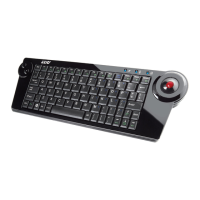
Brief welcome message upon purchasing the AZIO KB351RT Wireless USB Trackball Keyboard.
Details the slim design, trackball, MCE keys, hotkeys, wireless technology, and construction.
Lists all items included in the AZIO Wireless Trackball Keyboard package.
Outlines the necessary computer and operating system requirements for installation.
Step-by-step instructions for connecting the wireless receiver to your PC.
Guide on inserting batteries and powering on the wireless trackball keyboard.
Procedure to pair the keyboard and USB receiver for wireless communication.
Explains the meaning of different LED lights on the keyboard (Pairing, Battery Low, Charging).
Describes how the keyboard enters sleep mode to save power and how to wake it.
Details the available power sources: primary batteries, rechargeable batteries, and USB power.
Provides solutions for common problems like the keyboard not working or not being recognized.
States FCC rules, warnings about interference, and methods to correct reception issues.
Information on how to get technical assistance, contact support, and warranty claims.

 To Next Page
 General