14
EN
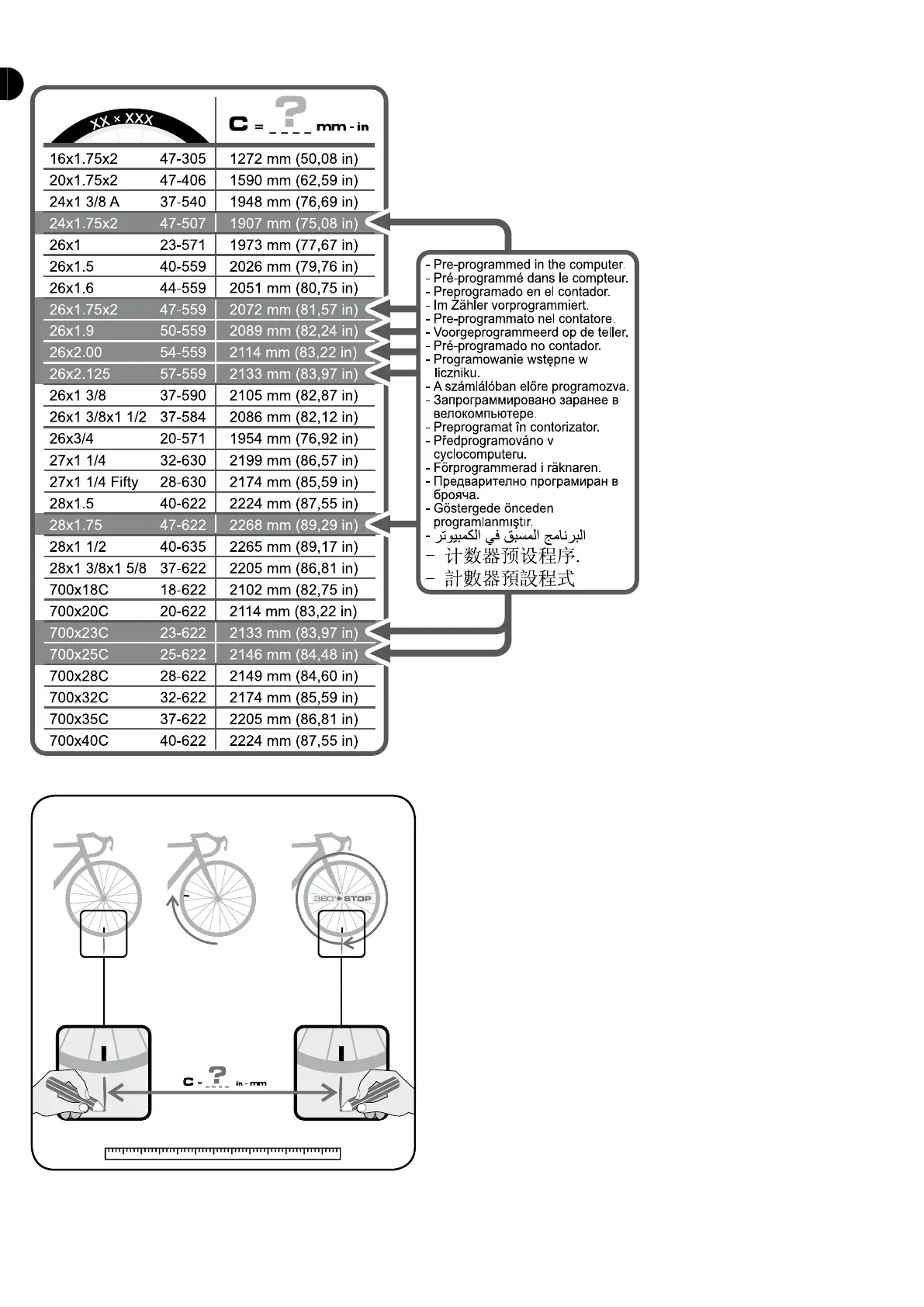
You will nd the size on the side of your tyres. If your tyre size is not on the list, you can enter a specic size by selecting «OTHER» in the list. You must then enter the
circumference of the wheel in mm. There are 2 methods to work out the circumference:
- 1st method:
- 2nd method:
TOTAL KM: to change the total distance already covered.
NEW BICYCLE: to set a new bike. You can set up to 3 bikes, so 3 dierent speed/cadence
sensors.
If you enter the menu (press S), the computer will immediately start to search for the
new sensor (of the new bike). Don’t forget to turn the wheel or the crankarm so that the
sensor sends a signal to the computer. Once the sensor is connected, you can choose a
name for your bike (MTB, ROAD or OTHER). That name is now linked to the sensor.
REMOVE BIKE: to delete a set bike. Press S enter the menu, then select the bike by
pressing B1 and B2 then conrm with S.
LIGHT
Your COUNT14+ computer has a backlit screen. You can switch it on or o in the LIGHT
menu. Press S to enter the menu, then press S a second time to make ON/OFF ash.
Select ON or OFF with B1 and B2 and conrm with S.
Once ON, the light switches on as soon as you press a button. Only activate this option
when necessary as it uses a lot of energy.


 To Next Page