1
1
2
1
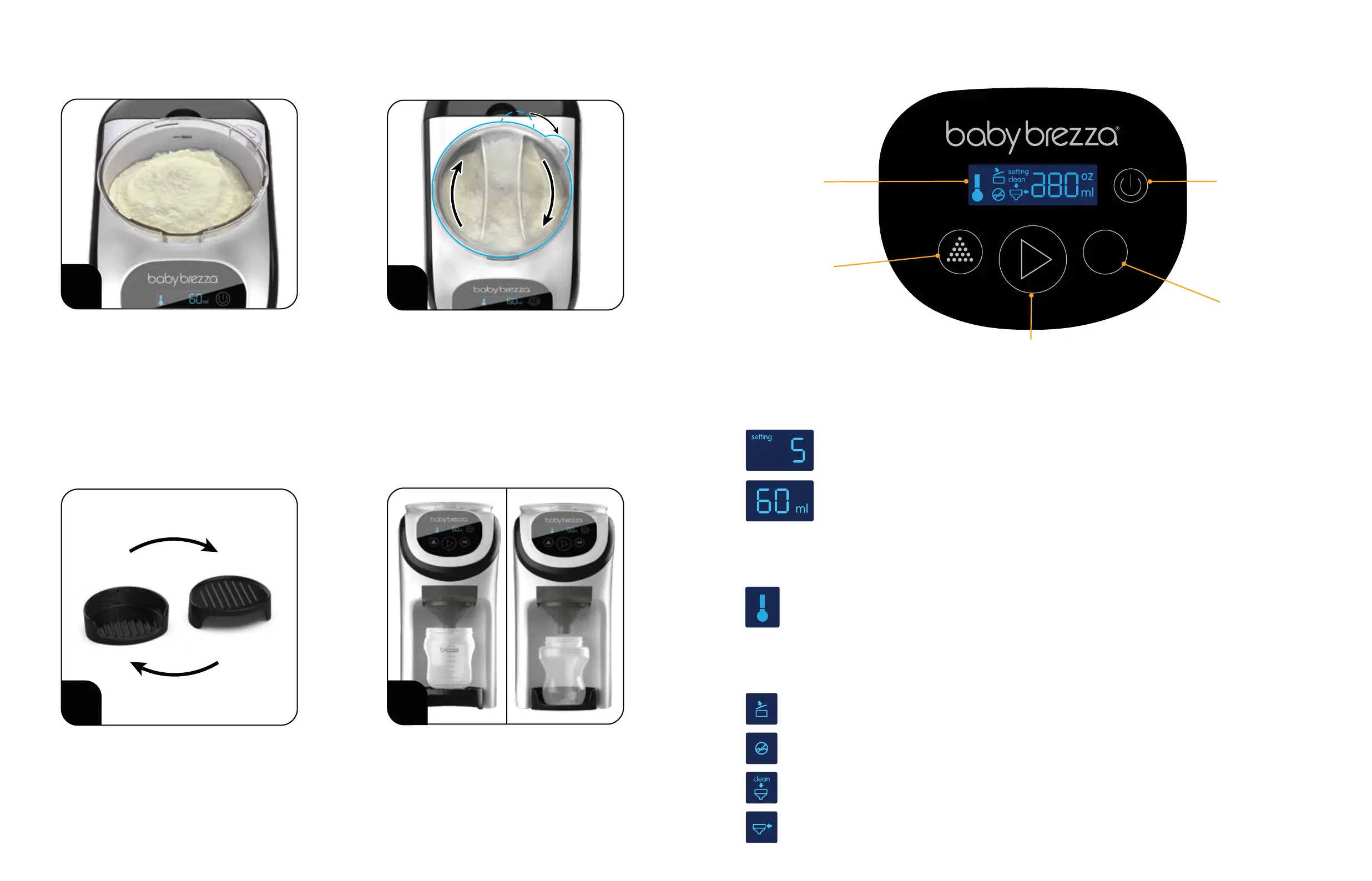
Place the Drip Tray so that your bottle is as
close to the Funnel as possible to avoid spills.
E) Drip Tray Set-up
Now let’s review the controls on the next page.
The Drip Tray can be used in 2 positions to
make sure your bottle ts under the Funnel.
2
Carefully pour formula powder into the
Powder Container. Make sure the powder
is lled between the “MIN” & “MAX” lines
printed on the Powder Container.
Place the Lid on the Powder Container and
turn clockwise until it stops.
This will engage the safety switch & lock
the Powder Container onto the Base.
To remove the Powder Container, turn the
Lid counter-clockwise.
D) Add the powder F) Set up the controls
Powder Lid Open - The Powder Container Lid is not closed completely or is not on the Powder Container
correctly. Close the Powder Container Lid completely and correctly when this symbol is illuminated.
Low Water - Rell Water Tank when this symbol is illuminated.
Clean Funnel - This symbol will illuminate after every 4 bottles are made. When this symbol is illuminated,
remove Funnel assembly, wash and dry completely, then place it back into the Base. See Page 11 for details.
Funnel Out - Funnel is removed or not inserted completely. Make sure the Funnel is pushed all the way in.
Warning symbols
Water temperature
Powder & water settings
Powder Setting Indicator - Use the “Powder Setting” button to choose your powder setting 1-10.
Go to babybrezza.co.uk to nd the correct setting for your formula powder.
ml Indicator - Use the “ml” button to chose how many ml of water to mix with powder.
60, 90, 120, 180, 240, 300 ml of water are available. There is no option to make a
30ml bottle. Press and hold the 'ml' button for 6-7 seconds to convert to Ounces and then select the
number of Ounces required. 1 Ounce is equivalent to 30ml, so choose between 2-10 ounces.
The Formula Pro® Mini will not run if any of these symbols are illuminated on the LCD display.
The temperature icon will ash when heating & will stay solid when the water reaches body temperature.
ml
Powder Setting
button: Press to
select setting number
for your formula
brand and type.
LCD Display:
Shows selected
functions &
warnings.
ml button:
Press to select ml
of water dispensed.
(Press & hold the button for
5 seconds to change to ounces).
Power button:
Press to turn
machine on or o.
Press to stop
dispensing.
Start button: Press to start
dispensing formula.
Go to babybrezza.co.uk to nd the
correct setting for your formula powder.
Set-up and cleaning videos available at
www.babybrezza.co.uk
87


 To Next Page