13
ENG
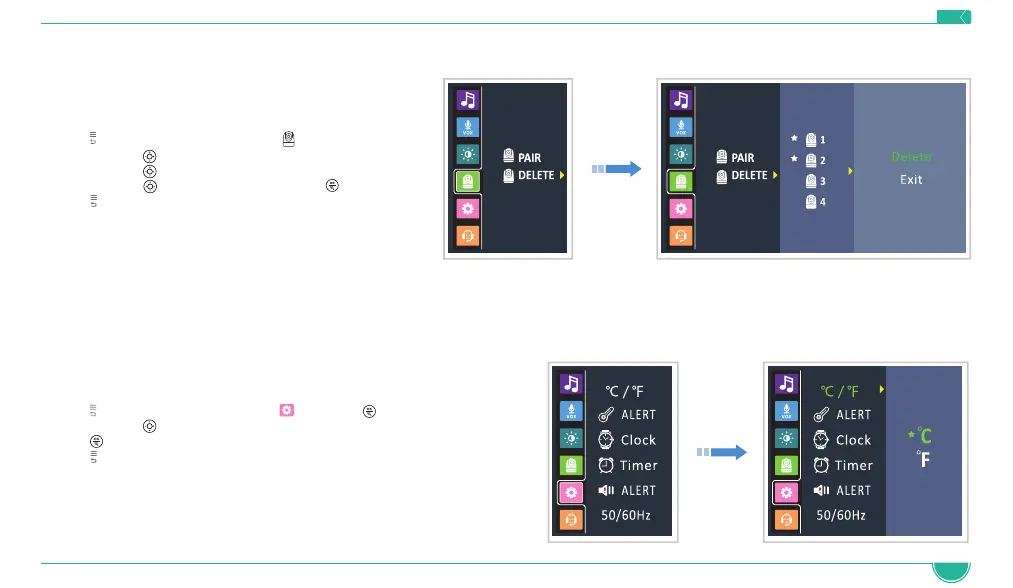
4.6 Deleting the Baby Unit (Camera)
1. Press to access the menu, choose
2. Navigate with
to select DELETE option
3. Navigate with
to select the camera you want to delete
4. Navigate with
to select DELETE and press
5. Press
to exit the menu
4.7 Temperature Scale Setting
The temperature reading from the temperature sensor (26) at the back of the Baby Unit will be displayed on the top of the screen. To switch
between °F (Fahrenheit) and °C (Celsius) follow the below instructions:
1. Press
to access the menu, choose and press
2. Navigate with
to select the desired scale
3. Press
button to confirm
4. Press
to exit the menu
Press OK Key
to confirm


 To Next Page