Need help?
Do you have a question about the BabySense Max View and is the answer not in the manual?
Covers critical safety hazards including strangulation, choking, suffocation, power cord dangers, and product handling.
Essential safety guidelines for using the AC power adapter, focusing on heat, cord integrity, and proper handling.
Detailed instructions for the Li-ion battery, covering repair, handling, disposal, and precautions against damage.
Guidelines for environmentally responsible disposal of the product and its packaging materials.
Lists all items included in the product package for both the Parent and Baby units.
Identifies and describes the various buttons, ports, and components of the Parent Unit.
Identifies and describes the various components, sensors, and features of the Baby Unit.
Step-by-step instructions on how to connect the power adapter and turn on the Baby Unit.
Step-by-step instructions on how to connect the power adapter and turn on the Parent Unit.
Details on how to charge the Parent Unit's battery and its charging status indicators.
Guidance on initial setup, including placement and cord management for optimal performance and safety.
Explains the various icons used in the monitor's menu interface for accessing different functions.
How to use the lullaby and white noise features to soothe the baby, with duration and volume controls.
Configuration of the Voice Activated Transmission (VOX) mode for sound-activated monitoring and standby.
Steps to adjust the screen brightness level of the Parent Unit.
Instructions for pairing additional or new Baby Units with the Parent Unit.
Procedure to remove a paired Baby Unit from the Parent Unit's system.
How to switch the temperature display between Celsius (°C) and Fahrenheit (°F).
Configuration of alerts for high or low temperature conditions in the baby's room.
How to set the current time and choose between 12-hour and 24-hour time formats.
How to set a timer for specific functions or alerts within the monitor system.
Adjusting the volume for low battery, temperature alerts, and out-of-range notifications.
Adjusting the frequency setting to reduce potential screen flicker in varying lighting conditions.
How to increase or decrease the audio output volume on the Parent Unit.
How to activate and control the night light feature on the Baby Unit, including color and brightness.
How to use the zoom functionality (x2, x4) to magnify the camera feed on the Parent Unit.
Method to manually switch between different paired cameras on the Parent Unit display.
How to enable automatic scanning and switching between paired Baby Units on the screen.
How to view multiple camera feeds simultaneously side-by-side on the Parent Unit screen.
Instructions for using the two-way audio feature to communicate with the baby or partner.
How to turn the Parent Unit's LCD screen on or off, enabling an audio-only monitoring mode.
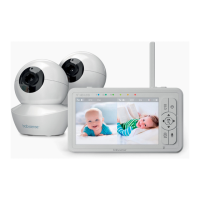
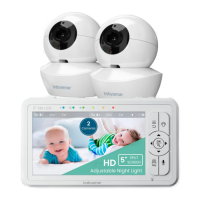
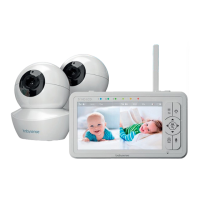
The Babysense Max View is a wireless digital video baby monitor designed to help parents watch, listen to, and talk to their baby. It features a 5.5-inch split screen and provides Full HD 1080P video, ensuring clear visuals of the baby's room. The monitor is available in models with either one or two cameras, catering to different monitoring needs.
The primary function of the Babysense Max View is to provide continuous audio and video surveillance of a baby. The system consists of a Parent Unit (monitor) and one or more Baby Units (cameras). The Parent Unit displays the video feed from the Baby Unit(s), allowing parents to see their baby. It also transmits audio, enabling parents to hear their baby's sounds. A key feature is the "Talk to Baby" function, which allows parents to speak to their baby or a partner in the baby's room through the Baby Unit's speaker.
The monitor includes a VOX (Voice Operated eXchange) mode, which puts the Parent Unit into standby if no sound is detected for 30 seconds. When the Baby Unit registers a sound above a set sensitivity level, the system automatically reactivates, transmitting audio and video. This feature helps conserve battery and reduces constant screen activity. The VOX sensitivity can be adjusted to Low, Medium, or High, or turned off for continuous transmission.
An integrated night light in the Baby Unit provides a comforting glow in the baby's room. Parents can remotely activate and control this light from the Parent Unit, choosing from three light levels and six colors. There's also a "Rainbow mode" where colors automatically cycle through all six options at a selected intensity and speed.
The monitor also features a lullaby and white noise setting. Parents can play five pre-programmed lullabies or white noise from the Baby Unit to soothe their baby to sleep. The duration and volume of the music can be adjusted from the Parent Unit.
Temperature monitoring is another important function. The Baby Unit has a temperature sensor that displays the room temperature on the Parent Unit screen. The temperature scale can be switched between Fahrenheit and Celsius. The monitor also includes an automatic temperature alert system that notifies parents if the baby's room temperature is too high (90°F/31°C and higher) or too low (55°F/15°C and lower). The alert levels can be customized.
For multi-camera setups, the monitor offers several viewing options. Users can switch between paired cameras by briefly pressing the CAMERA SWITCH button. A SCAN mode allows for automatic switching between paired Baby Units, displaying each camera's feed for 15-20 seconds in a loop. Additionally, a Split Screen setting enables viewing images from two Baby Units side-by-side on the Parent Unit.
The monitor also includes a zoom function, offering x2 and x4 zoom levels for a closer look at the baby. This feature is not available when Split Screen mode is active.
The Babysense Max View is designed for indoor use only. It is crucial to keep the Baby Unit, Parent Unit, and all power cables out of reach of children (at least 6 feet away) to prevent strangulation hazards. The Baby Unit should be placed on a flat surface at least 6 feet away from the crib or wall-mounted, never inside the crib, bed, or playpen.
The Parent Unit is powered by a built-in rechargeable Li-ion battery (3.8V 5000mAh) and can also be operated while plugged into an AC power adapter. It is recommended to fully charge the Parent Unit for approximately 8 hours before first use or after long storage. The Baby Unit requires continuous power from its AC adapter.
The Parent Unit features a user-friendly interface with a menu system accessed via a dedicated MENU/EXIT button. Navigation keys allow users to scroll through options, and an OK/ZOOM button confirms selections and controls the zoom function. Volume Up/Down buttons adjust the sound coming from the Parent Unit.
The monitor's range is measured in open space, and environmental obstacles like concrete walls can shorten the actual range. To minimize interference, the monitor should be kept at least 5 feet away from other electronic equipment such as microwave ovens or Wi-Fi routers.
To ensure the longevity and proper functioning of the Babysense Max View, specific maintenance procedures should be followed. All maintenance should be performed when both the Baby and Parent Units are unplugged and turned off.
Surfaces of both units should be cleaned with a soft, fluff-free cloth. Harsh cleaning agents or solvents should never be used. If the units become dirty, a lightly damp cloth can be used to wipe surfaces, taking care to prevent water from entering any openings.
Regularly check the power cords for intactness and ensure they are not damaged, cut, or bent, as this can lead to overheating, damage, combustion, or electrocution. The power adapters should only be the ones supplied by the manufacturer. When removing the power adapter from the wall outlet, always hold and pull from the receptacle, not the cable itself, to avoid stressing and damaging the cable.
The battery is non-removable and pre-installed. Do not attempt to dismantle, cut, open, crush, bend, puncture, or shred the battery cells. If the battery leaks, avoid contact with the liquid and seek medical assistance immediately. The battery should not be exposed to direct sunlight or heat sources. Only use the battery pack supplied with the product. If the battery is believed to be damaged, remove the product from the charger and stop using it.
In case of troubleshooting issues, such as no reception, interference, or a frozen image, specific actions are recommended. These include ensuring proper power connections, adjusting antenna position, moving units closer, checking for other 2.4GHz devices causing interference, and resetting the Baby or Parent Unit. If the camera lens appears dirty, follow the maintenance procedure to clean it.
For any product-related questions or if troubleshooting steps do not resolve an issue, customers are advised to contact customer service via email or phone. The product should be disposed of responsibly at the end of its life, in accordance with local waste disposal requirements. All packaging materials are recyclable.
 General
| Camera | Yes |
|---|---|
| Two-way Talk | Yes |
| Temperature Monitoring | Yes |
| Wireless Technology | 2.4GHz FHSS |
| Range | Up to 900ft (open space) |
| Lullabies | Yes |
| Zoom | Digital Zoom |
| Mounting Options | Tabletop |

 To Next Page