EasyManua.ls Logo

BabySense V24US - User Manual

BabySense V24US
12 pages
Print Icon
To Next Page IconTo Next Page
Loading...
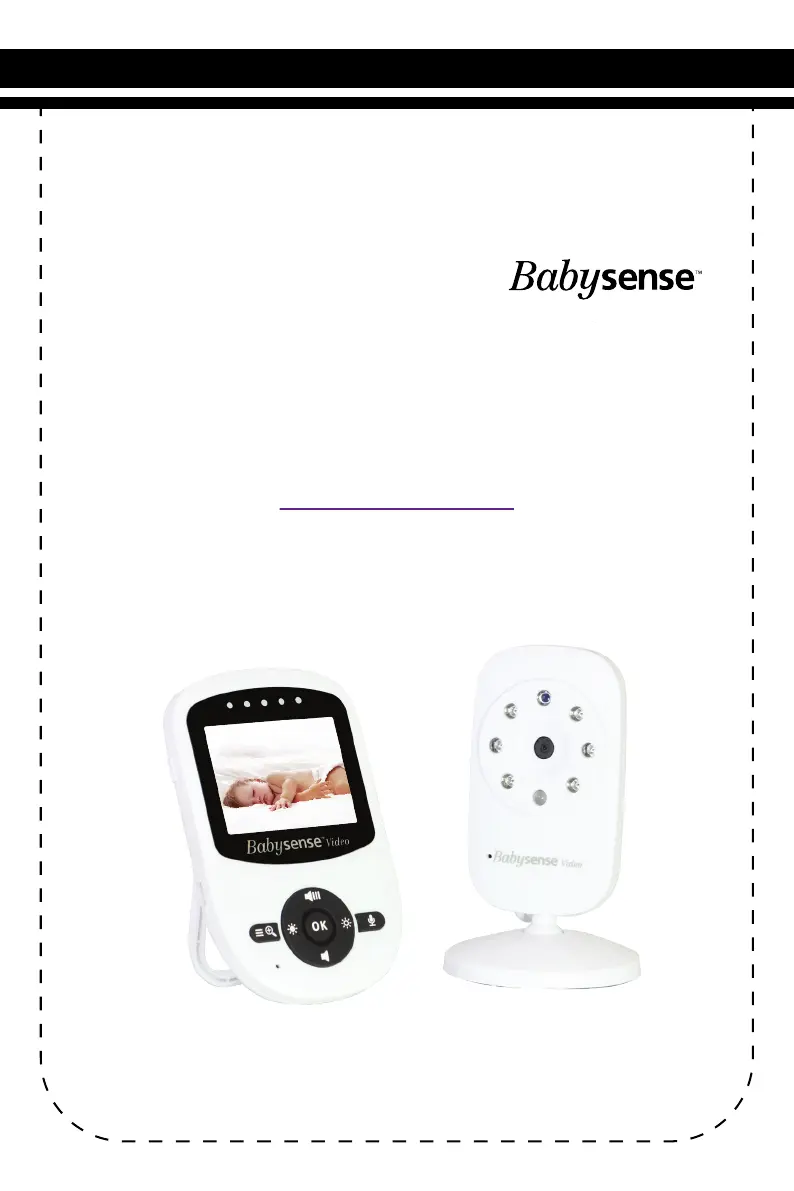
USER GUIDE
Model: V24US
Video Baby Monitor
By
www.babysensellc.com
Toll Free Number -
(833) 568-2229
Email - service@hisense.co.il

Questions and Answers

  • C
    Carla ChavezAug 4, 2025
    Why can't I hear baby sounds on my BabySense V24US Baby Monitor?
    • M
      Mason JohnsonAug 4, 2025
      If you cannot hear your baby's sounds on the Parent Unit of your BabySense Baby Monitor, the volume setting on the Parent Unit may be too low, so increase the volume. Also, check if the battery power is low and recharge the battery if needed.
  • S
    Samuel LeeAug 8, 2025
    How to fix background noises on BabySense V24US?
    • M
      Michael HensleyAug 8, 2025
      To address background noises on your BabySense Baby Monitor: * If you are in a silent environment surrounding the Parent Unit, decrease the volume on your parent unit to level 3 and below. * If you are in a loud environment surrounding the Parent Unit, increase the volume on your parent unit to the maximum level.
  • V
    vhernandezAug 13, 2025
    What to do if my BabySense V24US is having charging issues?
    • C
      Charles WebsterAug 13, 2025
      If you're experiencing charging issues with your BabySense Baby Monitor, try switching the power adapters between the camera and parent units.
  • D
    Dana JacksonAug 18, 2025
    What to do if there is no reception on my BabySense V24US?
    • K
      Kristen ZavalaAug 18, 2025
      If you're experiencing reception issues with your BabySense Baby Monitor, there are several potential causes and solutions: * Ensure both the Baby and Parent Units are powered ON. * Keep the baby monitor at least 5ft (1.5m) away from other 2.4GHz products like Wi-Fi routers, Bluetooth systems, or microwave ovens, or turn them off to prevent interference. * Restart the Baby Unit by unplugging the power adapter from the wall outlet, waiting about 5 seconds, and then plugging it back in. * Press the reset key at the back of the Parent Unit. * Ensure that the power adapters are properly connected. * Move the Baby unit closer to Parent unit.
  • L
    Leonard SolisAug 23, 2025
    Why is the picture on my BabySense V24US Baby Monitor black and white?
    • K
      Karen HernandezAug 25, 2025
      The picture on your BabySense Baby Monitor might be black and white because the automatic night vision mode is activated. To resolve this, turn on the room lights to take the monitor out of night vision mode.
  • N
    nmooreAug 28, 2025
    How to fix lines across the screen on BabySense V24US?
    • T
      toddmannAug 28, 2025
      To resolve lines across the screen on your BabySense Baby Monitor: * Press the reset key at the back of the Parent Unit. * Confirm that power adapters are properly connected.

Summary

Warnings and Safety Instructions

General Safety Precautions

Covers strangulation, suffocation, handling, indoor use, water, adult supervision, power source, ventilation, small parts, and heat.

Battery Charging and Installation

Recommends battery charging and discusses optimal installation location.

Service, Cleaning, and Usage Warnings

Includes service, cleaning, and non-medical device usage warnings.

Pack Contents

Included Components

Lists Parent Unit, Baby Unit, AC Adapters, Battery, Manual, and Mounting Set.

Product Overview

Parent Unit Overview

Identifies features and controls of the Parent Unit.

Baby Unit Overview

Identifies features and components of the Baby Unit.

Getting Started

Initial Setup and Power On

Covers powering on Baby/Parent Units and initial charging.

Placement and Setup Guidelines

Discusses optimal Baby Unit placement and cord safety.

Operating The Monitor

Pairing and Camera Switching

Explains pairing Baby Units, switching cameras, and scan mode.

Signal and Environmental Factors

Discusses radio link, interference, and placement impact.

Key Operating Modes and Features

Covers ECO mode, Audio Only, Talk To Baby, and Digital Zoom/Pan/Tilt.

Device Management

Instructions for deleting paired Baby Units.

Volume, Brightness, and Temperature Settings

Adjusts audio volume, screen brightness, and temperature display.

Lullaby and Alarm Configuration

Manage lullabies and set timed alarms.

Infrared Night Vision

Enables clear night vision in low light conditions.

Maintenance

Cleaning and Care Procedures

Procedures for cleaning and maintaining the units.

Customer Support

Contact and Resource Information

Contact information and resources for product assistance.

Warranty Terms

Product Warranty Details

Details about the product's one-year warranty against defects.

Troubleshooting

Reception and Image Troubleshooting

Addresses no reception, interference, frozen images, and lines on screen.

Sound and Power Issues

Solutions for noise, no sound, background noise, and charging problems.

Technical Data

Product Specifications

Specifications of the video baby monitor.

Safety Instructions for AC Power Adapter

AC Adapter Usage Precautions

Precautions for using the AC power adapter safely.

Safety Instructions for Li-ion battery

Li-ion Battery Handling Guidelines

Precautions and safety guidelines for the Li-ion battery.

Information on Disposal of Battery and Product

Disposal Guidance

Guidance on environmentally responsible disposal of batteries and product.

FCC STATEMENTS:

FCC Compliance Information

Compliance statement for FCC rules regarding radio frequency energy.

IC STATEMENTS:

IC Compliance Information

Compliance statement for Industry Canada standards.

BabySense V24US Specifications

General IconGeneral
BrandBabySense
ModelV24US
CategoryBaby Monitor
LanguageEnglish

Related product manuals