17
ENG
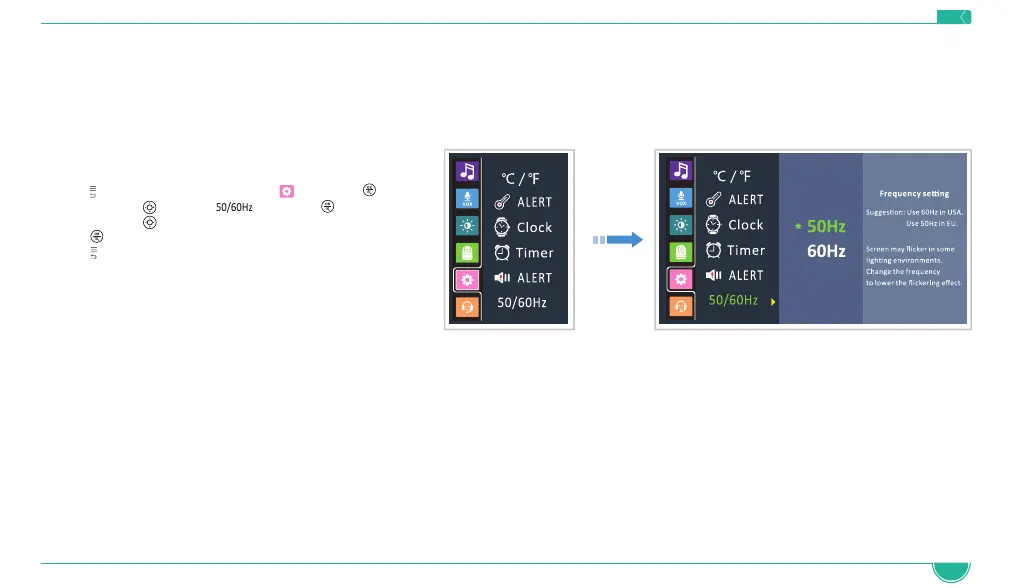
4.12 Frequency Setting
This function allows you to choose desired frequency format 50Hz (for US) or 60Hz (for EU).
The screen may flicker in some lighting environments and changing the Frequency Setting helps lower the flickering effect.
1. Press
to access the menu, choose and press
2. Navigate with to select and press
3. Navigate with
to select the desired frequency
4. Press
button to confirm
5. Press
to exit the menu
4.13 Volume Adjustments
• Press the VOLUME UP/DOWN buttons (5) to increase/decrease the sound coming out of the parent unit.
NOTE: In normal use, it is recommended to set the volume at level 3 and below. Higher volume levels are intended for loud/noisy environments.
NOTE: If the volume on the Parent Unit is set too high and the Baby and Parent Units are close to each other, a high-pitched noise may be heard
(also known as feedback or static noise).


 To Next Page