The BAFANG DP C01.CAN display is a user-friendly interface designed for electric bicycles, providing essential information and control over the e-bike system. Its primary function is to serve as a central hub for monitoring riding data, adjusting assistance levels, and managing various system settings, enhancing the overall riding experience.
Function Description
The display offers a comprehensive overview of the e-bike's operational status and riding metrics. Key functions include:
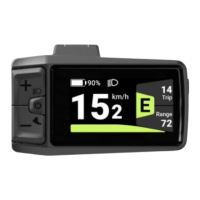
- Speed Display: Real-time indication of current speed, with the option to switch between kilometers per hour (Km/h) and miles per hour (Mile/h). This allows riders to choose their preferred unit of measurement for speed.
- Battery Capacity Indication: A visual representation of the battery's remaining charge, displayed in real-time as a percentage from 100% down to 0%. This feature helps riders manage their journey length and plan for recharging. The display also provides detailed battery information, including current temperature, voltage, discharge rate, remaining capacity, total capacity, default loader status, instant charge, charging cycles, maximum time without charge, and individual cell voltages.
- Support Level Selection: Riders can easily adjust the motor's assistance level, typically ranging from 0 (no assistance) to 5 (maximum assistance), though the number of available levels can be set. This allows for dynamic adaptation to different terrains and riding preferences.
- Lighting System Control: The display enables activation and deactivation of the e-bike's front and taillights, enhancing safety during low-light conditions. The brightness of the display's backlight can also be adjusted.
- Kilometer Stand (Odometer and Trip Distance): Tracks both the total distance traveled by the e-bike (ODO) and the distance covered during a single trip (TRIP). The trip distance can be reset for each new journey.
- Time Display: Shows the duration of single journeys, allowing riders to monitor their ride time.
- Walk Assistance Model: A dedicated feature that provides low-speed motor assistance (approximately 5 km/h) when the rider is walking alongside the pedelec. This is particularly useful for maneuvering the bike in crowded areas or up inclines when not riding.
- Indication of Performance Support: Visually informs the rider about the current level of motor assistance being provided.
- Error Message Indication: Displays specific error codes if a fault is detected within the e-bike system, helping riders or technicians diagnose and troubleshoot issues. The display can show up to ten recent error codes, from "E0" to "E9," with "--" indicating no error.
Usage Features
The DP C01.CAN display is designed for intuitive interaction through a set of physical buttons:
- Mode/System On/Off Button: Used to switch the e-bike system on or off by pressing and holding for more than 2 seconds. A brief press (less than 0.5 seconds) allows viewing of trip (TRIP) or total (ODO) kilometers.
- Up (+) Button: Primarily used to increase values or navigate upwards in menus. When the display is on, a brief press (less than 0.5 seconds) switches to a higher support level. Holding it for more than 2 seconds activates the front and taillights. In settings, it increases values like brightness or time.
- Down (-) Button: Primarily used to decrease values or navigate downwards in menus. When the display is on, a brief press (less than 0.5 seconds) switches to a lower support level. In settings, it decreases values.
Navigating Settings:
To access and modify settings, the user typically presses and holds both the Up (+) and Down (-) buttons simultaneously for 2 seconds to enter the setting interface. Within the settings, brief presses of the Up (+) or Down (-) buttons are used to select different options or adjust values. To save changes and exit to the main interface, both Up (+) and Down (-) buttons are pressed simultaneously. Alternatively, a brief press of the Mode/System On/Off button can save changes and move to the next setting item.
- Selection of Unit (km/Miles): Allows the rider to choose between Km/h and Mile/h for speed display.
- Set Display Brightness: Adjusts the backlight intensity of the display (typically from 1 to 8 levels).
- Set Clock: Configures the time displayed on the unit.
- Set Auto Off: Sets a time duration (0-60 minutes) after which the display will automatically turn off if there is no operation, conserving battery. Setting it to 0 minutes disables this function.
- Set Support Level: Configures the number of available assistance levels (e.g., 3, 5, or 9 levels).
- View Information: This section allows viewing of various system parameters without the ability to change them. This includes:
- Wheel Size: Displays the configured wheel size.
- Speed Limit: Shows the set maximum speed for assistance.
- Display Information: Provides hardware and software versions of the display.
- Controller Information: Displays hardware and software versions of the controller.
- Torque Information: Shows hardware and software versions related to the torque sensor.
- Message of Error Code: Allows viewing of past error codes.
Maintenance Features
The BAFANG DP C01.CAN display is designed with durability and ease of maintenance in mind:
- Waterproof Design: The product is designed to be waterproof, although submerging it under water is strongly discouraged to prevent potential damage.
- Cleaning Instructions: For cleaning, it is recommended to avoid using thinners, other solvents, steam jets, high-pressure cleaners, or water hoses, as these can damage the display's surfaces. Gentle cleaning with appropriate methods is advised.
- Error Code Diagnosis: The integrated error code system is a crucial maintenance feature. When an error is detected, the display shows a specific code (e.g., E04 for throttle not in correct position, E05 for throttle fault, E07 for overvoltage protection, E08 for hall sensor signal error, E09 for engine phase error, E10 for engine over-temperature, E11 for motor temperature sensor error, E12 for current sensor error, E13 for battery temperature sensor error, E14 for controller over-temperature, E15 for controller temperature sensor error, E21 for speed sensor error, E25 for torque signal error, E26 for torque sensor speed signal error, E27 for overcurrent from controller, E30 for communication problem, E33 for brake signal error, E35 for 15V detection circuit error, E36 for keypad detection circuit error, E37 for WDT circuit fault, E41 for total battery voltage too high, E42 for total battery voltage too low, E43 for total battery power too high, E44 for single cell voltage too high, E45 for battery temperature too high, E46 for battery temperature too low, E47 for SOC of battery too high, E48 for SOC of battery too low, E61 for switching detection defect, E62 for electronic derailleur cannot release, E71 for electronic lock jammed, E81 for Bluetooth module error). These codes guide users or technicians in identifying the root cause of a problem, facilitating efficient troubleshooting and repair. In many cases, restarting the system or checking connections can resolve minor issues. For persistent problems, contacting a retailer is recommended.
- Software Updates: The presence of a QR code label on the display cable, containing information from the label, is important for potential future software updates, ensuring the display can be kept current with new features or improvements.
- Warranty Considerations: The warranty does not cover wear and tear, normal use, and aging, which is a standard consideration for electronic devices.

 Need help?
 General











 To Next Page