3
2
1
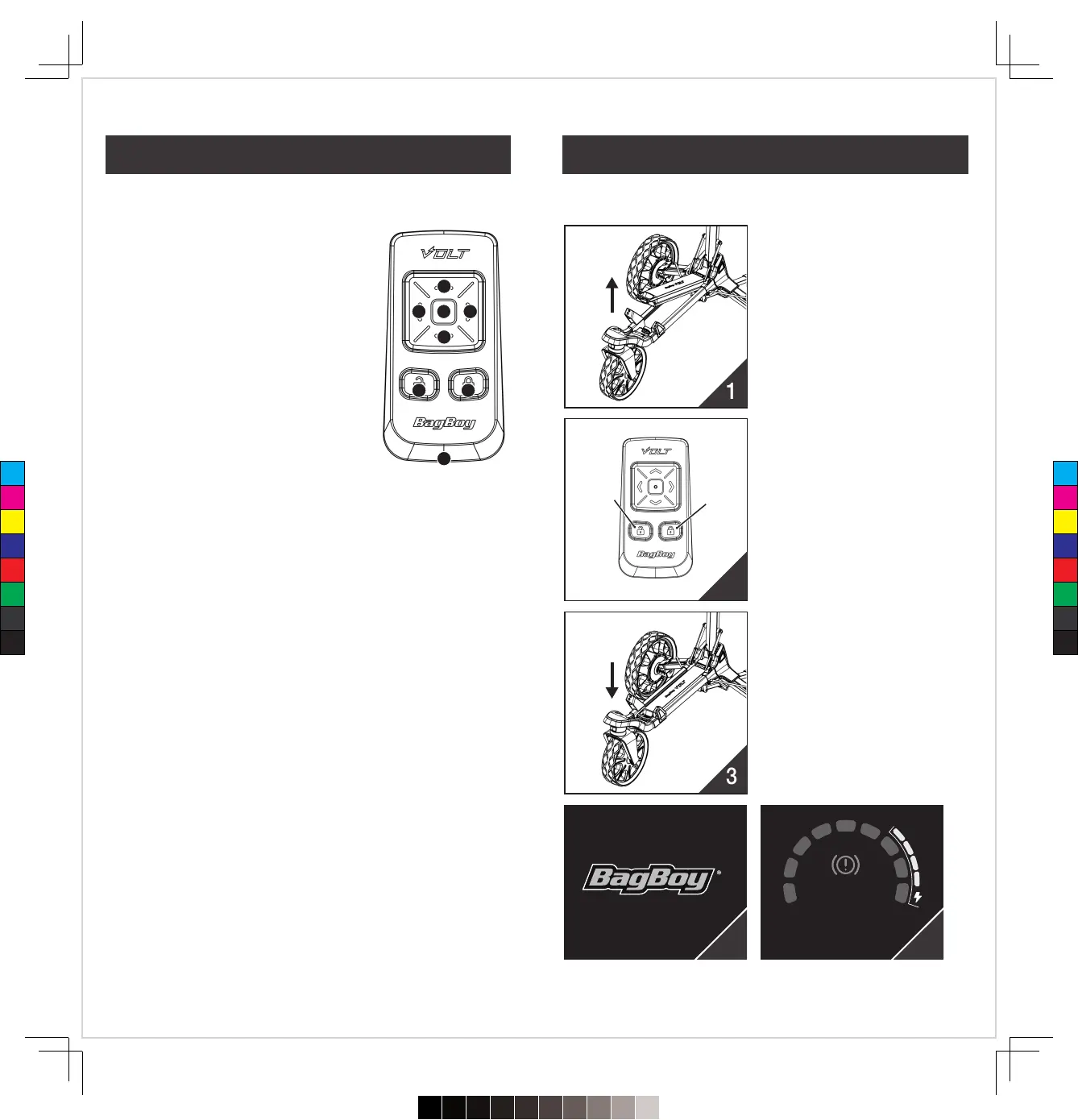
Operating Remote
❶ Forward Button
� The starting speed is level 2. Each tap
increases 1 speed level, maximum is level 9.
� Press and hold the Forward Button to speed
up the motor quickly. (accelerate to level 9 in
3 seconds)
❷ Down Button
� When the brakes is activated, press and hold
Down Button to move the cart in reverse.
� While moving forward, every time you tap
the Down Button, the speed will be reduced
by 1level, and the minimum speed is level 1
❸&❹ Left / Right Button
� Tap the Left / Right Button, then the cart will turn slightly and continue to
move forward. ( no matter if the cart is moving or not )
� Press and hold the Left / Right Button, then the cart will keep turning left /
right until release the button.
❺ Stop Button
� You can stop the cart by tapping the button in every case.
� When the motor protection is activated, press the Stop Button to release
from this, or you may press the Dial on the cart console.
*
Read the description of the motor protection on ‘’Warming Info’’ page (p.16).
❻ Unlock Button
� If the remote control keys are locked, press the Unlock Button to unlock
the keypads.
� Press any button when the keypad unlocked, the blue LED will light up.
❼ Lock Button
� Press the Lock Button to limit and prevent unexpected control.
� Press any button when the keypad locked, the red LED will light up.
❽ Charging Port
� USB-C port
� The keypad will be locked while charging
*
The cart will automatically stop after walking 100 yards – unless it receives a
new command from the remote.
1.Turned off the power of the
cart. You can remove the
battery from the cart or turn off
the power of the battery.
2.Press and hold the Lock &
Unlock buttons on the remote
at the same time until the blue
and red LED blink alternately.
Then the remote will enter into
the pairing mode and continue
sending the pairing signal for
60 seconds.
3.Turn on the power of the cart.
4.The cart will search for the
pairing signal from the remote
for 5 seconds automatically
after switched on. When the
screen displays ‘’ Found a New
Remote ‘’ as Pic.4, It means
the pairing is complete.
5.Then the screen will automati-
cally enter into the main page
as Pic. 5
*
The keypad of the Remote will be
locked during the pairing mode
except for the Unlock Button.
*
The remote control will automatically
exit the pairing mode after 60
seconds, or press and hold the
Unlock Button for
3 seconds.
1
2
3
6
7
8
4
5
Found a New Remote
Trip 1.
Mile54321 .
0
BRAKE
4
Lock
Button
Unlock
Button
5
20
19
Remote Control Pairing Your Remote
C
M
Y
CM
MY
CY
CMY
K
720≤£´~§‚•U≠◊ßÔ.pdf112023/7/20下午1:19


 To Next Page