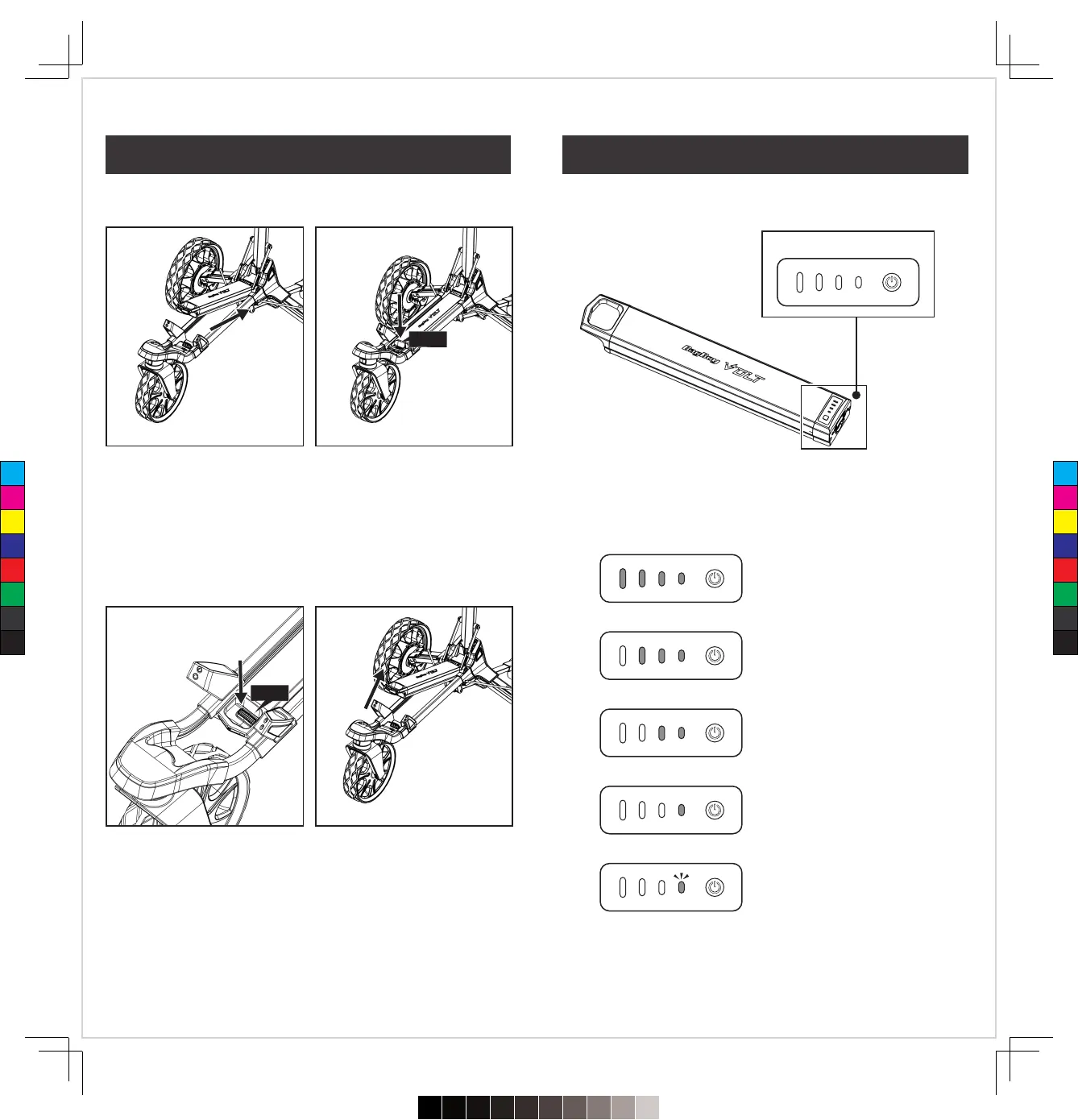
Press and hold the power key for 3 seconds to turn the battery
ON/OFF. To check the power level, just tap the power key.
Notice : If you keep holding the power key for over 10 seconds,
the battery will turn off.
�
Hold the battery-handle and connect the bottom of the battery to
the position on the cart.
�
Press down on the battery-handle until it “Clicks” into place.
�
To remove the battery from the cart, just press down on the grey
release button near the handle of the battery on the cart until
hearing click.
Click
Click
Power key
100%-75% Power Level
75%-50% Power Level
50%-25% Power Level
25%-10% Power Level
With flashing green LED light.
Under 10% Power Level
10
09
Battery Connection Battery Indicator
C
M
Y
CM
MY
CY
CMY
K
720≤£´~§‚•U≠◊ßÔ.pdf62023/7/20下午1:19


 To Next Page