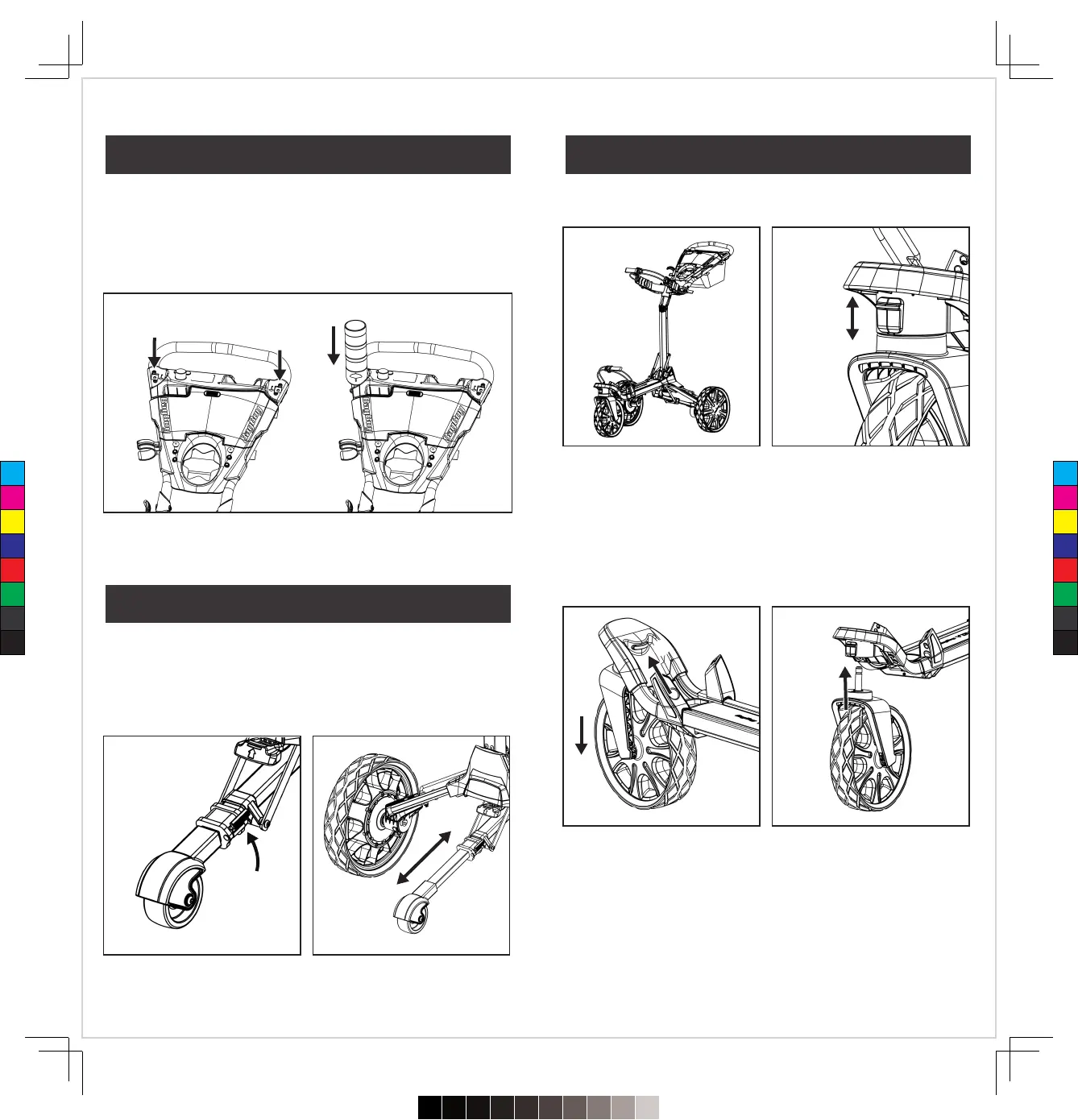
The umbrella holder can be installed on either side of the handlebar
in the area marked with the umbrella symbol.
Swivel Lock Out
�
There is a slider “Swivel Lock” located at the front of the
Wheel Housing.
�
This feature will lock when pushing on a side-hill terrain to provide
better control of the golf cart without the front swivel
�
To lock the front wheel, slide Swivel-Lock down and turn the front
wheel forward until the lock clicks into place.
The Fourth Wheel is designed to prevent the cart from turning over
on steep inclines. To adjust the length of the wheel, just flip the grey
quick-release buckle on the right side, then pull the tube to position
and close the quick-release buckle.
Remove the Front Wheel
To remove the front wheel, press the grey release button
🅐
located on the inside of the front-wheel housing.
Install the Front Wheel
Insert the wheel pin into the front-wheel base until it “Clicks”
into place.
Unlock
Lock
🅐
08
07
Assembling Umbrella Holder Front Wheel
Retractable Anti-Tip Fourth Wheel
C
M
Y
CM
MY
CY
CMY
K
720≤£´~§‚•U≠◊ßÔ.pdf52023/7/20下午1:19


 To Next Page