Trip 1.
MPH0.0
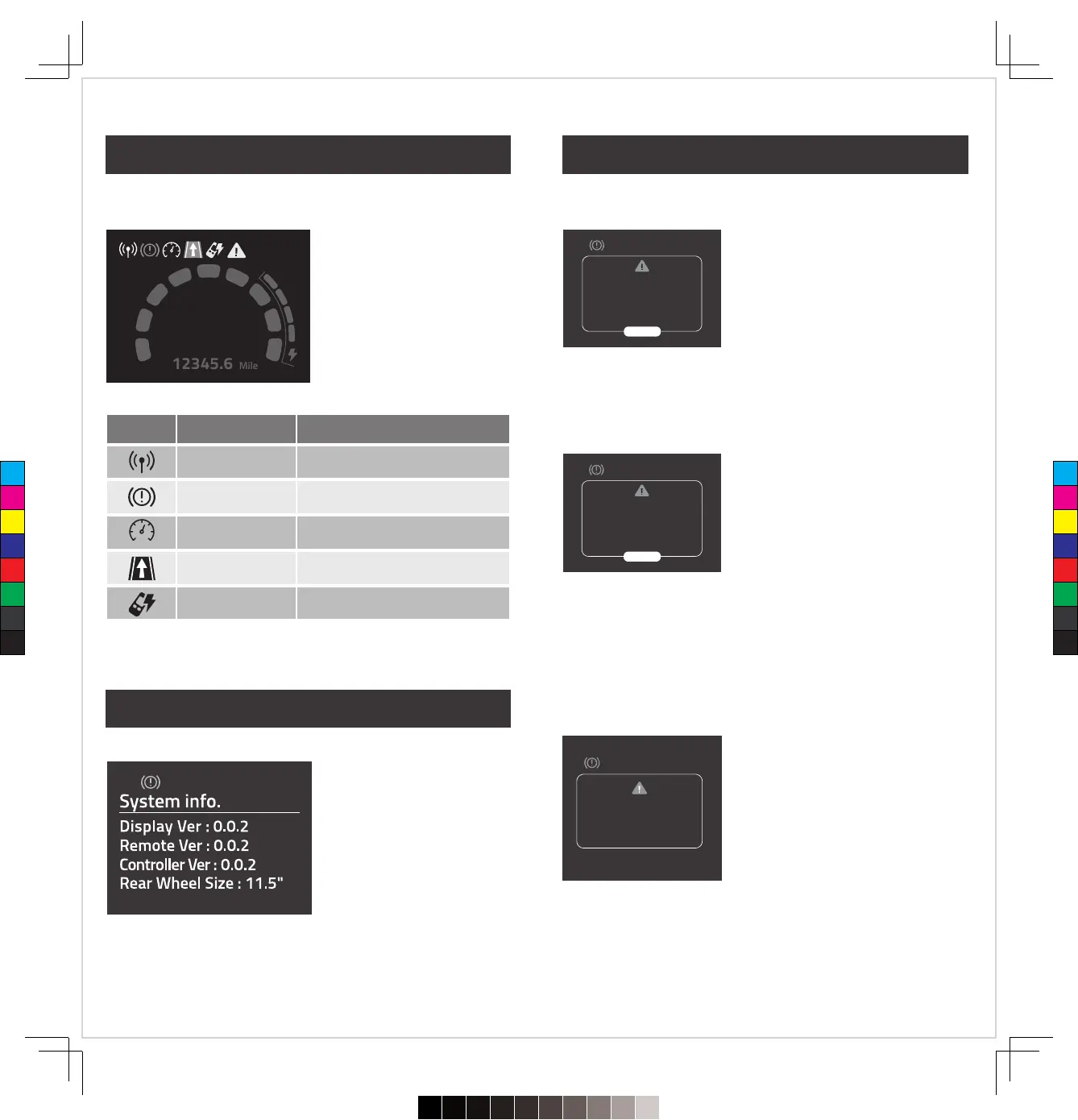
Icon Bar:
The icons of the cart status are
displayed at the top of the
screen. You can find the
description in the table below.
Motor Protection
� When the system detects the motor
overload condition, it will display this
notification and activate the Brakes.
� Press the Dial to close the notification,
and move the cart to a flat surface to
continue using it.
� If this prompt still shows up, please
remove the battery from the cart and
contact customer service for support.
Angle Detection
� When the Gyroscopic Straight Line
Tracker is activated, and the system is
detecting that the Volt forward direction
has changed to over 90 degrees, it will
detect that the cart has potentially
crashed, the brake will be activated at
once to protect the motor system.
� Pressing the button to release it, you
could continue to use the cart.
� If this prompt continues to display,
please remove the battery from the cart
and contact customer service for
support.
Signal abnormality warning
� When this notification displays, the
brakes will be activated.
� Please restart the power of the battery,
then you can continue using it.
� If this prompt still shows up, please
remove the battery from the cart and
contact customer service for support.
The cart receives the signal from the
Remote.
The ‘’Gyroscopic Straight Line
Tracker’’ is turned on.
Brakes have been activated.
Remote needs to charge.
Moving by Distance Control function.
Straight line walking
Distance control
Stop
Signal
Remote Low Power
icon
Meaning of the icon
� Press and hold the Right Button
while powering on the cart, and
the cart will enter into the
System information page.
� The cart will ignore remote
control commands when in the
Information page.
Error Code : E01
Please Restart the cart.
Overload Volt forward
direction change, the brakes
have been activated.
Please press the knob to
restart the motor.
RESTART
The motor protection
system has been activated,
please press the knob to
restart the motor.
RESTART
16
15
Display – Icon Bar
Display – System Info.
Display – Warning Info.
C
M
Y
CM
MY
CY
CMY
K
720≤£´~§‚•U≠◊ßÔ.pdf92023/7/20下午1:19


 To Next Page