Disclaimer
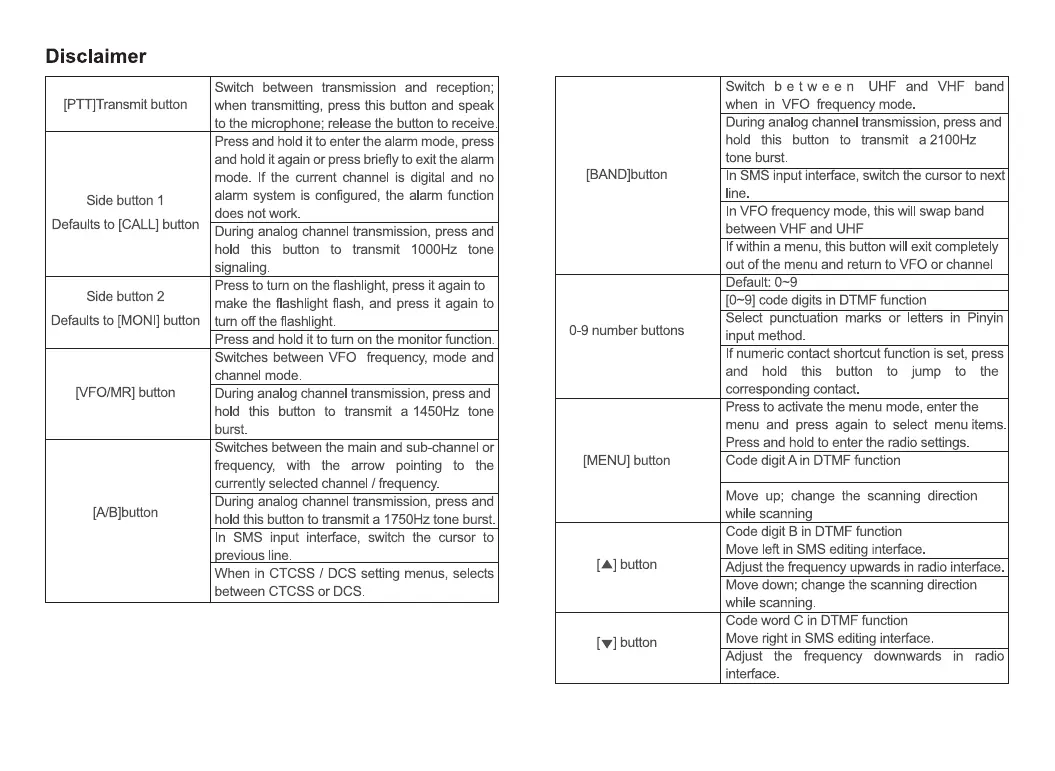
[PTT]Transmit button
Side button 1
Defaults to [CALL] button
Side button 2
Defaults to [MON'] button
[VFO/MR] button
[A/B]button
Switch between transmission and reception;
when transmitting, press this button and speak
to the micro hone; release the button to receive.
Press and hold it to enter the alarm mode, press
and hold it again or press briefly to exit the alarm
mode. If the current channel is digital and no
alarm system is configured, the alarm function
does not work.
During analog channel transmission, press and
hold this button to transmit 1000Hz tone
signalin
Press to turn on the flashlight, press it again to
make the flashlight flash, and press it again to
tum off the flashlight.
Press and hold it to turn on the monitor function.
Switches between VFO frequency, mode and
channel mode.
During analog channel transmission, press and
hold this button to transmit a 1450Hz tone
burst.
Switches between the main and sub-channel or
frequency, with the arrow pointing to the
currently selected channel / frequency.
During analog channel transmission, press and
hold this button to transmit a 1750Hz tone burst
In SMS input interface, switch the cursor to
revious line.
When in CTCSS / DCS setting menus, selects
between CTCSS or DCS.
[BAND]button
0-9 number buttons
[MENU] button
[A] button
[V] button
Switch b e tween UHF and VHF band
when in VFO frequency mode.
During analog channel transmission, press and
hold this button to transmit a 2100Hz
tone burst.
In
Input Inte ace, swit t e cursor to next
line.
In VFO frequency mode, this will swap band
between VHF and UHF
If within a menu, this button will exit completely
out of the menu and return to VFO or channel
Default: 0-9
[0-9] code digits in DTMF function
Select punctuation marks or letters in Pinyin
input method.
If numeric contact shortcut function is set, press
and hold this button to jump to the
corresponding contact.
Press to activate the menu mode, enter the
menu and press again to select menu items.
Press and hold to enter the radio settings.
Code digit A in DTMF function
Move up; change the scanning direction
while scanning
Code digit B in DTMF function
Move left in SMS editing interface
Adjust the frequency upwards in radio interface.
Move down; change the scanning direction
while scanning.
Code word C in DTMF function
Move right in SMS editing interface.
Adjust the frequency downwards
interface.
in radio


 To Next Page