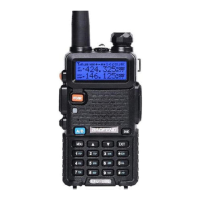
① antenna 11.accessory jack
② flashlight 12.A/B key(frequency display switches)
3. knob (ON/OFF,volume) 13.BAND key(band switches)
4.LCD 14.keypad
5.SK-side key1/CALL(radio,alarm) 15.SP.&MIC.
6.SK-side key2/MONI(flashlight,monitor) 16.battery pack
7. PTT key(push-to-talk) 17.battery contacts
8.VFO/MR (frequency mode/channel mode) 18.battery remove button
9.LED indicator
10.strap buckle
8.2.- COMMAND/KEY DEFINITION:
-【PTT】(PUSH-TO-TALK):
Press and hold down the 【PTT】 button to transmit; release it to receive.
- SK-SIDE KEY1/【CALL】:
-Press the 【CALL】button,to activate the FM Radio;Press it again to deactivate the FM Radio.
-Press and hold on the 【CALL】button,to activate the alarm function; Press and hold it again,to
deactivate the alarm function.
- SK-SIDE KEY2/【MONI】:
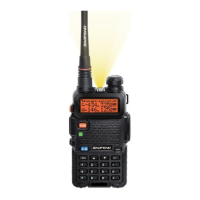
-Press the 【MONI】button,to turn on the flashlight;Press it again to turn off.Press and hold on the
【MONI】 button,to monitor the signal.
-【VFO/MR】BUTTON:
-Press the 【VFO/MR】button,to switch the frequency mode and channel mode.
-【A/B】BUTTON:
-Press the 【A/B】button,to switch frequency display.
-【BAND】BUTTON:
-Press the 【BAND】button,to switch band dispaly.
-While FM radio being activated,press the 【BAND】button to switch the band of FM radio(band
65-75MHz/76-108MHz).
-【*SCAN】KEY:
-Press the 【*SCAN】key to activate the Reverse function,it will exchange a separate reception and
transmission frequency.
-Press the 【*SCAN】key for 2 seconds to start scanning(frequency/channel).
- While FM radio being activated,press the 【*SCAN】key to search FM radio station.


 To Next Page