-While setting the RX CTCSS/DCS, press the key 【*SCAN】to scan the RX CTCSS/DCS.
- KEY:
-Under channel mode, press key to switch High/Low transmit power.
-Press key for 2 seconds to lock/unlock the keypad.
-FUNCTION KEYPAD:
-【MENU】key:
-To enter the menu of the radio and confirm the setting.
-【▲】【▼】key:
-Press and hold 【▲】or 【▼】key for frequency up or down fast.
-Press 【▲】or 【▼】key,the scanning will be opposite.
-【EXIT】key:
-To cancel /clear or exit.
-NUMERIC KEYPAD:
-Used to enter information for programming the radio’s lists and the non-standard CTCSS
-Under transmission mode, press the numeric key to send the signal code
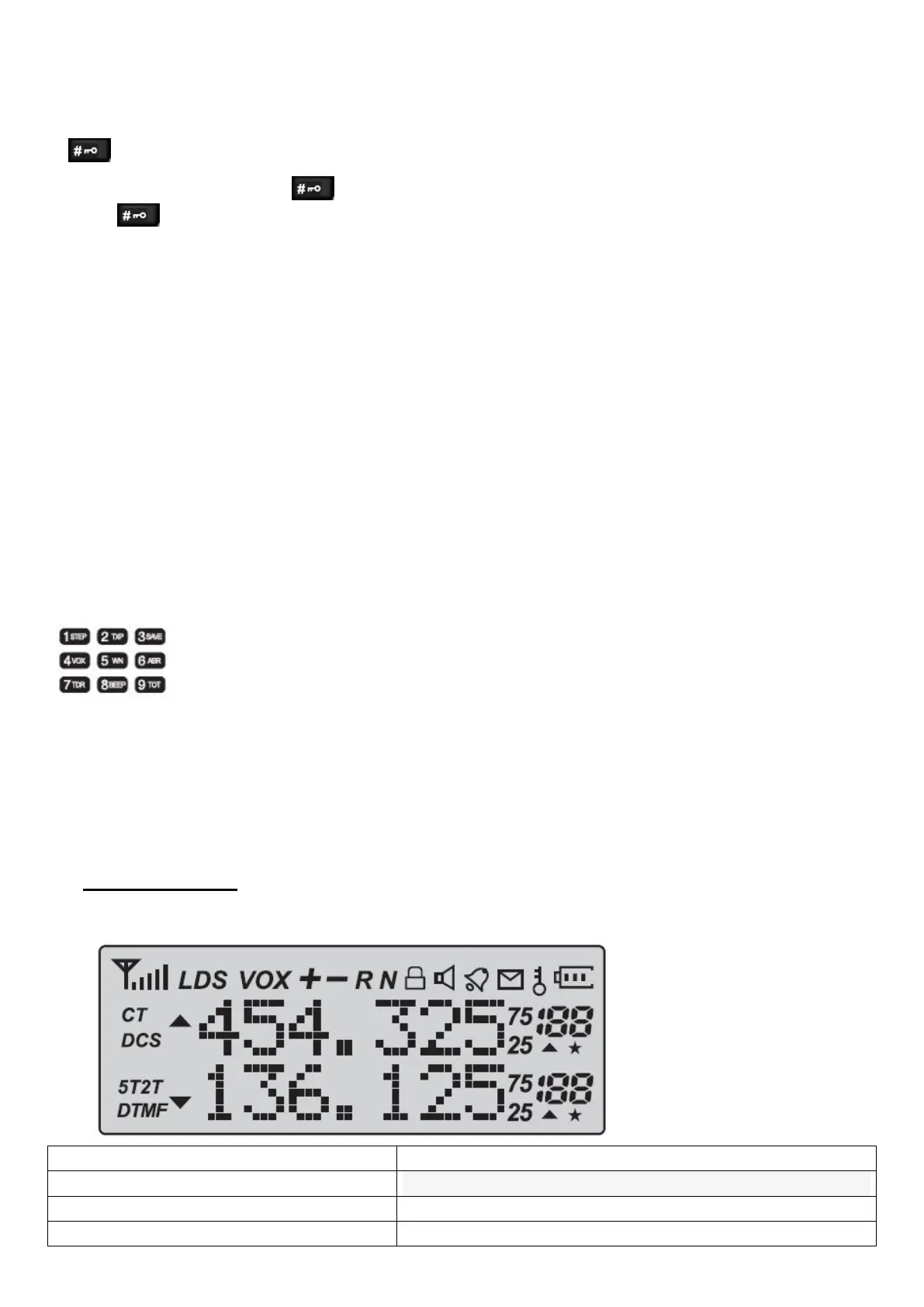
9.-‘LCD’ DISPLAY:
The display icons appear when certain operations or specific features are activated.
Icon Description
188 Operating channel.
75/25
CT ‘CTCSS’ activated.


 To Next Page