EasyManua.ls Logo

Baofeng UV3R - Page 7

Baofeng UV3R
14 pages
Print Icon
To Next Page IconTo Next Page
To Previous Page IconTo Previous Page
Loading...
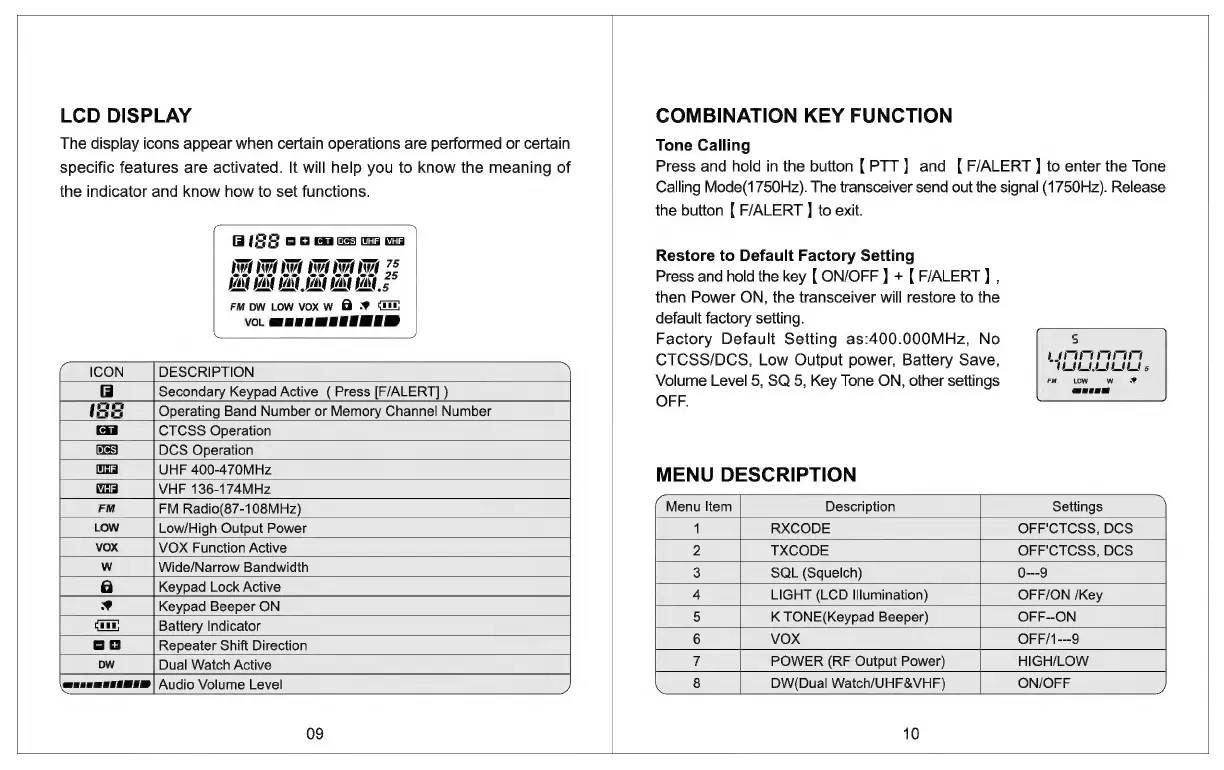
LCD
DISPLAY
The
display
icons
appear
when
certain
operations
are
performed
or
certain
specific
features
are
activated.
It
will
help
you
to
know
the
meaning
of
the
indicator
and
know
how
to
set
functions.
BIS
os
[UHF}
DOO
gO
OO
ee
JAN Sat
Jat
JA
Jan JAN
Z
FM DW
LOW
vox
w
@
@
fe
Vol
ooo
ICON
DESCRIPTION
Secondary
Keypad
Active
(
Press
[F/ALERT]
)
Operating
Band
Number
or
Memory
Channel
Number
CTCSS
Operation
UHF
400-470MHz
Pata]
os
hs
DCS
Operation
[UHF]
FM
VHI
VHF
136-174MHz
FM
Radio(87-108MHz)
LOW
Low/High
Output
Power
vox
VOX
Function
Active
Wide/Narrow
Bandwidth
a
Keypad
Lock
Active
Md
Keypad
Beeper
ON
mi
Battery
Indicator
-]
Repeater
Shift
Direction
Dw
Dual
Watch
Active
queeemeee@e@)
Audio
Volume
Level
09
COMBINATION
KEY
FUNCTION
Tone
Calling
Press
and
hold
in
the
button
[PTT]
and
[
F/ALERT]
to
enter
the
Tone
Calling
Mode(1750Hz).
The
transceiver
send
out
the
signal
(1750Hz).
Release
the
button
{
F/ALERT
]
to
exit.
Restore
to
Default
Factory
Setting
Press
and
hold
the
key
[
ON/OFF
]
+
[
F/ALERT]
,
then
Power
ON,
the
transceiver
will
restore
to
the
default
factory
setting.
Factory
Default
Setting
as:400.000MHz,
No
CTCSS/DCS,
Low
Output
power,
Battery
Save,
Volume
Level
5,
SQ
5,
Key
Tone
ON,
other
settings
OFF.
MENU
DESCRIPTION
Menu
Item
Description
Settings
1
RXCODE
OFF'CTCSS,
DCS
2
TXCODE
OFF'CTCSS,
DCS
3
SQL
(Squelch)
0---9
4
LIGHT
(LCD
Illumination)
OFF/ON
/Key
5
K
TONE(Keypad
Beeper)
OFF--ON
6
VOX
OFF/1---9
7
POWER
(RF
Output
Power)
HIGH/LOW
8
DW(Dual
Watch/UHF&VHF)
ON/OFF
10

Related product manuals