6
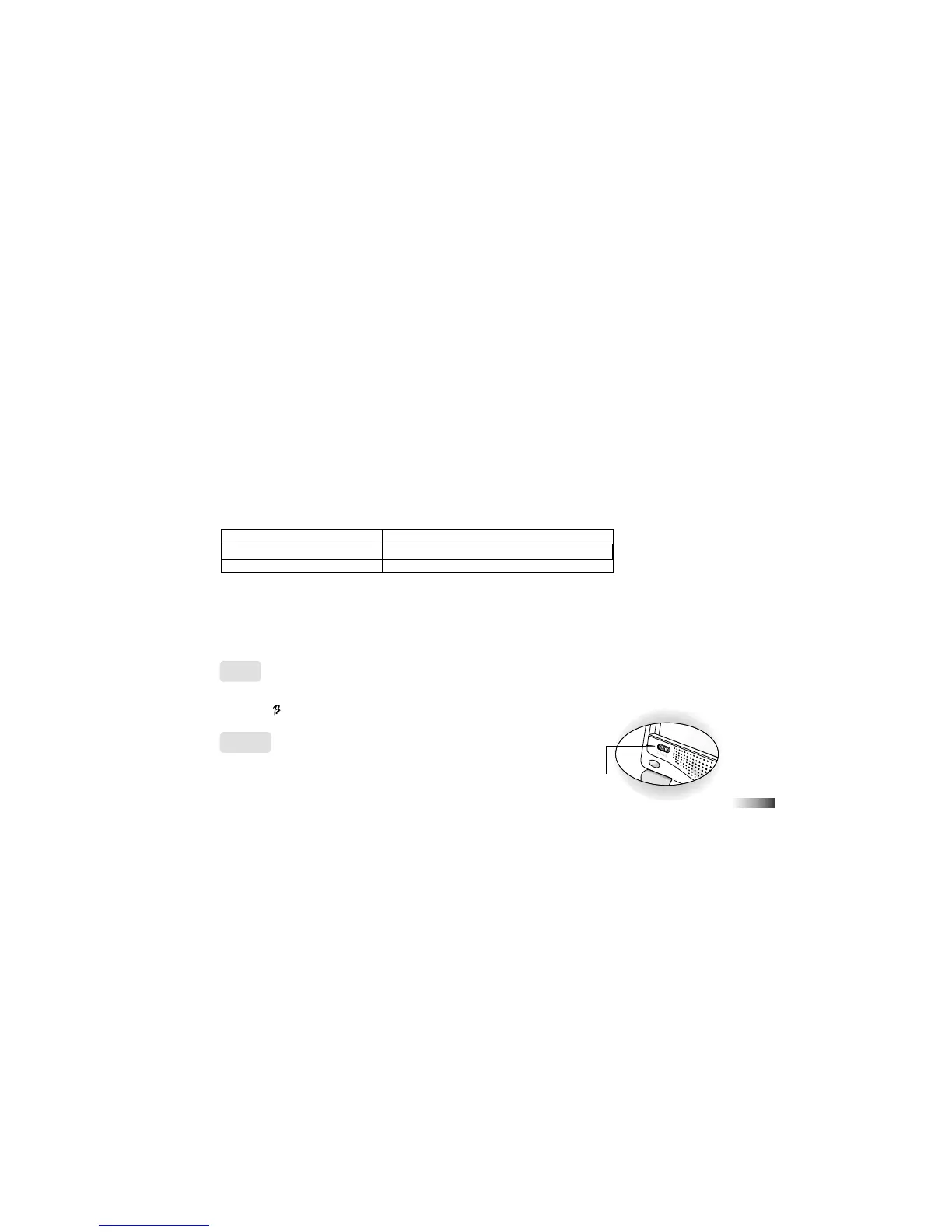
Volume
Switch
The current activity is interrupted and the Barbie
™
Expansion Card animation begins.
After the title screens, a menu screen appears. On this menu screen are two direction icons and a title of one
of the activities included on the Barbie
™
Expansion Card.
2. Use the arrow cursor or directional cursor button to scroll through the titles.
3. Press [Enter] to play the displayed activity.
Expansion questions for the following activities are included on each Barbie
™
Expansion Card.
Name of Barbie
™
Expansion Card Activities
Grammar Card Capitalization, Punctuation, Phonetic Recognition
Spelling Card Spelling Rules, Word Formation, Word Recognition
Vocabulary Card Grammar Rules, Plurals, Antonyms
While the Barbie
™
Expansion Card is plugged in, only those activities included on the Barbie
™
Expansion Card
are available. To play other games in the learning PC, unplug the Barbie
™
Expansion Card. Press [Game Code]
to go to the Game Code screen, and enter a game code from the Game Menu.
N.B.: If you purchase an older Barbie
™
Expansion Card the activities written on the card will not match the actu-
al expanded activities. The above list is the correct version.
Demo
When the [Demo] button is pressed, you will be shown a demonstration of some of the exciting features and activi-
ties in your
-Book
™
Laptop.
Volume
You may adjust the volume to a lower setting.
The volume switch is located at the lower left corner of the screen.



 To Next Page