1717
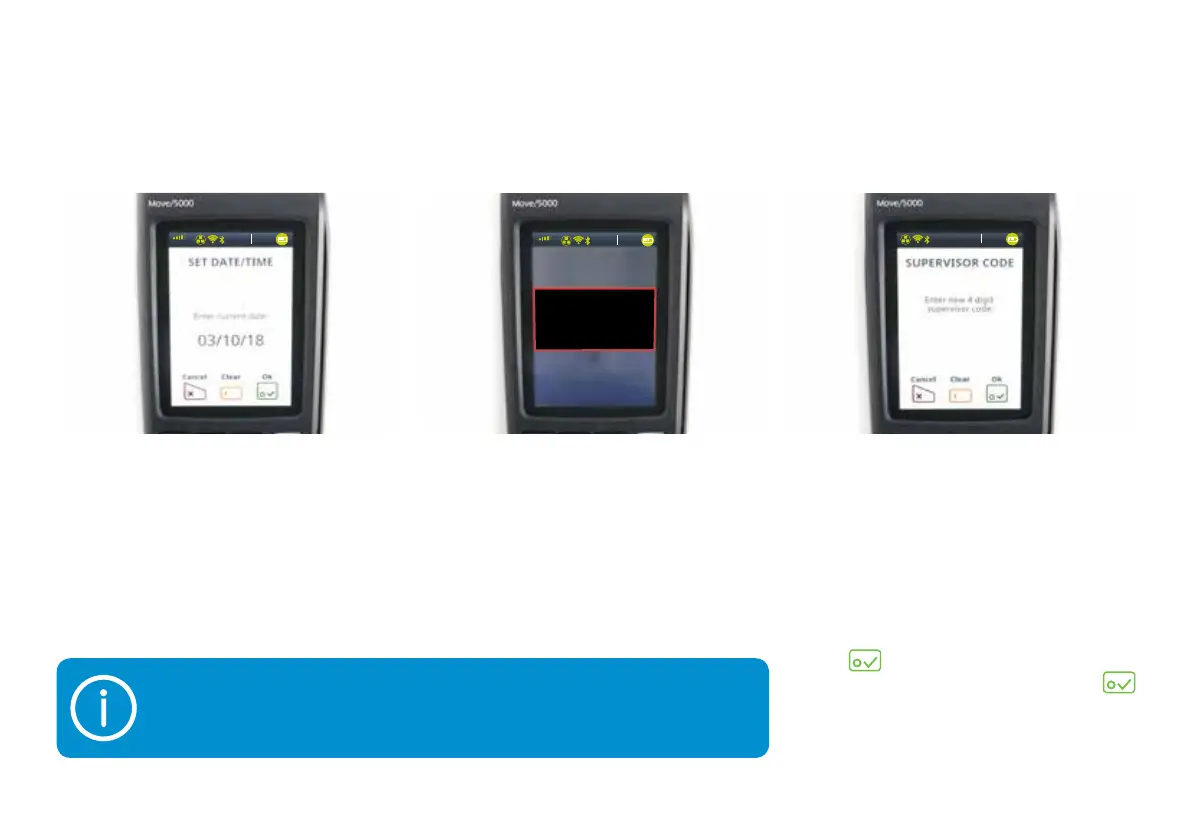
18) Your terminal will ask you to set
up your four-digit supervisor code.
This is the four-digit code needed
to authorise certain actions on
your terminal, such as refunds.
This should be set by whoever’s
in charge.
When you have entered the code,
tap
. You’ll be asked to confirm,
so type in the code again and tap
.
16) You’ll then need to enter the
current date and time using
the terminal keypad.
17) Now you’ll see this screen. Don’t
do anything – your terminal is just
setting itself up and rebooting.
The screen will then go black.
Your supervisor code can’t be any four sequential digits, e.g. 1234, 4567,
etc, or four digits that are the same, e.g. 1111, 3333, etc.
3G
vodafone UK
13:3 7
03/10/2018
13:3 7
03/10/2018
3G
vodafone UK
13:3 7
03/10/2018
Reboot
In progress


 To Next Page