3.3 SD Card
A memory card (SD card) is required to operate the camera.
When the camera is "ON" and no memory card is used, the screen displays
"No card". The SD slot of the camera has a 32 GB memory capacity. Before
inserting or removing the memory card, the camera must be turned "OFF".
Failing to do so may cause loss of or damage to the pictures/videos already
recorded on the memory card. When the SD card is full, the viewing screen
shows "Memory Full". You can select SD Cycle “ON” to overwrite the oldest
photos. SD Cycle “ON” will keep your camera operating when the SD card is
full.
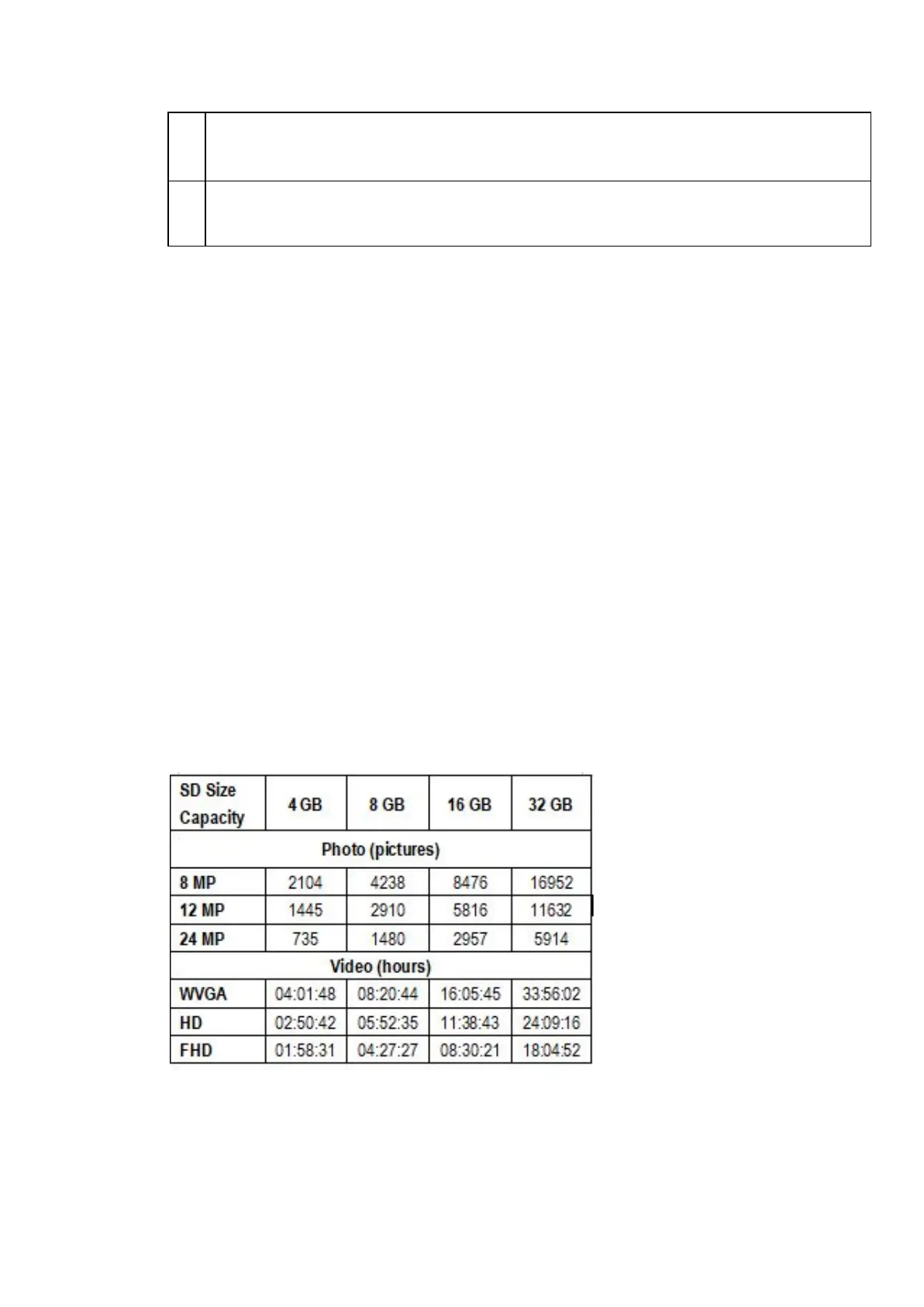
Chart below will show you the approximate capacity of different size SD
cards.
3.4 USB Connection
When the camera is connected via USB cable, the screen will display “MSDC”.
Press “Menu” once, “MSDC” turns to “PC Cam”, and the camera now can be
Barn Owl Tech, Inc 10


 To Next Page