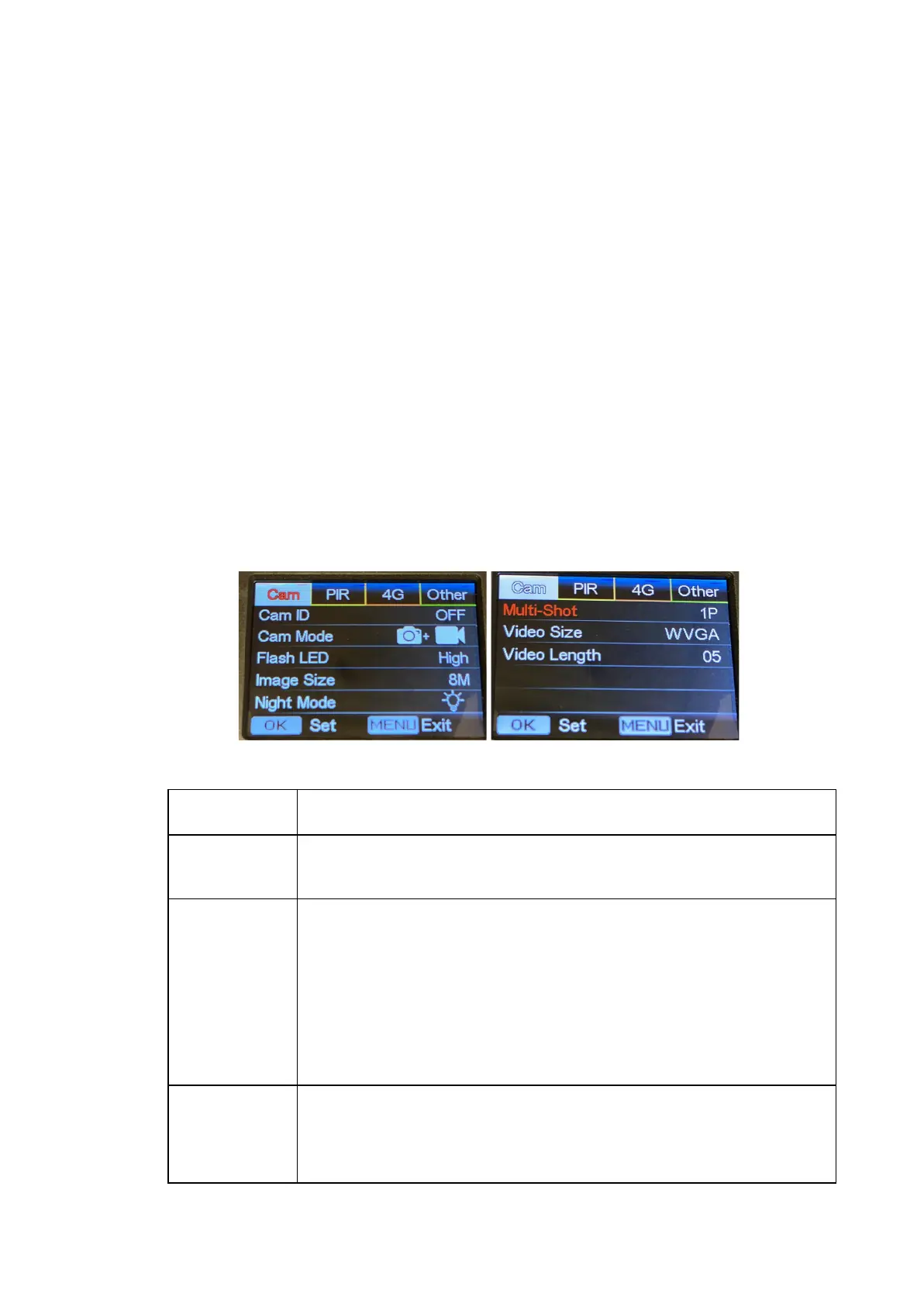
Note: Camera screen will stay on if camera is in Menu configuration pages.
4.5 Operation Menu
Test mode, Press “Menu” once to enter the camera setting menu. Navigate
the settings menu with the “←”, “↑”, “→”, or “↓” buttons, press “OK” to select,
press “Menu” to exit to previous page or switch character sets on the
keyboard screen.
Note: For some settings, you’ll need to press “OK” to save your entry (Cam
ID, Delay, Time Lapse, Timer, Password)
Barn Owl Tech, Inc 13
Select “ON”, press “OK”, to set 12 digits/letters for each camera.
Use this to easily differentiate cameras.
Photo, Video, PIC+VIDEO
1) Photo: camera shoots photos only based on configured
Burst Shot & Image Size;
2) Video: camera shoots videos only based on configured
Video Length/Size;
3) “PIC+VIDEO”, camera shoots photo(s) first, then video upon
the same trigger event based on configured Video
Length/Size and Burst Shot/ Image Size.
All/Part
All: 60 IR LEDs will work in dark environment;
Part: Bottom 30 IR LEDs will be turned off.


 To Next Page