Barn Owl Tech, Inc 17
Default: unlimited;
Optional: 1~99
i.e.: user chooses 50, then camera will only transmit 50 times each day.
Each time. The rest of the photos/videos will only be stored on the SD
card.
1) Daily: (Recommended if using AA batteries only)
Camera will check for new commands (settings updates,
command trigger, etc) once per day, not immediately.
2) Instant: (Recommended if using external power: Solar panel, 12V,
120V, etc)
Camera will receive commands immediately, but drains the battery
more quickly.
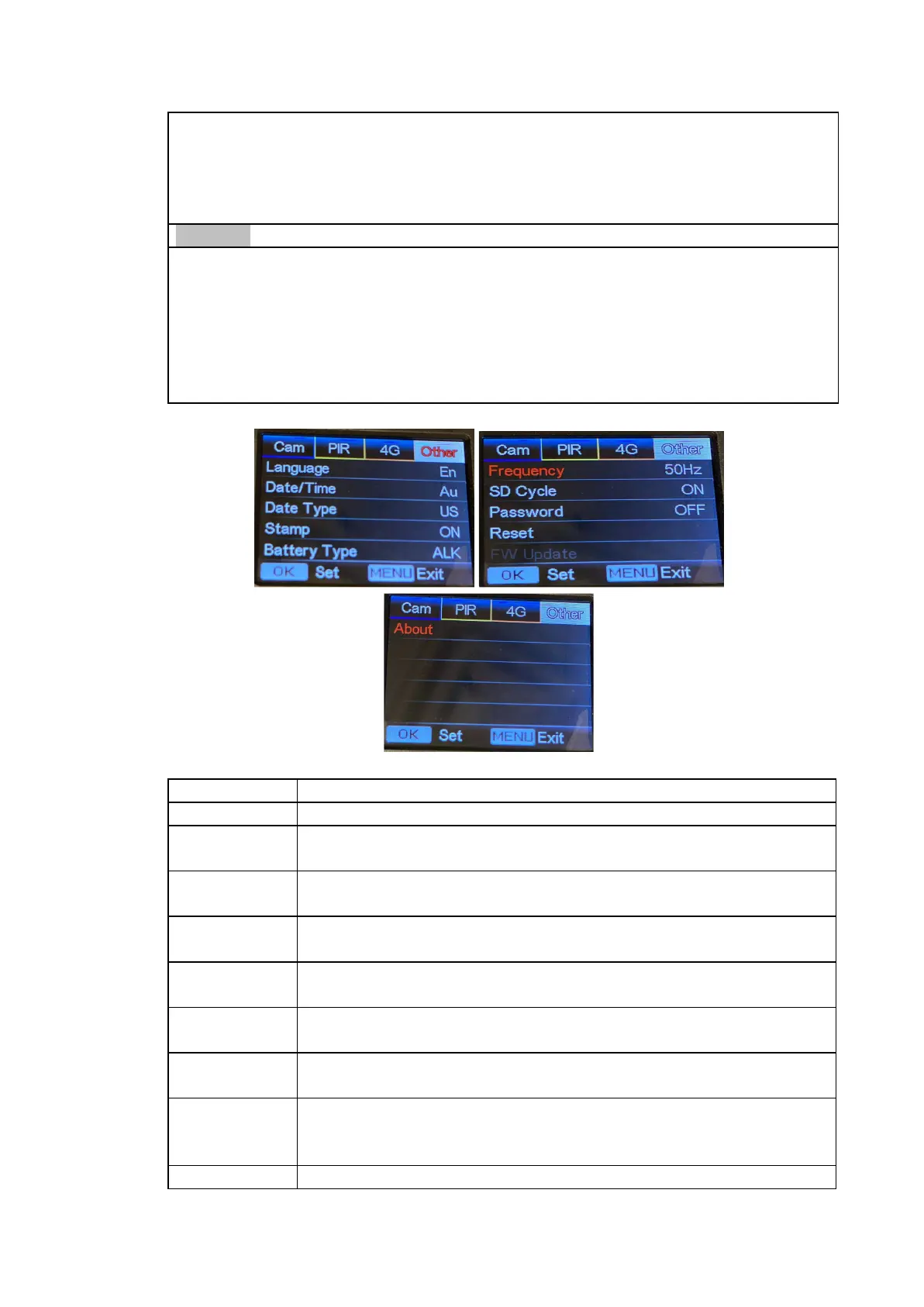
Imprints of programmed camera ID, moon phase,
temperature, date, and time on photo
Alkaline/ NI-MH
Choose the correct type of AA batteries being used.
50HZ, 60HZ; improper setting may cause camera screen
flicker
Select “ON”, press “OK”, camera will continue to record
photos/videos by deleting the oldest files on the SD card.
Select “ON”, press “OK”, to enable password protection for
your camera; supports up to 6 letters/numbers.
Select “Yes” to reset camera back to factory default
settings.
With update firmware on the SD card, you can enter this
menu to update camera firmware by confirming “Yes” in the
options.
Firmware version in camera (Version: / IMEI: / MCU:/MOD:)


 To Next Page