Need help?
Do you have a question about the Barska ax11224 and is the answer not in the manual?
Verify registered fingerprint functionality by extending the bolt and scanning the finger.
Delete all registered fingerprints by inputting a specific code sequence on the keypad.
Verify registered PIN code functionality by extending the bolt and entering the code.
Secure the safe to a wall by anchoring to studs, ensuring proper drill hole placement.
Mount the safe to a floor by using appropriate drill tools and securing to anchors.
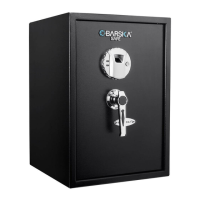
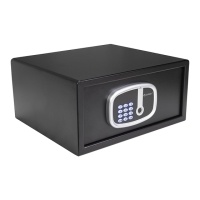
This document describes the BARSKA Digital Keypad Biometric Safe, a security device designed for storing valuables. The safe offers multiple access methods, including fingerprint recognition, a programmable PIN code, and traditional override keys, providing flexibility and redundancy for users.
The primary function of the BARSKA safe is to secure contents through a robust locking mechanism controlled by biometric (fingerprint) and digital (PIN code) access, complemented by physical override keys. The safe is designed to prevent unauthorized access while offering convenient entry for registered users. It can store up to 20 unique fingerprints and one 3-6 digit PIN code. The system includes an LED light for visibility, a battery compartment for power, and a keypad for PIN entry. The fingerprint scanner is the biometric interface, allowing quick and secure access. The safe also features bolts that extend to lock the door and retract to unlock it.
To begin using the safe, users must first remove all accessories and insert four AA batteries, ensuring correct polarity. The battery cover should then be replaced, and a corner guard on the safe door removed. It's crucial not to mix new and old batteries or use rechargeable/non-alkaline batteries.
In case of forgotten PINs or unreadable fingerprints, the override keys provide an alternative access method. To use them, the override key cover must be removed, the keys inserted, and turned counter-clockwise to retract the bolt. It is explicitly stated that the override keys should never be stored inside the safe.
The safe allows registration of up to 20 fingerprints. With the door open and the bolt retracted, the user presses "CLEAR CLEAR" and then "LOCK" on the keypad. The screen will display "PrOG," and the fingerprint scanner will light up. The user then places their finger firmly on the scanner, waits for a beep, and repeats this process three times. The display will show "dONE" followed by the number of registered fingerprints. If "Error" appears, the registration was unsuccessful and should be repeated. The screen will show "Full" once 20 fingerprints are registered.
To test a registered fingerprint, the user closes the safe door and presses "LOCK" to extend the bolt. Then, they press their registered fingerprint on the scanner to wake it up and again to initiate the unlock sequence. If successful, the bolt retracts, and the display shows "OPEN" or "OPENED."
To delete all registered fingerprints, the user inputs "CLEAR CLEAR 763 LOCK" on the keypad while the safe is unlocked. This action will delete all stored fingerprints.
The safe comes with a factory default PIN code of 123456, which can be changed. To register a new PIN (3-6 digits), the user opens the door, retracts the bolt, and inputs "CLEAR CLEAR 68 LOCK" on the keypad. The screen will display "NEU." The user then enters the new 3-6 digit PIN code and presses "LOCK." The bolt will extend, and the screen will show "CLOSED," confirming the new PIN is registered. This process overwrites any previously registered PIN code.
To test a registered PIN code, the user closes the safe door and presses "LOCK" to extend the bolt. They then input the PIN code on the keypad. If correct, the bolt retracts, and the display shows "OPEN" or "OPENED."
The safe's sound can be toggled on or off.
If an incorrect PIN code is entered four times consecutively, the safe will enter a lock-out mode for 15 minutes. During this time, the safe cannot be accessed via PIN or fingerprint, but the override keys can still be used.
When the safe's battery is low, pressing any key on the keypad followed by "LOCK" will display "BA-LO." This indicates that the batteries should be changed as soon as possible.
The safe can be mounted to a wall or floor. Users should be aware of load-bearing considerations and use appropriate tools and eye protection.
To ensure optimal security and performance, the fingerprint scanner should be kept clean. A dry cloth can be used to remove smudges or prints. Registered fingerprints and PIN codes should be tested every six months to ensure functionality.
Liquids should be kept away from the control panel to prevent damage and electric shock. The safe should be secured in an appropriate area to prevent falling, damage, or injury. Users are explicitly warned not to disassemble the product; all repairs should be handled by BARSKA Customer Service. Harsh chemicals or cleaning agents should not be used on the safe.
BARSKA offers a 1-year limited warranty covering original defects in material and/or workmanship under normal use. The warranty does not cover damage from improper installation, maintenance, misuse, abuse, accidents, normal wear and tear, fire, flood, acts of nature, or unauthorized repairs. Labor, shipping charges for removal and replacement of defective parts beyond the initial 12 months, and all transportation/shipping charges are not covered. Removing or altering the seal voids the warranty. The warranty is limited to the original purchaser and is non-transferable, applying only to products purchased in the United States.
For warranty service, users must email info@barska.com or call 1.888.666.6769 to obtain a Return Merchandise Number (RMA#). The RMA# must be visible on the shipping package. Products must be carefully packed in their original packaging and returned freight pre-paid to BARSKA OPTICS Repair Department. The return package must include complete user details (name, address, phone, email, RMA#), purchase receipt or proof of purchase, a brief explanation of the defect, and a check/money order for $40.00 to cover inspection, shipping, and handling. Delivery typically takes 6-8 weeks. BARSKA will repair or replace defective parts or units within the warranty period. If repairs are needed after the warranty expires, the purchaser will be charged for replacement parts and return shipping. BARSKA® Optics is not liable for consequential, incidental, and/or contingent damages, nor will it cover shipping, insurance, transportation charges, import fees, duties, or taxes.
 General
| Type | Freestanding safe |
|---|---|
| Material | Steel |
| Lock type | Fingerprint reader, Key |
| Product color | Black |
| Mounting kit | Yes |
| Power source type | Battery |
 Weight and Dimensions
| Depth | 368 mm |
|---|---|
| Width | 419 mm |
| Height | 196 mm |
| Weight | 11339 g |
| Interior dimensions (W x D x H) | 412 x 304 x 177 mm |

 To Next Page