EasyManua.ls Logo

Bartlett V6-CF - Controller Front Panel; Control Buttons and Sections; Display and Input Area

Bartlett V6-CF
20 pages
Print Icon
To Next Page IconTo Next Page
To Previous Page IconTo Previous Page
Loading...
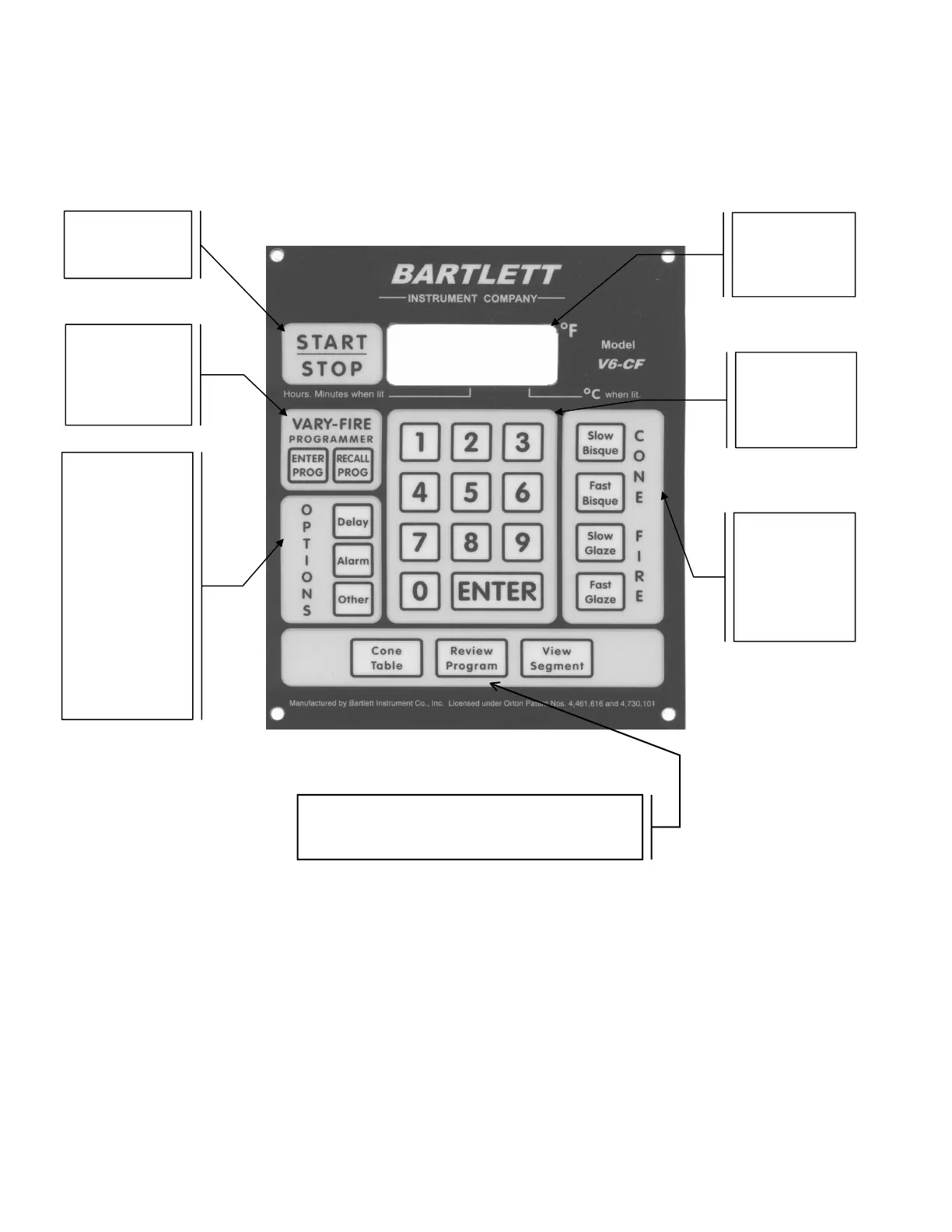
Controller Front Panel
On the following pages the individual sections of the controller front panel will be explained in
more detail.
Start-Stop button
for starting and
stopping firings.
LED DISPLAY -
four digit display
showing times and
temperatures.
VARY-FIRE
Programmer for
setting and saving
your own firing
profiles
OPTIONS section
for setting delay
start and alarm. Set
one of nine “Other”
options: Default
reset, Preheat stage
time, Controller ID,
16 segment
program, Cone
offset, Change °F to
°C, set Error codes
off, set T/C offset,
check board
temperature.
Number keys
section for
entering
temperatures and
times.
CONE FIRE
section for
choosing one of
four preset cone
fire speeds.
VIEW section to look up cone temperatures, review
the selected program, view the current segment, or
skip to the next firing segment.