Upper Threshold Moisture Sensor-Based Watering
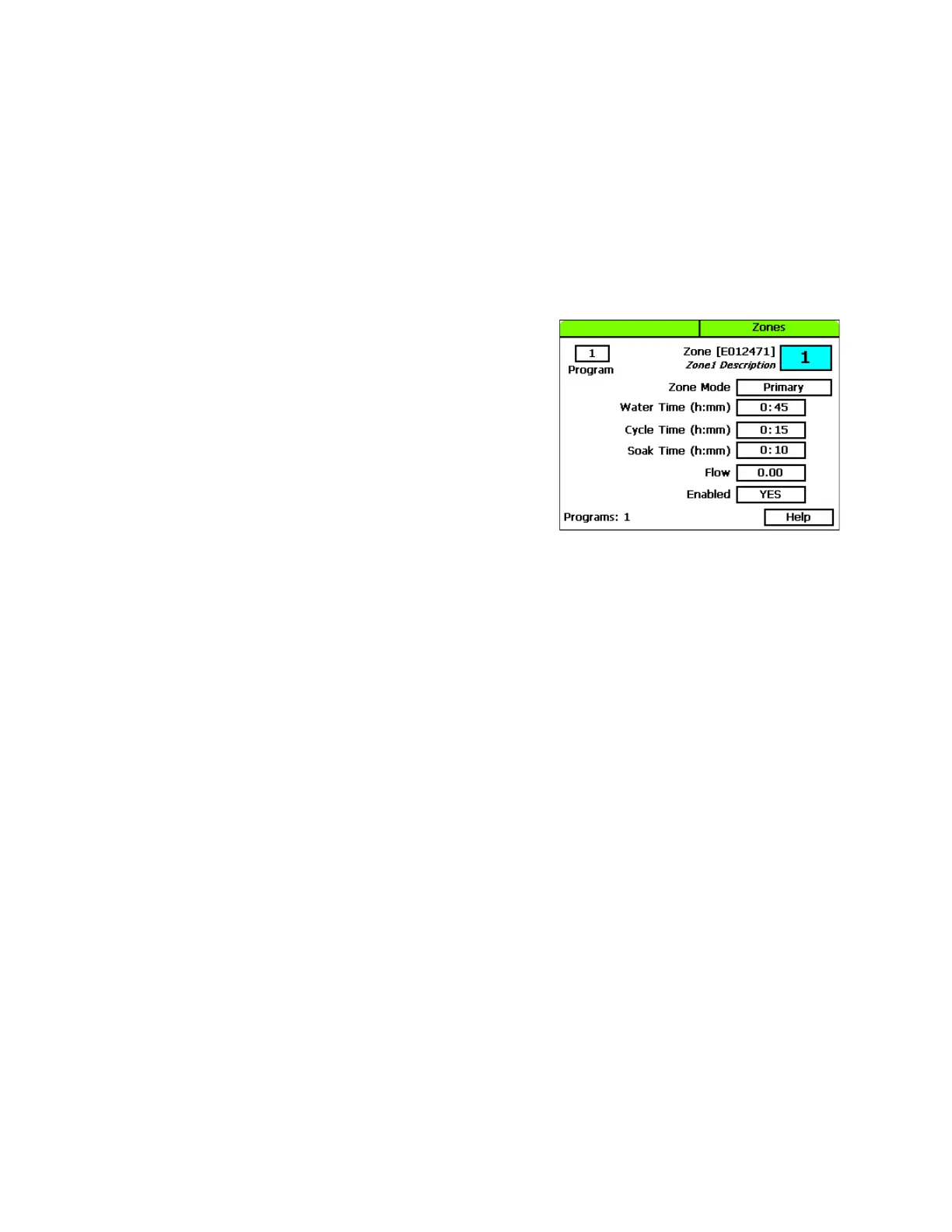
To configure the zone settings
Upper threshold watering starts a watering cycle on each start time for the primary zone and adjusts the
watering time to raise the moisture level back up to the upper limit (field capacity). The controller
increases or decreases the water time, but it never adjusts more than twice your initial water time.
When you set a program to start based on a biSensor reading that is greater than the limit, you need to
set up at least 3 soak cycles with a soak time that is at least twice as long as the cycle time. Soak cycling
breaks the total runtime into shorter water “cycles” with “soak” periods in between to allow time for
water to soak into the soil.
1. Press the Next button to move to the Water Time field.
Set zone water times to apply ½ - ¾ inch of water.
If you want to increase the value in the hours place,
press the + button.
If you want to change the value in the minutes place,
press the Next button, and then press the + or –
button.
Note: When you change the water time setting for a
linked zone, notice that a percentage displays to the
left of the Water Time field. This percentage
compares the new value with the value in the Water Time field for the Primary zone and
establishes a tracking ratio. The ratio will be maintained when changes are made to the primary
zone’s water time.
Tip: Let the controller calculate the cycle time and soak time settings for you. Press the Next button
to move to the minutes placeholder in the Soak Time field, and then press the Back button. The
controller divides the time in the Water Time field by 3. This value is used for the cycle time and the
default soak time is 30 minutes.
2. Press the Next button to move to the Cycle Time field. The cycle time defines the duration of each
watering cycle interspersed with soak times.
Note: You cannot change the cycle time setting for a linked zone.
3. Press the Next button to move to the Soak Time field. The soak time defines the duration of each
soaking cycle interspersed with watering times.
Note: You cannot change the soak time setting for a linked zone.
4. Press the Next button to move to the Flow field. If you know the gallons per minute flow for this
zone, you can press the + or – button to enter it in this field. You can also perform a Learn Flow
operation to update this field. Refer to Learning Flow by Zone in the BaseStation 3200 User Manual.
5. Press the Next button to move to the Enabled field. Press the + or – button to toggle the value in
the field between YES and NO.
Note: If you want to prevent a zone from running, you can temporarily set the Enabled field to NO.
When you want the zone to run again, return to the Zones dial position and change this setting to
YES. This setting disables the zone in all programs.
Baseline Support: 866-294-5847 4 www.baselinesystems.com


 To Next Page