Upper Threshold Moisture Sensor-Based Watering
Step 5 – Configuring the biSensors and Setting Up Watering Strategies
1. Turn the dial to the Smart Watering position.
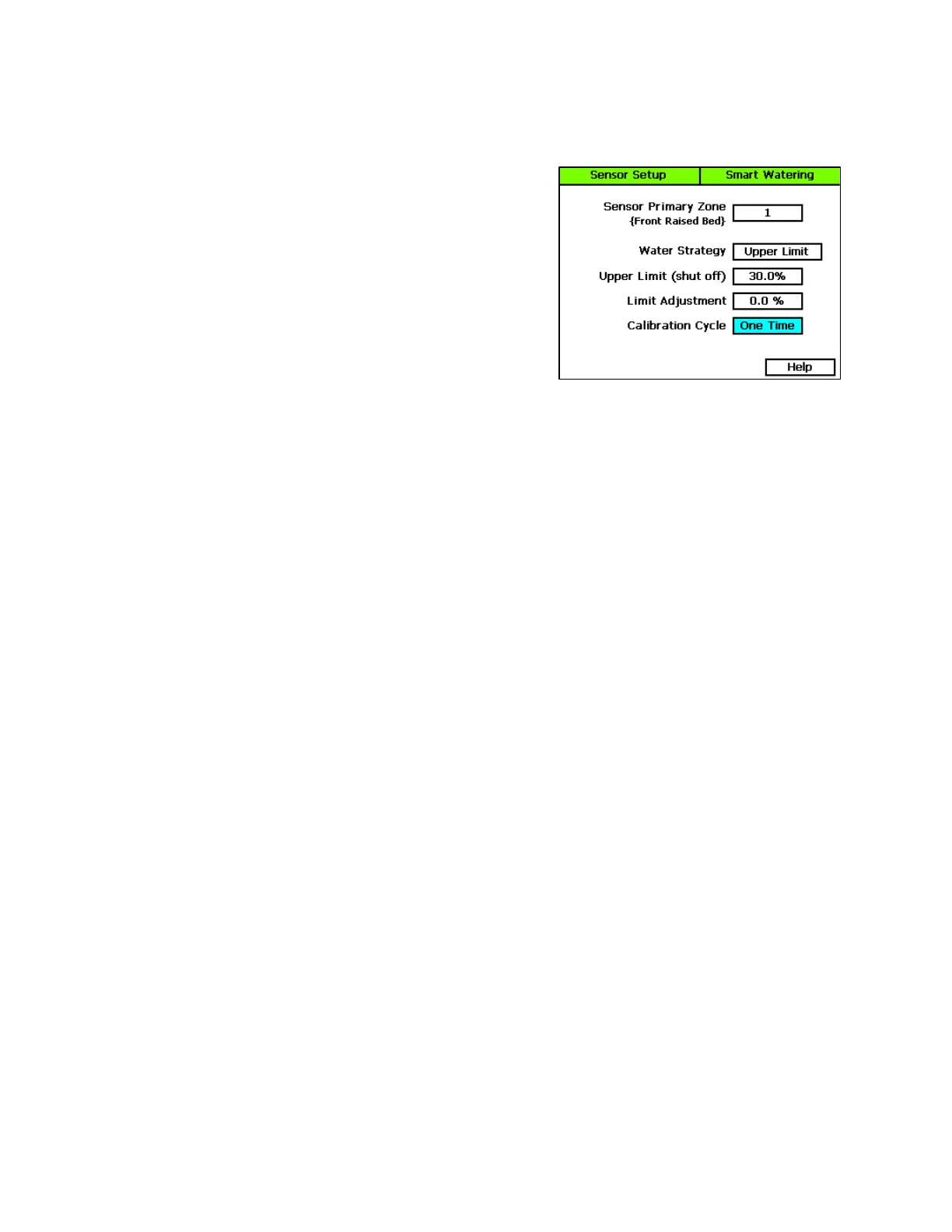
2. Press the Next button to select Moisture Sensor Setup,
and then press the Enter button. The Sensor Setup screen
displays.
3. If you have more than one biSensor installed and
assigned to a primary zone, verify that the correct
primary zone displays in the Sensor Primary Zone field
(the serial number of the assigned biSensor displays in
the lower-left corner of the screen). If the biSensor that
you want to configure is not displayed in the field, press
the + or – button to select the correct one.
4. Press the Next button to move to the Water Strategy field, and then press the + or – button to
select the Upper Limit water strategy.
5. Press the Next button to move to the Upper Limit field. Press the + or – button to change the
number in the field.
Note: When you choose the upper threshold water strategy, you must set and manage the upper
watering limit. You can have the controller perform an initial calibration cycle to establish the
starting limit value. This calibration cycle will be run on the first start time, two days after the
biSensor installation date. After the initial calibration cycle has been run, you must monitor the
moisture levels and plant health so you can make adjustments as needed.
6. Press the Next button to move to the Limit Adjustment field.
Note: This field is typically used to offset the limit set by a calibration cycle. You can use this
adjustment to make the soil a little wetter or a little drier than the controller set limit. If you think
that you might need to use this field, contact Baseline Support for help.
7. Press the Next button to move to the Calibration Cycle field.
Never – No calibration cycle will be performed
One Time – A single calibration cycle will be performed at the next start time
Monthly – A calibration cycle will be performed each month at the first start time
Note: Calibration cycles require that soak cycles be enabled. When you set these watering
strategies, soak cycles will be automatically enabled.
8. When you have finished making changes, turn the dial to the RUN position.
Note: If for any reason the biSensor becomes damaged or fails (12 hours of failed data or
communication) the corresponding primary zone and linked zones will water based on a timed
operating mode which is based on set water times and program schedule.
Baseline Support: 866-294-5847 6 www.baselinesystems.com


 To Next Page