ZENITH SERIES
GF Health Products, Inc. - www.grahamfield.com Zenith Series Service Manual 999-0831-190C DEC. 2013
17
BED OPERATIONS - CHAIR POSITION
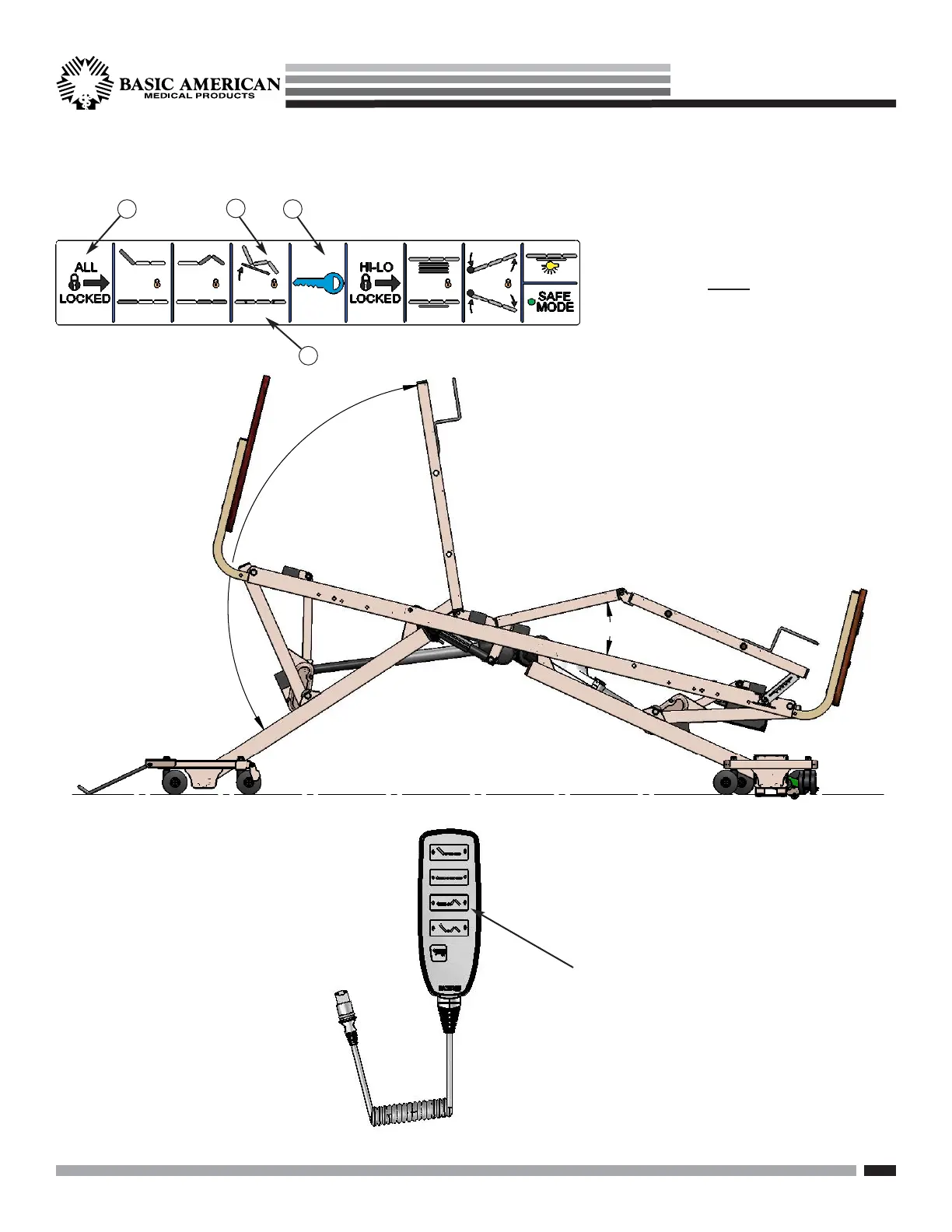
1. Make sure the Chair position on the staff
control panel is not locked out (orange
lock icon). To unlock, press the Key icon #1
and Chair icon #2 (or “All Locked” button
#3) at the same time.
2. To move the bed to the Chair position
(foot & knee decks angled up, head deck
angled up, and head of bed tilted upward),
press on the chair icon button (#2).
To release the chair feature and return
the bed back into a horizontal position,
press the flat bar icon (#4).
1
2
4
3
HEAD
END
FOOT
END
The Chair feature
can also be operated
using the Pendant.
(See page 15.)
Up and Down
Buttons for
Chair Position


 To Next Page