EasyManua.ls Logo

Bauer 20181F-B - User Manual

Bauer 20181F-B
12 pages
Print Icon
To Next Page IconTo Next Page
Loading...
!"#"$%&'(%)*+#"$*%,$-%.$$/-00)))1.,(+&(2(*"3.$14&5
65,"7%&'(%$*4.8"4,7%#'//&($%,$-%/(&9'4$#'//&($:.,(+&(2(*"3.$14&5
Owners Manual & Safety Instructions
Save This Manual Keep this manual for the safety warnings and precautions, assembly,
operating, inspection, maintenance and cleaning procedures. Write the product’s serial number in the back
of the manual near the assembly diagram (or month and year of purchase if product has no number). Keep
this manual and the receipt in a safe and dry place for future reference. 20b
When unpacking, make sure that the product is intact
and undamaged. If any parts are missing or broken,
please call 1-888-866-5797 as soon as possible.
Copyright
©
2020 by Harbor Freight Tools
®
. All rights reserved.
No portion of this manual or any artwork contained herein may be reproduced in
any shape or form without the express written consent of Harbor Freight Tools.
Diagrams within this manual may not be drawn proportionally. Due to continuing
improvements, actual product may differ slightly from the product described herein.
To ols required for assembly and se rv ic e m ay n ot b e i nc lu de d .
Read this material before using this product.
Failure to do so can result in serious injury.
SAVE THIS MANUAL.
Question and Answer IconNeed help?

Do you have a question about the Bauer 20181F-B and is the answer not in the manual?

Summary

Safety Symbols and General Warnings

Warning Symbols and Definitions

Explains hazard alert symbols used in the manual.

General Power Tool Safety

Provides overarching safety guidelines for power tool operation.

Work Area Safety

Outlines requirements for a safe and organized workspace.

Specific Safety & Usage Guidelines

Electrical Safety

Precautions regarding electrical hazards and wet conditions.

Battery Tool Use and Care

Guidelines for handling and maintaining the Li-Ion battery.

Stapler Safety Warnings

Detailed safety instructions for operating the stapler.

Vibration and Operational Safety

Vibration Safety

Information on reducing risks associated with tool vibration exposure.

General Operation Precautions

Reminders on common sense and operator responsibility.

Grounding, Specifications and Setup

Grounding

Safety instructions for proper electrical grounding of the charger.

Specifications

Technical details of the stapler, including charger and battery ratings.

Setup - Before Use

Instructions and recommendations before initial product setup.

Operating Instructions

Workpiece and Work Area Set Up

Guidelines for preparing the workspace and securing workpieces.

Charging Instructions

Steps for charging the battery and indicator light meanings.

Actuation Mechanism Testing

Procedure to test the stapler's single-sequential actuation mechanism.

Stapler Loading and Operation

Adding Staples

Instructions for loading staples into the magazine.

General Operating Instructions

Steps for turning on the tool, positioning, and firing fasteners.

Maintenance and Servicing

Cleaning, Maintenance, and Lubrication

Procedures for cleaning, maintaining, and lubricating the tool.

Battery Removal

Steps for safely removing the battery from the stapler.

Parts and Assembly Information

Parts List

A comprehensive list of all parts with their descriptions and quantities.

Assembly Diagram

An illustrated diagram showing the assembly of the stapler's components.

Warranty Information

Limited 90 Day Warranty

Details of the warranty coverage, exclusions, and claims process.

Summary

Safety Symbols and General Warnings

Warning Symbols and Definitions

Explains hazard alert symbols used in the manual.

General Power Tool Safety

Provides overarching safety guidelines for power tool operation.

Work Area Safety

Outlines requirements for a safe and organized workspace.

Specific Safety & Usage Guidelines

Electrical Safety

Precautions regarding electrical hazards and wet conditions.

Battery Tool Use and Care

Guidelines for handling and maintaining the Li-Ion battery.

Stapler Safety Warnings

Detailed safety instructions for operating the stapler.

Vibration and Operational Safety

Vibration Safety

Information on reducing risks associated with tool vibration exposure.

General Operation Precautions

Reminders on common sense and operator responsibility.

Grounding, Specifications and Setup

Grounding

Safety instructions for proper electrical grounding of the charger.

Specifications

Technical details of the stapler, including charger and battery ratings.

Setup - Before Use

Instructions and recommendations before initial product setup.

Operating Instructions

Workpiece and Work Area Set Up

Guidelines for preparing the workspace and securing workpieces.

Charging Instructions

Steps for charging the battery and indicator light meanings.

Actuation Mechanism Testing

Procedure to test the stapler's single-sequential actuation mechanism.

Stapler Loading and Operation

Adding Staples

Instructions for loading staples into the magazine.

General Operating Instructions

Steps for turning on the tool, positioning, and firing fasteners.

Maintenance and Servicing

Cleaning, Maintenance, and Lubrication

Procedures for cleaning, maintaining, and lubricating the tool.

Battery Removal

Steps for safely removing the battery from the stapler.

Parts and Assembly Information

Parts List

A comprehensive list of all parts with their descriptions and quantities.

Assembly Diagram

An illustrated diagram showing the assembly of the stapler's components.

Warranty Information

Limited 90 Day Warranty

Details of the warranty coverage, exclusions, and claims process.

Overview

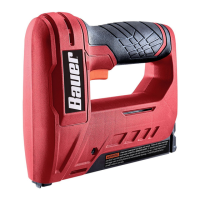
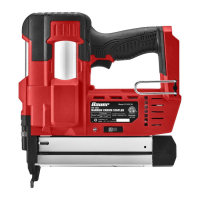
The Bauer 4V Cordless Stapler, model 20181F-B (Item 57241), is a battery-operated power tool designed for driving staples into various work surfaces. This manual provides essential information for its safe operation, maintenance, and setup.

Function Description:

The Bauer 4V Cordless Stapler is a portable, battery-powered tool used for fastening materials with staples. It features a single-sequential actuation mechanism, which ensures accurate placement of fasteners by requiring the Contact Safety to be pressed against the workpiece before the Trigger can actuate. The tool is designed to cycle only once per trigger squeeze, enhancing control and safety. It is suitable for tasks requiring quick and efficient stapling, such as upholstery, crafting, or light construction.

Important Technical Specifications:

  • Charger Input Rating: 120VAC / 60Hz / 1000mA
  • Battery Rating: 4V / 1500mAh
  • Battery Type: Li-ion
  • Staple Length: 1/4", 5/16", 3/8", 1/2"
  • Fastener Type: 3/8" Crown
  • Actuation Mechanism: Single-Sequential

Usage Features:

  • Cordless Operation: Powered by a 4V Li-ion battery, offering portability and freedom from power cords.
  • Battery Status Indicator: Provides visual feedback on the battery's charge level.
  • Contact Safety: A crucial safety feature that prevents accidental discharge by requiring the tool to be firmly pressed against the workpiece before firing.
  • Trigger: The primary control for actuating the stapler.
  • Magazine Lock: Secures the staple magazine, allowing for easy loading and unloading of fasteners.
  • Pusher: Facilitates the loading of staples into the magazine.
  • Power Switch: Controls the on/off state of the tool.
  • Charge Port: Located on the back of the stapler for connecting the charger.
  • Staple Loading: Staples are loaded into the magazine with pointed ends facing up, and the pusher slides in to secure them.
  • Work Area Safety: Emphasizes keeping the work area clean, well-lit, and free from distractions. It also warns against operating in explosive atmospheres.
  • Personal Protective Equipment (PPE): Operators and bystanders must wear ANSI-approved safety goggles with side shields during use.
  • Fastener Application: Designed to drive fasteners into appropriate work surfaces; avoid surfaces too hard to penetrate or driving fasteners on top of others, which can cause ricochets.
  • Tool Handling: Always carry the tool by the handle, avoid contact with the trigger when not driving fasteners, and keep it away from the head and body during operation to prevent injury from kickback.
  • Elevated Work: Maintain balance and ensure the area below is clear when working in elevated locations.
  • Unintentional Starting Prevention: Always prepare to begin work before turning on the tool and avoid activating controls when not intending to drive fasteners.
  • Vibration Safety: The tool vibrates during use, and prolonged exposure can cause physical injury. Recommendations include wearing suitable gloves, taking vibration-free periods, gripping lightly, and maintaining the tool. Individuals with certain health conditions (e.g., impaired blood circulation, nervous system disorders) should consult a doctor before use.
  • Charging: The battery should be fully charged before first use. The Charge Indicator turns red during charging and green when complete. To prolong battery life, charge every 3 months if not in use and avoid charging at temperatures below 40°F.
  • Single-Sequential Actuation Mechanism Testing: A detailed procedure is provided to ensure the safety mechanism is functioning correctly, requiring the tool to be empty and tested against scrap wood. The tool should only actuate when the Contact Safety is pressed and the Trigger is squeezed, and only once per squeeze.

Maintenance Features:

  • Regular Inspection: Before each use, inspect the tool for damaged, loose, or missing parts, including proper Contact Safety operation, free movement of the Contact Safety and Trigger, secure hardware and housing, proper alignment of moving parts, and absence of cracks or broken parts. Do not use the tool if any issues are found until repaired.
  • Cleaning: After use, wipe external surfaces of the tool with a clean, dry cloth.
  • Storage: Store the tool in a dry, indoor area, out of reach of children, and away from metal objects to prevent shorting.
  • Battery Maintenance: The Li-ion battery should be recycled or disposed of properly. Do not open, crush, heat above 140°F, or incinerate.
  • Battery Removal (for service): Involves removing six screws from the side of the stapler gun, detaching the housing, disconnecting battery wires, and then removing the battery. This procedure should only be performed by a qualified technician.
  • Jam Clearing: Before any maintenance or repairs, including clearing jams, ensure the power switch is off, wear safety goggles, release the trigger, attempt to discharge the tool into scrap wood to confirm it's disconnected, and empty the magazine, leaving it open.
  • Qualified Technician: Procedures not specifically explained in the manual should only be performed by a qualified technician.
  • Labels and Nameplates: Maintain all labels and nameplates on the tool, as they carry important safety information. Contact Harbor Freight Tools for replacements if unreadable or missing.
  • No Modifications: Do not make any modifications to the tool.
  • Service with Identical Parts: Have the power tool serviced by a qualified repair person using only identical replacement parts to ensure tool safety is maintained.

Bauer 20181F-B Specifications

General IconGeneral
BrandBauer
Model20181F-B
CategoryPower Tool
LanguageEnglish

Related product manuals