3
A v i o n
®
8928
a s s e m b l y i n s t r u c t i o n s
b d i u s a .c o m c u s t o m e r s e r v i c e @b d i u s a .c o m
a. Remove rubber trim and
glass panel.
b. Replace insert panel
Step 6
Optional fabric speaker or glass insert panel
Avion’s drawer and door fronts feature removable/
replaceable panel inserts to permit customization of
your cabinet’s appearance and utility. (Contact BDI
Customer Service at customerservice@bdiusa.com)
Installing optional panel inserts is quick and easy:
1. From the inside of the door, and starting at one
corner of the pre-installed Glass or Speaker panel
insert, carefully pull away all four sections of the panel
retention trim, running along the perimeter of the
insert. (Use a blunt, tapered object or your finger to
start removing the rubber material.)
2. Once the trim material is completely pulled away,
remove the pre-installed panel insert and replace it
with the desired panel insert.
3. Re-install the trim, pressing it carefully back into
the groove around the new panel insert, section by
section, to complete the panel insert installation.
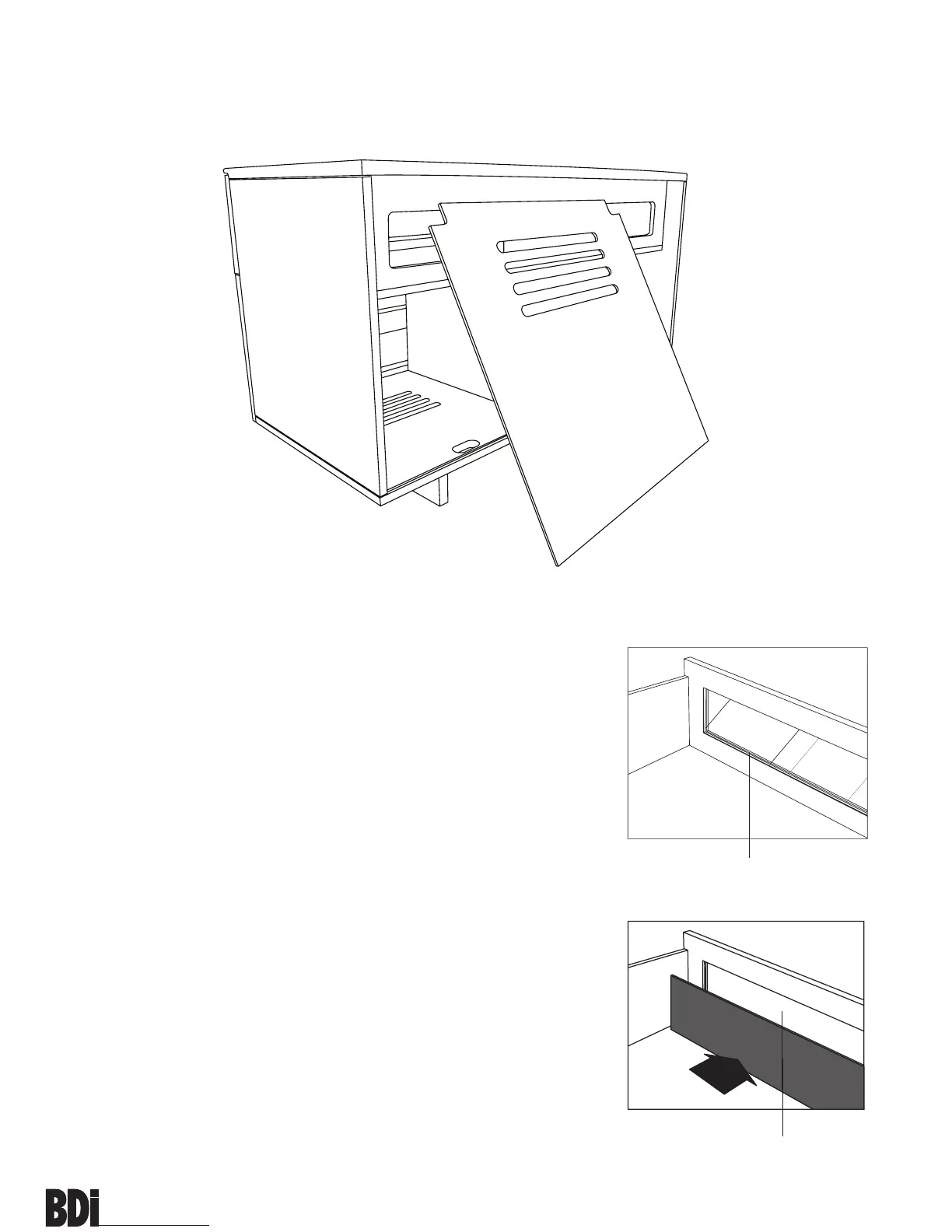
Step 5
Install both Back Panels (M) to the backside of the
cabinet. *Note: Velcro straps are included as wire
management for your convenience.


 To Next Page