EasyManua.ls Logo

Be Cool BCP12KL2002F - Control Panel and Remote Control; Control Panel Overview; Remote Control Setup

Be Cool BCP12KL2002F
Print Icon
To Next Page IconTo Next Page
To Previous Page IconTo Previous Page
Loading...
Seite 25 von 40
OPERATING PANEL and REMOTE CONTROL
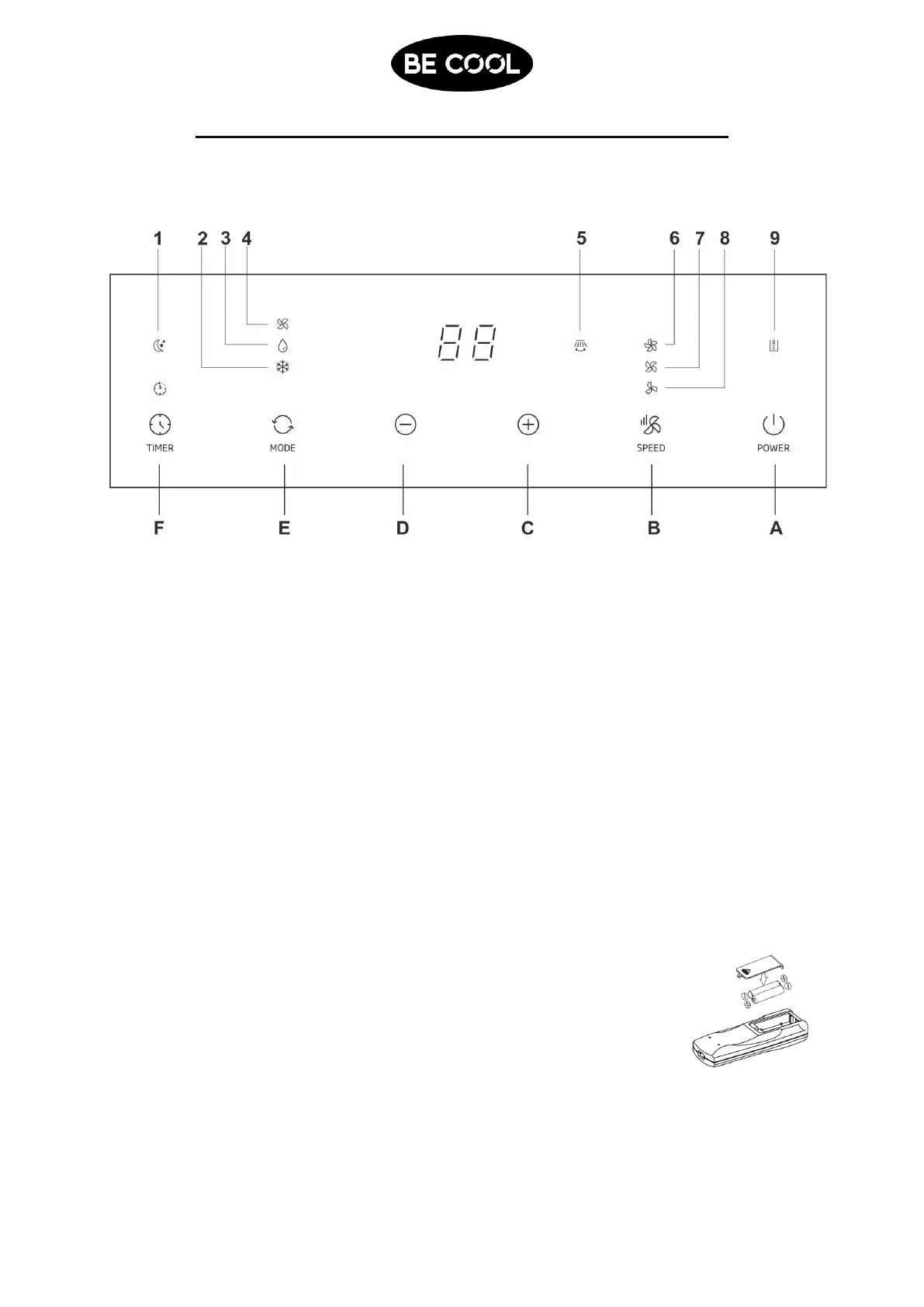
1. Description of the control panel
LED-Lights
Buttons
1.
Sleep-Mode
A.
POWER
2.
Cool-Mode
B.
Blower-Level
3.
Dehum-Mode
C.
Increase
4.
Fan-Mode
D.
Decrease
5.
Swing
E.
Mode
6.
High Blower Level
F.
Timer
7.
Medium Blower Level
8.
Low Blower level
9.
WATER FULL
2. Preparing the remote control inserting or replacing batteries
Please follow these instructions:
1. Remove the cover on the back of the remote control.
2. Now insert three “type A” batteries Observe the information on
the inside of the battery compartment to properly insert the
batteries.
3. Now put the cover back onto the remote control.


Related product manuals