NOTE CHORD ROOT
C6 C
C#6 C#/Db
D6 D
Eb6 Eb/D#
E6 E
F6 F
F#6 F#/Gb
G6 G
Ab6 Ab/G#
A6 A
Bb6 Bb/A#
B6 B
NOTE CHORD ROOT
C4 M
C#4 M(9)
D4 6
Eb4 mM7
E4 M7
F4 m
F#4 m(9)
G4 m6
Ab4 m7(9)
A4 m7
Bb4 m7b5
B4 7
NOTE CHORD ROOT
C5 7(b9)
C#5 7(9)
D5 7(#9)
Eb5 7(b13)
E5 7(13)
F5 7(#11)
F#5 dim7
G5 dim
Ab5 7aug
A5 aug
Bb5 7sus4
B5 sus4
MEMORY
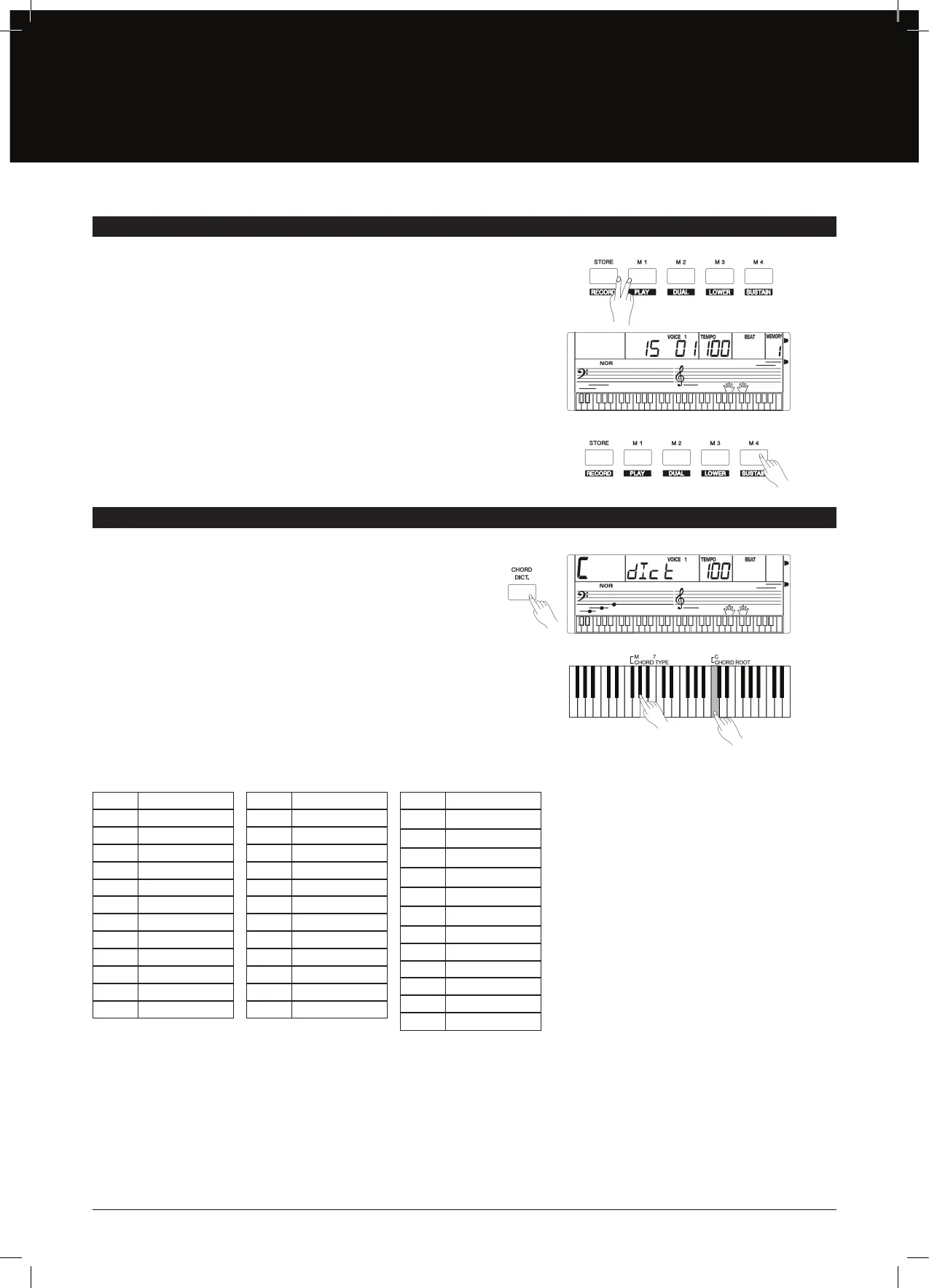
CHORD DICTIONARY
There are 4 memories (M1–M4)
1.
While holding the [STORE] button, press one of the MEMORY
buttons: [M1]–[M4] to register the panel settings. The new
settings will replace the previous memory data. The LCD will
display “Mem Stor”. The settings include voice number, style
number, tempo, beat value, sustain eect, etc.
2. Press one of the MEMORY buttons: [M1]–[M4] to recall the
panel settings.
Note:
The stored settings can not be recalled when the One Touch Setting
function is on. The stored settings will be returned to the default settings
after you turned o the power.
If you know the name of a chord but don’t know how to play it, you can use
the Chord Dictionary function.
1. Press the [CHORD DICT.] button to enter this mode. The LCD
displays the Chord Type and Chord Notes.
2.
The keys on and above the C4 are used to assign the Chord Type.
The keys on and above C5 are used to assign the Chord Root.
When the chord Type and Chord Root are conrmed, the LCD
will display the Chord and its sta position.
3. Play the chords on the keyboard according to the display. If you
press the correct notes, you will hear a prompt applause sound.
4. Press the [CHORD DICT.] button again to exit this mode.
24 Chords will be displayed in the dictionary mode as follows:
15


 To Next Page