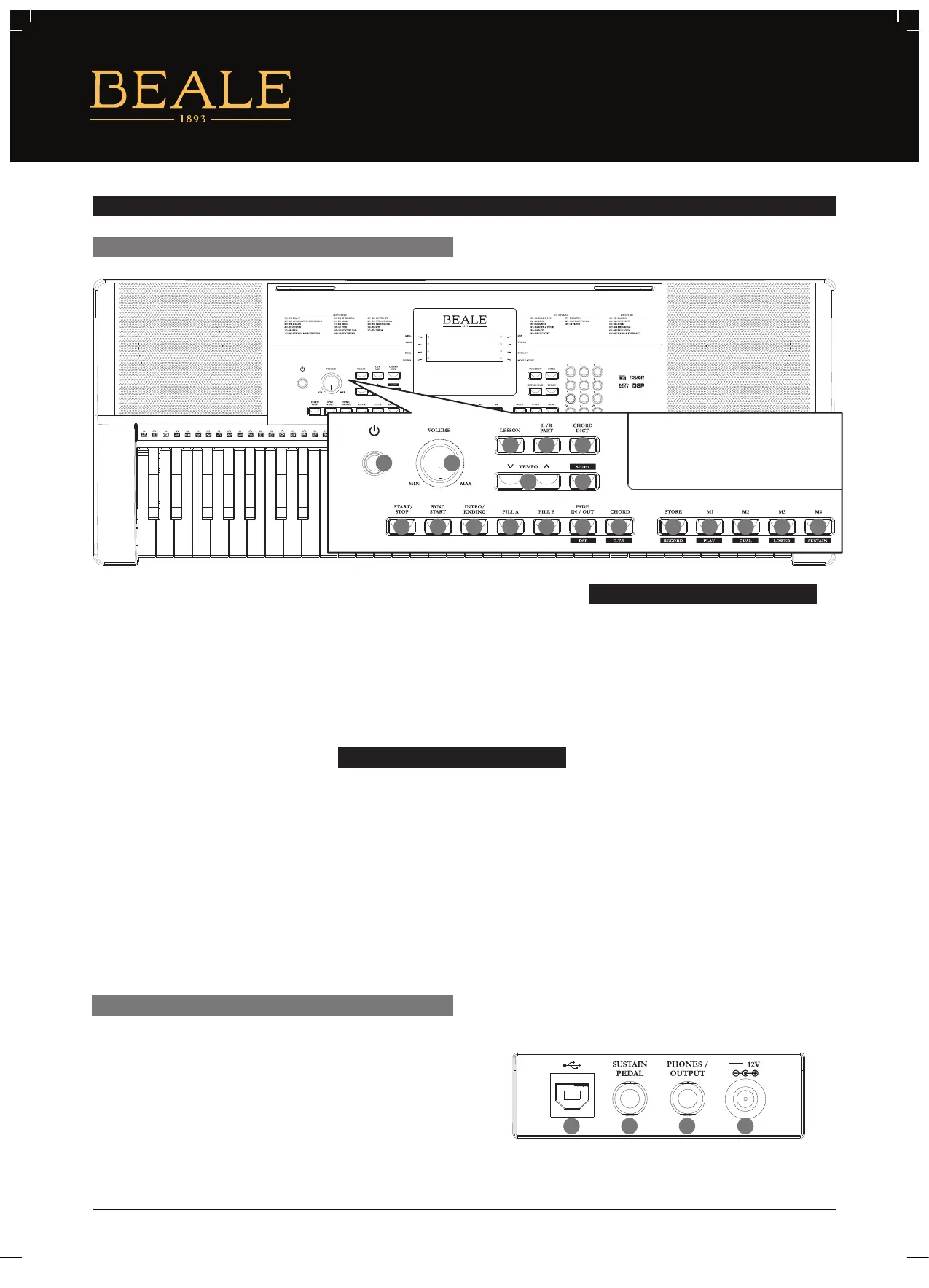
1. POWER ON/OFF
Turn the power on or o.
2. MASTER VOLUME
Adjust the master volume.
3. LESSON
Enter Lesson Mode.
4. L/R PART
Select the left/right–hand part
in Lesson Mode.
5. CHORD DICT.
Enter the Chord Dictionary.
6. TEMPO +/–
Change the current tempo.
7. SHIFT
Press and hold to access secondary
functions of other buttons.
8. START/STOP
Start or stop playing the song in
Song Mode. Start or stop playing the
style in Style Mode.
PANEL & DISPLAY DESCRIPTION
REAR PANEL
FRONT PANEL
AK140
2
3
8
6
4
9
5
10
7
1
11 13 15 1712 14 16 18 19
9. SYNC START
Turn the Sync Start on or o.
10. INTRO/ENDING
Play the Intro or Ending.
11. FILL A
Play the ll–in pattern A.
12. FILL B
Play the ll–in pattern B.
When the SHIFT button is
released
13. FADE IN/OUT
Turn the Fade In or Fade Out on.
14. CHORD
Enter Chord Mode.
15. STORE
Register the current
panel settings.
16-19. M1–M4
Recall the memory settings.
When the SHIFT button is pressed
13. DSP
Turn the DSP eect on and o.
14. O.T.S.
Enter the One Touch
Setting Mode.
15. RECORD
Start or stop real–time recording.
16. PLAY
Play back the recorded user song.
17. DUAL
Turn the Dual voice on or o.
18. LOWER
Turn the Lower voice on or o.
19. SUSTAIN
Turn the Sustain eect on or o.
1. USB
Connect to a computer.
2. SUSTAIN
Connect a Sustain pedal.
3. PHONE
Connect a pair of headphones.
4. DC IN
Connect DC IN power adaptor (optional).
21 3 4
4


 To Next Page