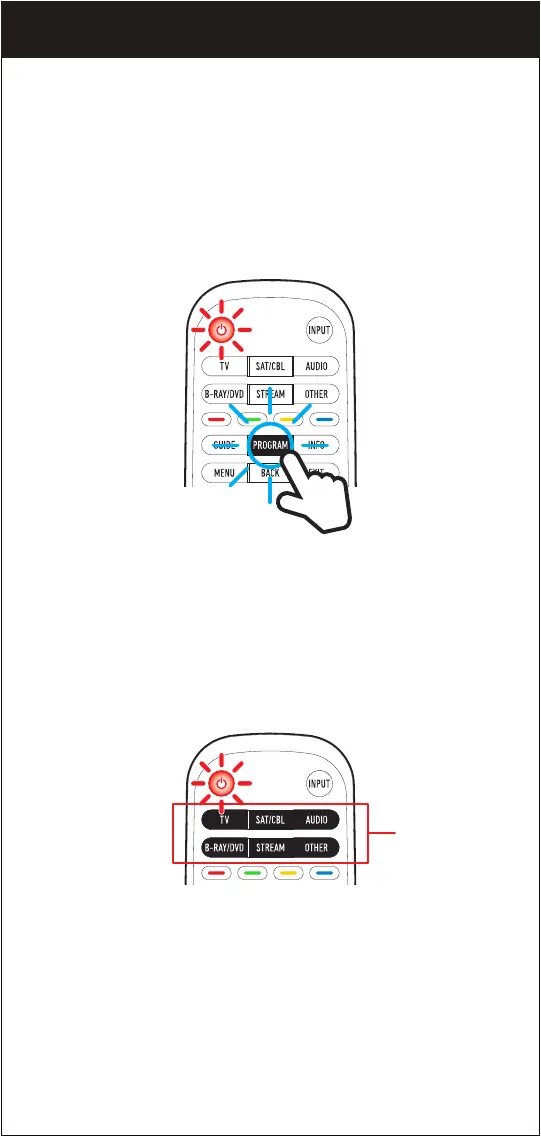
Before beginning, please make sure that the device you want to control
is powered on and follow these three simple steps.
NOTE: The Beam remote comes pre-programmed to operate many
Samsung TVs.
1. Press and hold the PROGRAM button until the POWER button
lights up red.
The POWER button’s red indicator light remains on.
NOTE: Press PROGRAM to exit at any time.
2. Select the device you want to program from the DEVICE CATEGORIES:
The POWER button’s red indicator light blinks once.
OPTION 2. PROGRAMMING USING THE CODE LIST
DEVICE
CATEGORIES
Red indicator light
07


 To Next Page