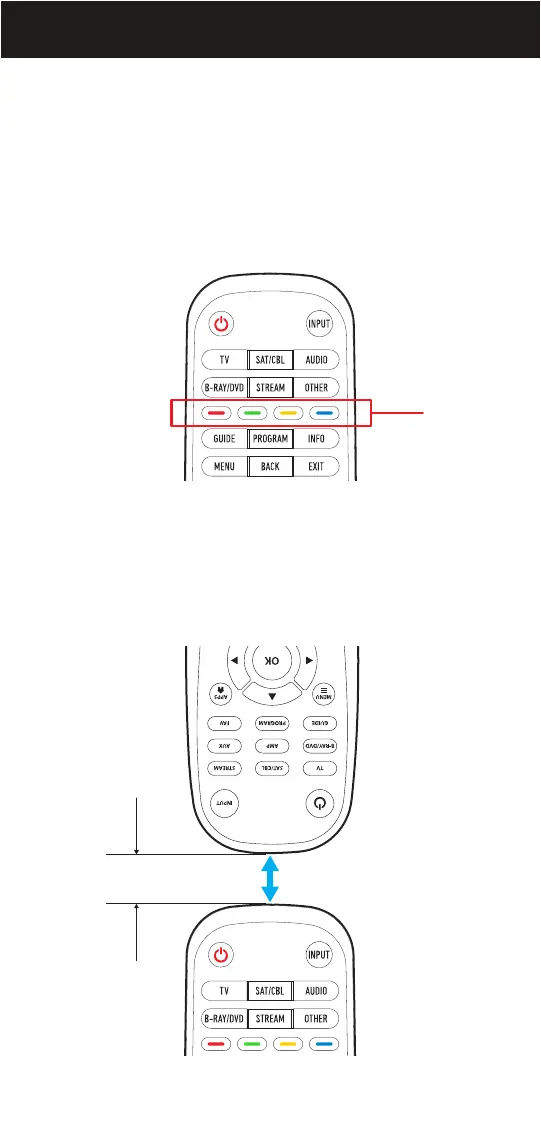
Your Beam remote can easily copy buttons from any other IR remote.
This feature is helpful if there are buttons on your original remote that
aren’t represented on the Beam remote or if you want to apply a favorite
button and have it work regardless of the Device Category or Activity
selected, e.g., use a CUSTOM Button to control your air conditioner
or heater while in any of the DEVICE CATEGORIES or Activity Modes.
CUSTOM BUTTONS
1. Make sure you have a working original remote and the Beam remote.
Hold both remotes approximately 0.5” - 1.0” from each other as shown
below.
Beam
remote
CUSTOM
BUTTONS
Original
remote
Beam
remote
0.5” - 1.0”
16


 To Next Page