CUSTOM BUTTONS
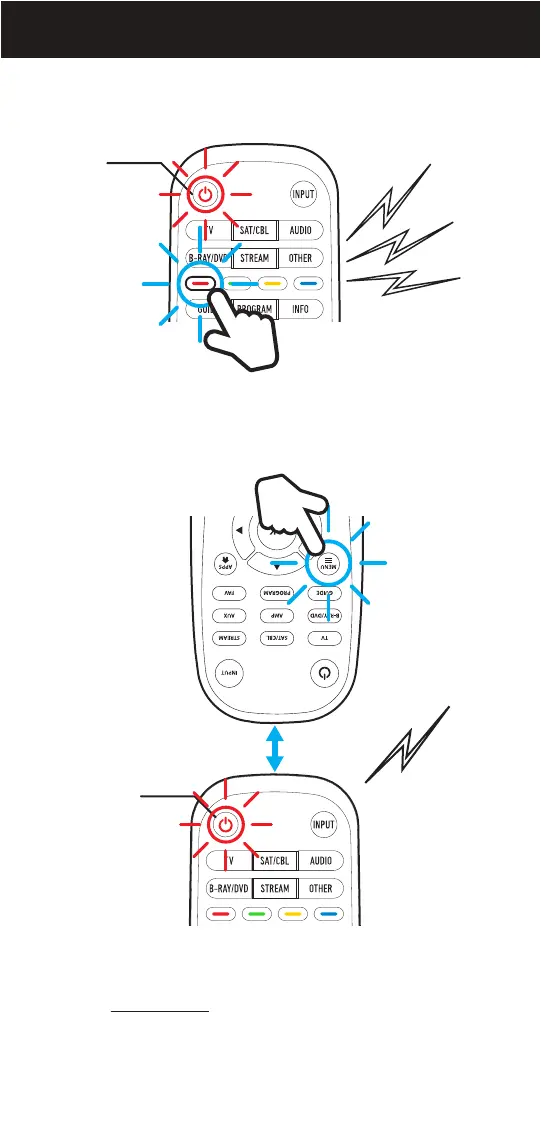
2. Press and hold the CUSTOM button you need to program until you
hear 3 beeps, and the LED of the POWER button starts blinking.
3. On your original remote, press and HOLD the button you want to
copy until you hear a long beep and the Beam’s POWER button
stops flashing.
Power
button
NOTE: Test the CUSTOM Button after copying, if it does not work as
expected please repeat the copying procedure and make sure that both
remotes are VERY CLOSE to each other. Sometimes it may take a few
attempts for the button to be successfully copied.
Press PROGRAM to exit at anytime.
Original
remote
Beam
remote
Power
button
17


 To Next Page