14
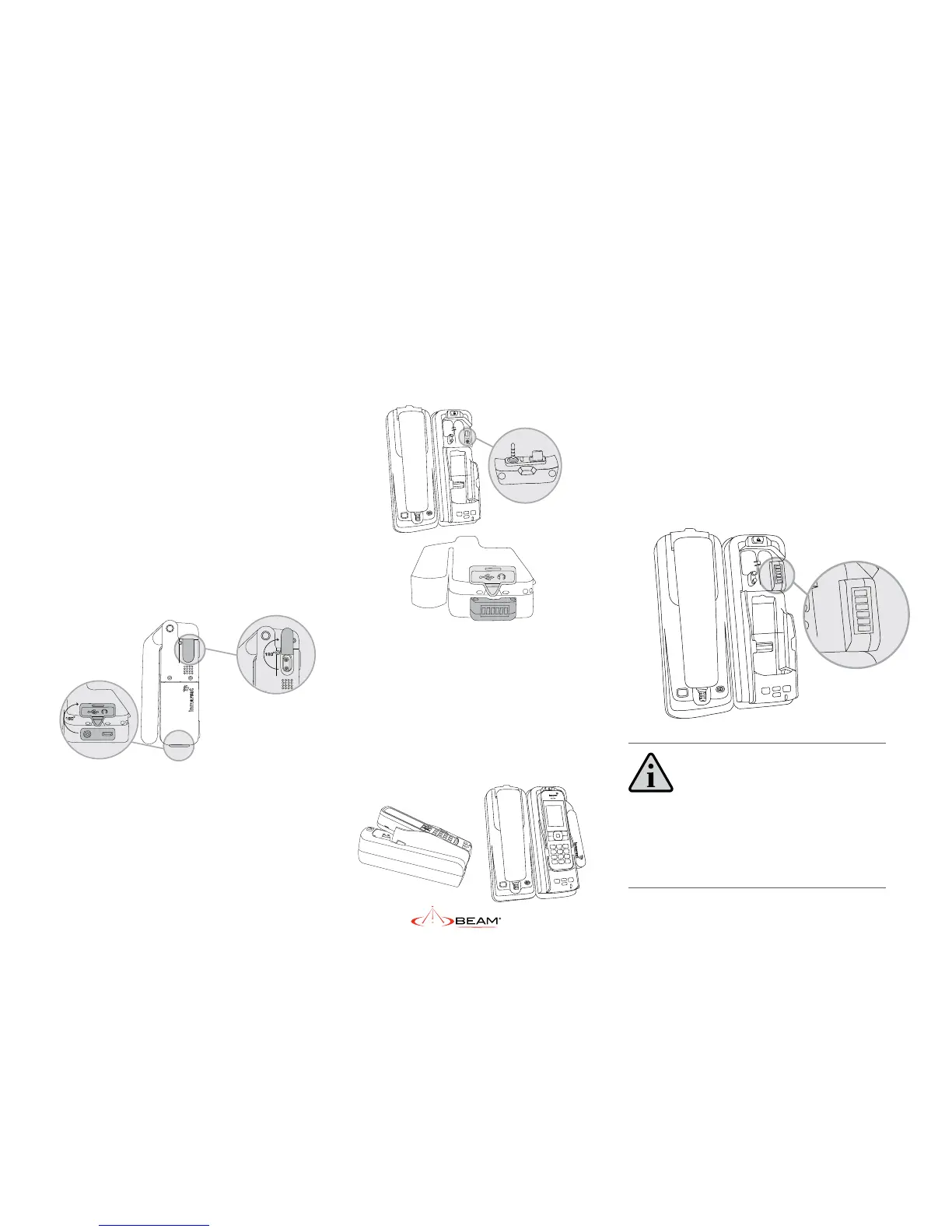
3. Detach the USB/Audio adapter from the
dock and insert by hand in the base of the
IsatPhone 2.
4. To dock the handset, open the antenna
slightly, align the IsatPhone 2 with the phone
tray and slide the handset down until it seats
ush to the bottom of the tray. Swing the
phone down into the cradle by applying
pressure to the top of the handset. An
audible ‘click’ is heard when the phone is in
the docked position.
5. To remove the handset from the cradle,
press the EJECT button at the top of the
docking station. The dock will swing out
and the handset can be removed.
6. Place the adapter back in its dedicated
slot, when the phone is not in the
docking unit.
IMPORTANT:
Before docking the IsatPhone 2 to the docking
station, check that the USB/Audio adapter has been
connected to the IsatPhone 2.
Docking & undocking the
IsatPhone 2 handset
To place the IsatPhone 2 into the docking
unit, both the ‘covers’ on the external antenna
connectors and the USB/Audio connectors
need to be opened.
1. The antenna ‘cover’ must be placed at 180
degrees to the antenna connector cavity
and run parallel to the side of the phone,
push down into open position.
2. The ‘cover’ in the base of the phone should
be rotated 180 degrees to be in the open
position.


 To Next Page