26
IsatPhone 2 Tracking Functionality
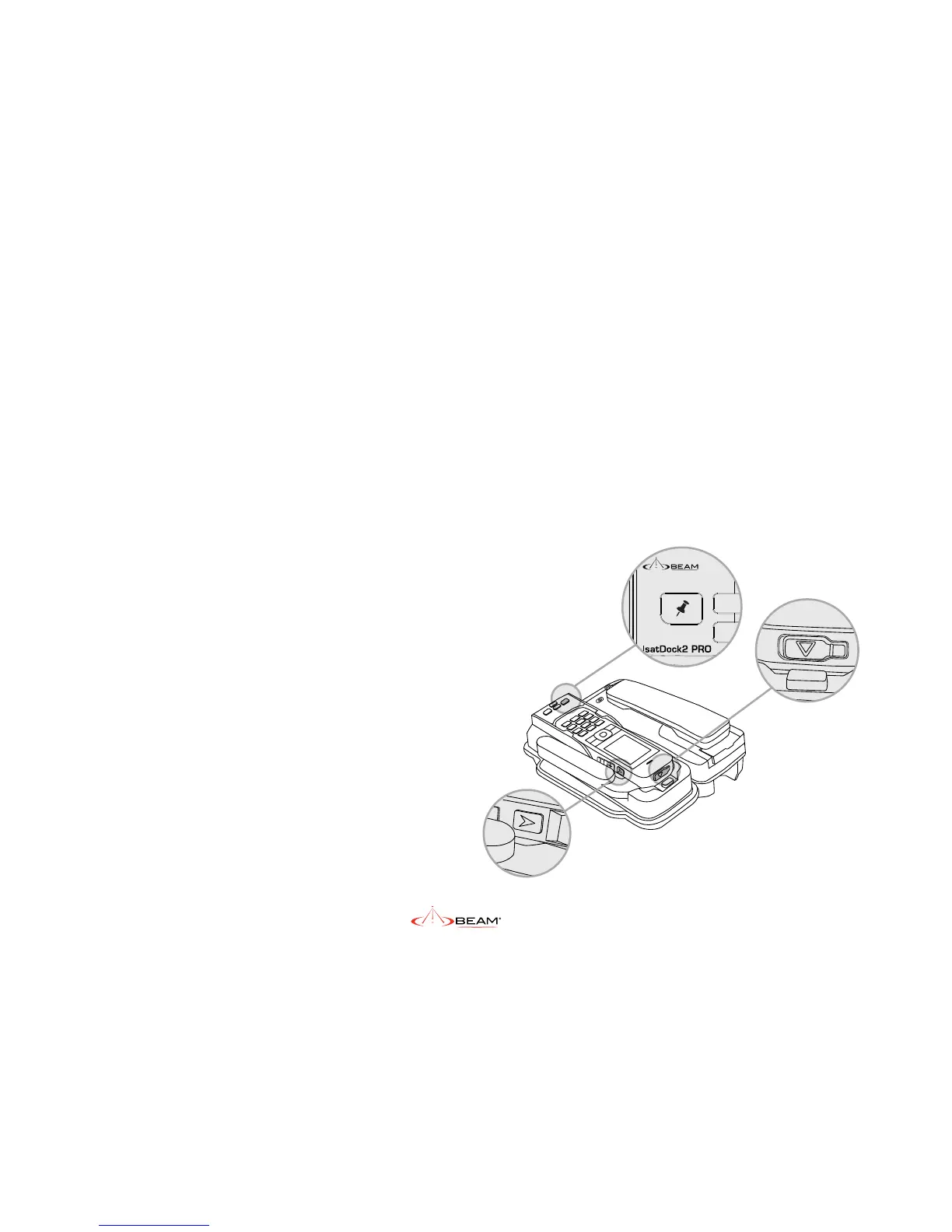
The Tracking Button turns the periodic tracking
functionality of the Isatphone 2 ON and OFF. In
order to send a tracking message, the following
conditions must be fullled for a docked
handset.
1. The GPS receiver of the IsatPhone 2, has
acquired enough satellite signals and
navigational data to calculate a positional
solution (x).
2. The IsatPhone 2 is registered with the
GSPS network.
3. Tracking is congured and enabled on the
isatPhone 2 handset.
Personal Alert, Assistance Alert and
Tracking Configuration (optional)
Personal Alert & Assistance Alert Operations
Please refer to the Inmarsat IsatPhone 2 User
Manual to congure the Personal Alert and
Assistance button operation and destinations.
Initiate an Instant notication
When the Personal Alert button of the IsatDock2
PRO is pressed, the IsatPhone 2 handset will
trigger and send a GPS position and short
message via SMS or email according to your
handset’s settings.
Refer to IsatPhone 2 User Manual for further
information.
Assistance Alert
IsatDock2 can be congured to trigger the
Assistance Alert by pressing the Assistance
button on the top of the handset when docked.
Assitance Alert must be congured to Handsfree
Call > OFF in the IsatPhone 2 Settings, to ensure
correct handsfree operation when docked.
Personal Alert Button
Tracking Button
Assistance Alert Button


 To Next Page