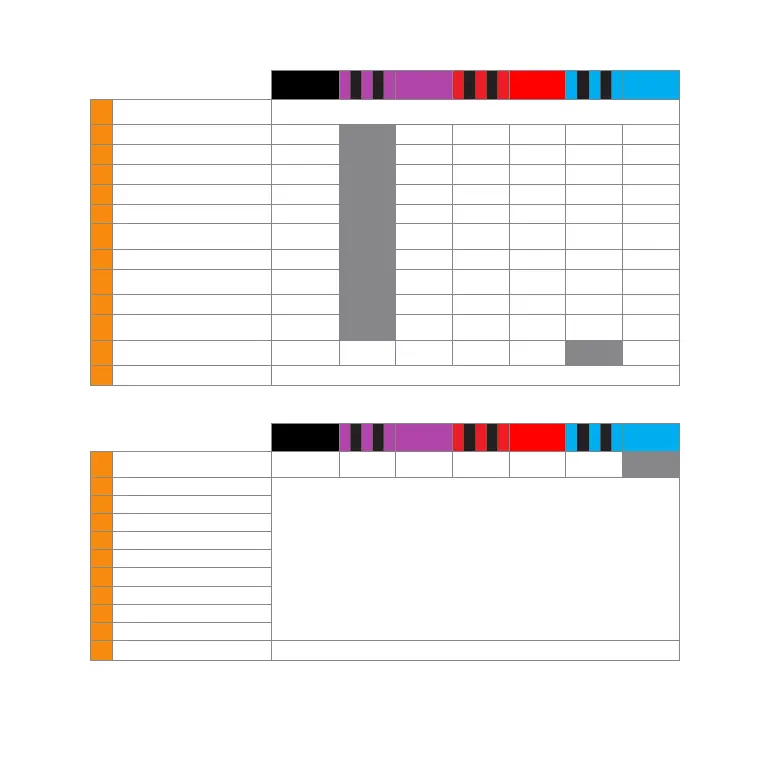
PARAMETER MENU
(Menu LED ashing quickly)
o
flashing
purple
purple
flashing
red
red
flashing
blue
blue
A
Swashplate quick trim /
AttitudeControl trim
Use aileron and elevator stick to trim, hold button 2s to trim rudder. Reset all by rudder stick input.
Switch trim mode by activating AttitudeControl using the AttitudeControl switch channel.
B
Control style User defined normal sport* pro extreme TX mode
C
Speed ight stability User defined very low low medium* high very high
D
Rudder rate consistency User defined very low low medium* high very high
E
Stick deadzone User defined very small small* medium large very large
F
Torque precompensation User defined off low - nor. high - nor. low - inv. high - inv.
G
Cyclic response User defined normal*
slightly
increased
increased aggressive
very
aggressive
H
Pitch boost User defined off* low medium high very high
I
Throttle response soft normal*
slightly
increased
increased aggressive
very
aggressive
J
Slow rampup speed User defined 50 rps 100 rps 200 rps* 300 rps 400 rps
K
Fast rampup speed User defined
using slow
rampup speed
300 rps 500 rps* 700 rps 900 rps
L
AttitudeControl mode
AttitudeControl
disabled*
Bail out rescue
Bail out rescue
w. pitch control
3D Mode
3D Mode w.
pitch control
Flight trainer
M
(AttitudeControl pitch) Adjust by giving aileron stick input. Reset with rudder stick input.
RECEIVER MENU
(Menu LED ashing)
o
flashing
purple
purple
flashing
red
red
flashing
blue
blue
A Receiver type Standard*
JR® RJ01
remote satellite
Spektrum®
remote satellite
Futaba® S-BUS SRXL SPPM
B Collective pitch
• Status-LED light up in blue color if valid incoming signal from receiver.
• Move the stick/channel on the transmitter you want to assign. The Status-LED will flash briefly in case the
movement has been detected.
• Menu points H, I and J can be skipped in case you don‘t want to use the specific function or if you want to
use nitro RPM Governor and/or AttitudeControl without separate switch channel.
• To load the default channel assingment keep the button pressed at any menu point. You will directly jump to menu
point N.
C Aileron
D Elevator
E Rudder
F Tail gyro gain
G Throttle [CH5]
H Auxiliary [CH6] (optional)
I RPM Governor (optional)
J AttitudeControl (optional)
N Throttle failsafe position Move throttle to failsafe position and push button to save all menu items and exit menu.
* Default setting
Please note: Not all menu items may be accessible. This depends on installed rmware and upgrade level.


 To Next Page
 Loading...

